-
-
May 6, 2020 at 5:28 pm
AliMosayyebi
SubscriberHi,
Â
I am trying to use Fluent (with Fluent Meshing) to run a simulation. For this, I have imported a STEP file to the software. I would like to separate all surfaces from each other to define inlet, outlet and walls. Any attempt I have made goes no where. As soon as I move to the solution part, I dont see inlet, outlet. All tutorials I have seen are using files that are imported from spaceclaim, which I am not really good at. Is there any short description or a brief tutorial in doing it with Fluent (with fluent Meshing)? And, am I right to say that after moving to solution, I cannot go back and make ammendment to my surfaces, meshes etc anymore?!
Also, I want to create customised new surfaces as interiors to help me for post prosessing. Any way I can do that?
FYI, I am using ANSYS 2020 R1 and call the Fluent (with fluent meshing) from WorkBench.
Â
THanks
-
May 7, 2020 at 3:43 pm
Rob
Forum ModeratorRead the Step into SpaceClaim and use the Groups > Named Selections to label surfaces. It's also possible in Fluent (Meshing and Solver) but much easier in the CAD.Â
If you want interior surfaces you need to build them into the CAD, but also review iso-surfaces and planes in Fluent as you can add these after the solution has run.Â
-
May 7, 2020 at 5:34 pm
AliMosayyebi
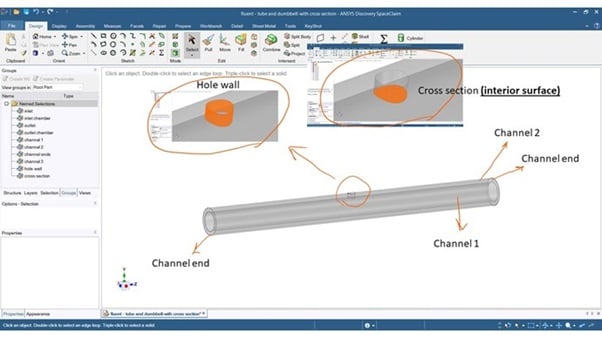
SubscriberThanks very much. So, i have followed your instruction. I detached all surfaces from the STEP file in spaceclaim. Then grouped them naming each section as follow and stuck in surface mesh area.
I have provided some images to explain what I have done, hope they help! Due to the file size, I am adding them as attachments.
I guess after this, the big challenge will be when I introduce fluid region and how to make sure the software sees the interior surface as an interior.
-
May 11, 2020 at 2:52 pm
AliMosayyebi
SubscriberFollow up on my message above. I have tried the process few more times and receiving different errors each time!
I guess adding the SpaceClaim was not the best option after all?
Â
I have also tried directly again through the Fluent (with Fluent Meshing) directly importing the STEP file. I can create in the geometry section, new labels ("Face Zone Labels" >> right click "Creat Labels") and name them Inlet, Outlet, etc.
But still when I mesh it, it does not let me choose Inlet and outlet! I have tried creating them in mesh but no luck!
I feel like there should be a simple solution for this but I cannot find it.
-
May 11, 2020 at 3:42 pm
Rob
Forum ModeratorNo need to detach the surfaces, that'll mess with the volume definitions. Read the step (volume I assume) into SpaceClaim and label the surfaces. Use the tool bar to launch Fluent Meshing and use the Clean/Watertight CAD workflow.Â
Staff are not permitted to open/download attachments or files so please post the image into the text.Â
-
May 11, 2020 at 3:45 pm
AliMosayyebi
SubscriberThanks, I will attach images here now.
-
May 11, 2020 at 4:02 pm
AliMosayyebi
SubscriberSo, for some reason, its not letting me to put all pictures here! I am putting summariese version!
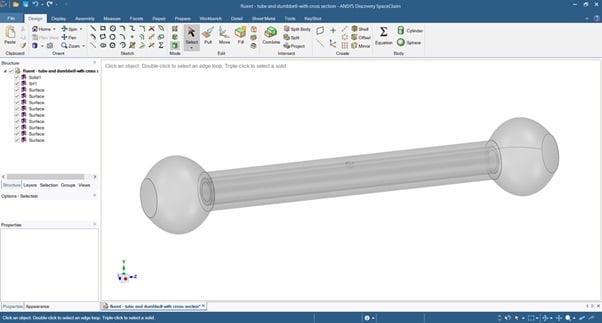
The CAD file includes two pieces in total. A dumblbell-shape channel and a tube inside it. The tube inside has a hole that includes the interior surface. Bear in mind that the CAD file that I import in STEP format is a fluid file. So, I am hoping that the software recognises the dead area without introducing fluid inside it.
If I dont detatch, It wont show the internal tube hence I cannot separate the interior that I am looking for!
as soon as I detach, I see everything!
Â
-
- The topic ‘Fluent (with fluent meshing) – boundary definition and customised surfaces’ is closed to new replies.

-
6660
-
1906
-
1469
-
1313
-
1022
© 2026 Copyright ANSYS, Inc. All rights reserved.