-
-
July 14, 2025 at 5:02 pm
domenico.catenacci
SubscriberHi everyone,
I’m working directly in ANSYS Mechanical APDL (MAPDL) on a static structural analysis that consists of multiple load steps, each one having several substeps. The analysis was solved using automatic time stepping and saved results at multiple substeps per step.
My goal is to:
Loop over all result sets (all steps and their substeps),
Extract nodal results (stress, EPPL, EPEL, etc.) for a group of nodes,
Write the results for each substep of each load step into a
.txtfile.
Here’s the issue:
The script loops from
SET,,1toSET,,48, and I confirmed in the GUI that there are 48 result sets corresponding to 12 steps, each with multiple substeps stored.For step 1, it correctly loops through and extracts the data for all substeps.
However, for steps 2 through 12, it only processes the first substep (or repeats it), and fails to iterate through the rest of the substeps.
As a result, I only get complete time-history data for step 1, and incomplete or repeated results for the other steps.

What I’ve tried:
Verifying that the
.RSTfile contains all expected steps and substeps (usingSET,LASTand GUI navigation).Using
*GET,TIMEVAL,TIME,0— it returns correct time values for substeps of Step 1 but repeats or stalls after that.Using
SET,,iindexing, assuming it walks linearly through all stored result sets, but it seems this approach breaks after the first full step.
What I need help with:
How can I correctly loop through all substeps of each load step in MAPDL POST1?
Is there a way to retrieve the actual number of substeps per step dynamically?
Do I need to use
SET,,,STEP,SUBSTEPexplicitly instead of flatSET,,iindexing?Could automatic time stepping or the way results are saved be interfering with the indexing of result sets?
Any guidance on how to fully iterate through each substep across all steps and extract nodal data would be greatly appreciated. Let me know if posting one of the output
.txtfiles would help illustrate the issue.Thanks in advance!
-
July 17, 2025 at 12:05 pm
Deepak
Ansys EmployeeHi,
Please find below a script that can be used in the/POST1environment to extract the time values at each substep across all load steps. This can be useful when you want to perform operations like data extraction (e.g., stress, displacement) at every substep for post-processing or reporting purposes.RESUME, file.db /POST1 ! Enter the post-processing environment !----------------------------------------------- ! Step 1: Get the total number of load steps !----------------------------------------------- *GET, NLS_TOTAL, ACTIVE, 0, SOLU, NCMLS ! Total number of load steps (NCMLS) !----------------------------------------------- ! Step 2: Count total number of substeps across all load steps !----------------------------------------------- TOTAL_SUBSTEPS = 0 *DO, LS, 1, NLS_TOTAL SET, LS ! Set current load step (LS) *GET, N_SUBSTEPS, ACTIVE, 0, SOLU, NCMSS ! Get number of substeps in this LS TOTAL_SUBSTEPS = TOTAL_SUBSTEPS + N_SUBSTEPS *ENDDO !----------------------------------------------- ! Step 3: Define an array to store time values at each substep !----------------------------------------------- *DIM, TIME_STEP, , TOTAL_SUBSTEPS ! Create a 1D array to store time values !----------------------------------------------- ! Step 4: Loop over each substep and store the time !----------------------------------------------- *DO,J,1,TOTAL_SUBSTEPS,1 SET,,, ,,, ,J *GET, MY_TIME, ACTIVE, 0, SET, TIME TIME_STEP(J) = MY_TIME !--------------------------------------- ! Insert commands to be executed here ! These will run at each substep ! Example: extract stress, write to file, etc. !--------------------------------------- *ENDDOThanks,
Deepak-
August 2, 2025 at 7:50 am
domenico.catenacci
Subscriber@Deepak thanks for the reply,
i followed the code structure that you gave me but what happens is that the txt. file only gets time values and results for set 1 and substeps for step 1, and then it copies the results over and over. i cant seem to undestand where the problem is in the code:
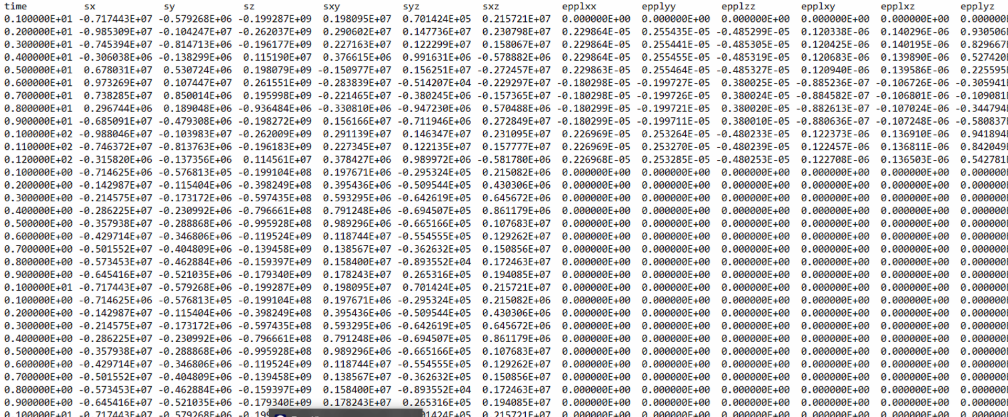
! Paso 1: obtener número de load steps y substeps totales*GET, NLS_TOTAL, ACTIVE, 0, SOLU, NCMLSTOTAL_SUBSTEPS = 0*DO, LS, 1, NLS_TOTALSET, LS*GET, N_SUBSTEPS, ACTIVE, 0, SOLU, NCMSSTOTAL_SUBSTEPS = TOTAL_SUBSTEPS + N_SUBSTEPS*ENDDO! Paso 2: nodos críticos*DIM, NLIST, ARRAY, 10NLIST(1) = 16312NLIST(2) = 16391NLIST(3) = 23936NLIST(4) = 23475NLIST(5) = 16390NLIST(6) = 23463NLIST(7) = 16310NLIST(8) = 16403NLIST(9) = 11NLIST(10) = 22893! Paso 3: recorrer todos los substeps globales*DO, J, 1, TOTAL_SUBSTEPSSET,,,,,,J*GET, TIMEVAL, TIME, 0*DO, I, 1, 10NID = NLIST(I)*GET, SX, NODE, NID, S, X*GET, SY, NODE, NID, S, Y*GET, SZ, NODE, NID, S, Z*GET, SXY, NODE, NID, S, XY*GET, SYZ, NODE, NID, S, YZ*GET, SXZ, NODE, NID, S, XZ*GET, EPPLXX, NODE, NID, EPPL, X*GET, EPPLYY, NODE, NID, EPPL, Y*GET, EPPLZZ, NODE, NID, EPPL, Z*GET, EPPLXY, NODE, NID, EPPL, XY*GET, EPPLXZ, NODE, NID, EPPL, XZ*GET, EPPLYZ, NODE, NID, EPPL, YZ*GET, EPELXX, NODE, NID, EPEL, X*GET, EPELYY, NODE, NID, EPEL, Y*GET, EPELZZ, NODE, NID, EPEL, Z*GET, EPELXY, NODE, NID, EPEL, XY*GET, EPELXZ, NODE, NID, EPEL, XZ*GET, EPELYZ, NODE, NID, EPEL, YZ*IF, J, EQ, 1, AND, I, EQ, 1, THEN*CFOPEN, nodo_%NID%, txt,,*VWRITE, 'time','sx','sy','sz','sxy','syz','sxz','epplxx','epplyy','epplzz','epplxy','epplxz','epplyz','epelxx','epelyy','epelzz','epelxy','epelxz','epelyz'(A10,19A14)*CFCLOSE*ENDIF*CFOPEN, nodo_%NID%, txt,,APPEND*VWRITE, TIMEVAL, SX, SY, SZ, SXY, SYZ, SXZ, EPPLXX, EPPLYY, EPPLZZ, EPPLXY, EPPLXZ, EPPLYZ, EPELXX, EPELYY, EPELZZ, EPELXY, EPELXZ, EPELYZ(E14.6,20E14.6)*CFCLOSE*ENDDO*ENDDOFINISHas an example in the image it is shown how the code only writes results for set 1
-
-
August 2, 2025 at 7:41 pm
domenico.catenacci
SubscriberAparently there was a missing coma in the set,,...j command, and it was accessing the wrong variable for set, i needed to acces nset and it was accessing order. Thank you so much guidance @Deepak
-
- You must be logged in to reply to this topic.
-
6485
-
1906
-
1458
-
1308
-
1022
© 2026 Copyright ANSYS, Inc. All rights reserved.