Ansys Assistant will be unavailable on the Learning Forum starting January 30. An upgraded version is coming soon. We apologize for any inconvenience and appreciate your patience. Stay tuned for updates.
3D Design

3D Design

Topics related to Ansys Discovery and Ansys SpaceClaim.

Spaceclaim Scripting

    • prabhukumar
      Subscriber

      Hi all,


      I am trying to automate a process in spaceclaim. My goal is to import an STL file, extrude it and save it as STEP file. I could record the script in the spaceclaim software and it works perfectly fine. I would like to run the script directly from the command terminal without manually opening the software. Any help would be appreciated. Thank you very much.


      Regards,
      Prabhu. 

    • Aniket Chavan
      Forum Moderator

      If you have your SpaceClaim script and know the container in which SpaceClaim resides (If you don't know you can simply start recording a journal from workbench page, and then open SpaceClaim to get the required information).


      myCommand="print 'test'"


      container.SendCommand(Language="Python", myCommand)


      as explained in the help:


      https://ansyshelp.ansys.com/account/Secured?returnurl=/Views/Secured/corp/v195/act_cust_wb/actdev_cap_customworkflow_definetask.html


      Also, see:


      https://ansyshelp.ansys.com/account/Secured?returnurl=/Views/Secured/corp/v195/wb2_help/wb2h_usingjands.html


      Finally, once your workbench python journal is ready, through which you can call SpaceClaim journal, you can use the following command from a windows command prompt:


      https://ansyshelp.ansys.com/account/Secured?returnurl=/Views/Secured/corp/v195/wb2_js/wb2js_cmdlineexec.html


      -Aniket


      How to access Ansys Online Help Document


      How to show full resolution image


      Guidelines on the Student Community


      How to use Google to search within Ansys Student Community


    • prabhukumar
      Subscriber

      Thanks for the reply. The links you have posted is secured to the customer portal. I am a student and looks like I cannot access the site with a proper license as well?


    • Aniket Chavan
      Forum Moderator
    • prabhukumar
      Subscriber

      Hi Aniket, thanks for the reply. 


      But I think the response on the link "How to access Ansys Online Help Document" is not working. No browser window is opening with Ansys 17.1 or 18.1. 


      I was looking on other links on the student community and found the below link


      /forum/forums/topic/links-to-help-go-to-customer-portal-sign-in-page/ where Peter also mentions about the steps for Ansys 19.1 and when I asked him (on that link) that steps doesn't work for 17.1 and 18.1. He replied that older versions of Ansys help were local and newer versions were web based. 


      So I cannot access them? 

    • Aniket Chavan
      Forum Moderator

      I don't think we had free student version back when we had 17 or 18? Are you using a free student license? 


      Links I have given are for 2019R3, you can download the latest version from https://www.ansys.com/academic/free-student-products


      Also, the scripting in SpaceClaim in older versions was beta and not work exactly the same as that of the latest versions.


    • prabhukumar
      Subscriber

      I am using the academic license of the university. And have access to Workbench 17.1 and 18.1. 

    • Aniket Chavan
      Forum Moderator

      Is there any chance that you can upgrade to latest version that is available free for students?


      I am asking this because:


      1. we only support latest and 2 major releases before that (even for commercial customers)


      2 Many of the scripting capabilities might not be possible in older versions.


    • prabhukumar
      Subscriber

      Thanks for your time. 


      I got an answer from a youtube video and the following command works to run a sample.py  from the command prompt: 


      C:Program FilesANSYS Incv194scdm>spaceclaim.exe /RunScript="E:tempsample.py" /Headless=True /Splash=False /Welcome=False /ExitAfterScript=True


      The arguments are: /RunScript - specify full path of script file /Headless - hide/show SCDM GUI /Splash - hide/show splash screen appearing while launching SCDM /Welcome - hide/show welcome screen /ExitAfterScript - specifies if SCDM application should exit when script is finished

    • Aniket Chavan
      Forum Moderator

      Good. Please post the link of the video as well so it will help others.

    • prabhukumar
      Subscriber

      https://www.youtube.com/watch?v=th4XTgAuRMQ&feature=em-comments Please look at the video and the comments. 

    • Tèche
      Subscriber
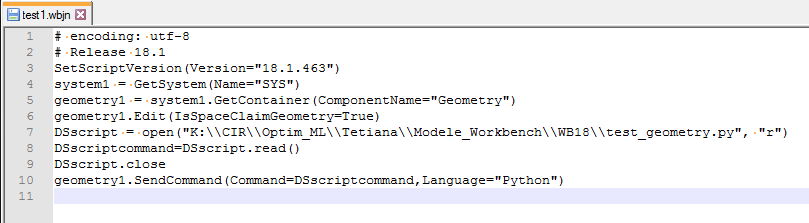
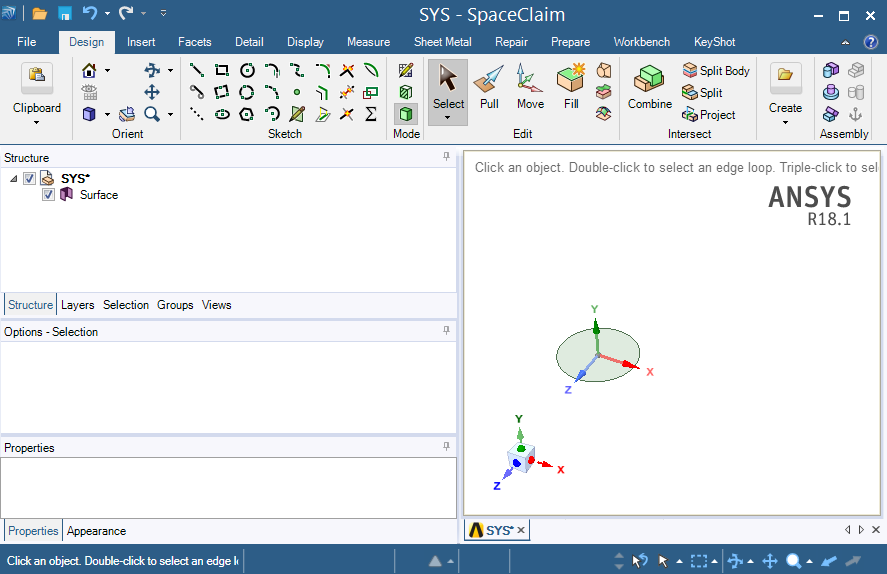
      Hello Aniket, I'm looking for at least one small example of using SendCommand with python script to create a simple geometry, in my ANSYS Help (V18) I only found an example with Javascript.. nAnd this example doesn't work for me:nI don't see any ellipse created when I run this..nThen I create a cylinder and record a py script. Running a script in SpaceClaim is ok:nThen I want to do the same by launching a .wbjn file (using SendCommand), so I do this:nBut it doesn't work, it only create a surface, and no extrusion, because , I guess, it doesn't know what is Info1 and Face1.nnYes, there is a documentation and some video on Youtube, but it s not clear at all for me how I should proceed. nCan you gives me any help?nThank you in advancenTatianan
    • Tèche
      Subscriber
      Hello, don't consider my question, I think I found a solution. There are examples in Insert Snippet/ ExamplesnArrayn
Viewing 12 reply threads
  • The topic ‘Spaceclaim Scripting’ is closed to new replies.
[bingo_chatbox]