Ansys Assistant will be unavailable on the Learning Forum starting January 30. An upgraded version is coming soon. We apologize for any inconvenience and appreciate your patience. Stay tuned for updates.
Fluids

Fluids

Topics related to Fluent, CFX, Turbogrid and more.

Raditation through MLI – Thermal Desktop

    • v_vishnu
      Subscriber

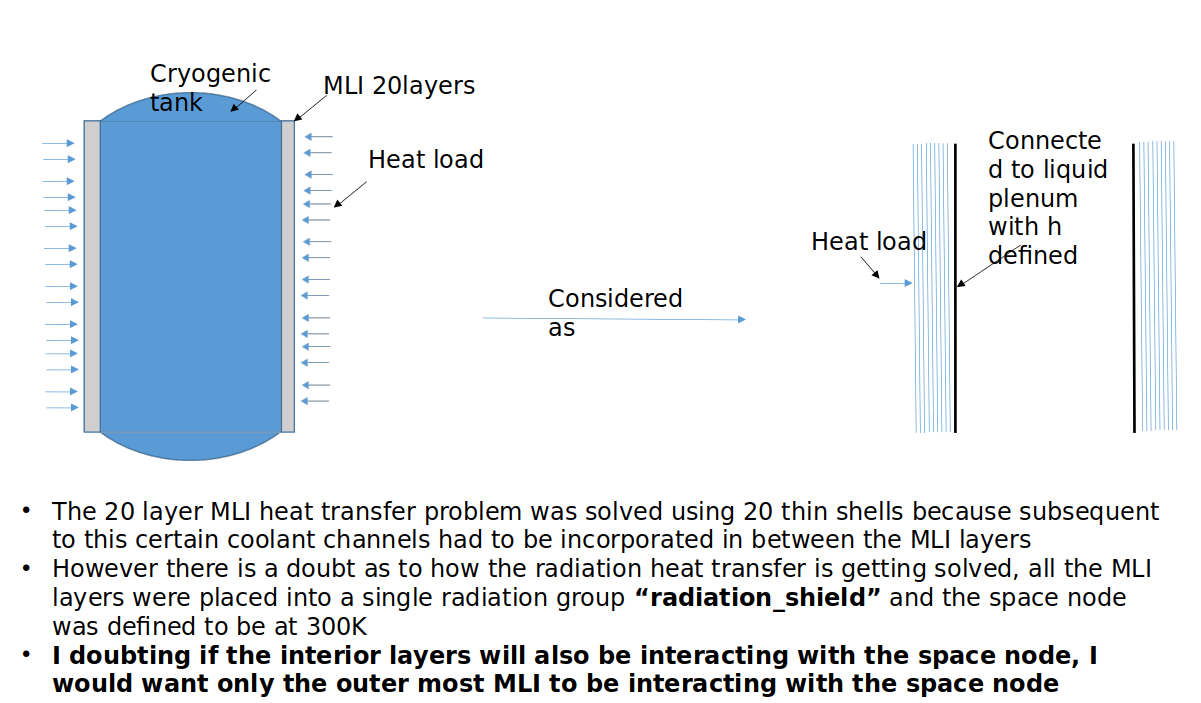
      Hi, I was trying to model heat transfer through MLI into a cryogenic tank in Thermal Desktop. Each MLI had to be modelled using thin shell elements for a separate purpose nut even before advancign I got a doubt as to whether this is the correct approach. The problem is defined below:

      Problem description

      The 20 layer MLI heat transfer problem was solved using 20 thin shells because subsequent to this certain coolant channels had to be incorporated in between the MLI layers
      However there is a doubt as to how the radiation heat transfer is getting solved, all the MLI layers were placed into a single radiation group “radiation_shield” and the space node was defined to be at 300K 
      I doubting if the interior layers will also be interacting with the space node, I would want only the outer most MLI to be interacting with the space node

    • Doug Bell
      Ansys Employee

      To ensure only the outermost layer sees the space node, the following must be true:

      • The MLI optical properties should have transmissivity = 0
      • The ends of the MLI layers should be closed out (covered). This could be a surface that is Active None with emissivity = 1
      • Each MLI layer should be fully enclosed in an outer layer. For concentric finite difference cylinders, R1 < R2 < R3 < ... Rn. For FE meshes, use curved elements.

      Assuming the emissivity of each layer is low, you may wish to increase Energy cutoff above 0.1 to prevent rays from bouncing too many times. You can read more about that setting in the documentation.

    • v_vishnu
      Subscriber

      Hi Doug, By defining a surface and editing the active side as, "None", does it mean its temperature will not affect the interior layers of the MLI and vice-versa. Also, how does setting transmissivity to 0 help. Ideally the layers should transmit the heat right. Thanks once again.

    • Doug Bell
      Ansys Employee

      If the closeout surface is just a closeout surface, you should set the radiation analysis group to Active None. This means that the surface properties are applied to incoming rays but rays are not initiated from the surface. The surface does not tally exchange factors with other surfaces. Typically, a closeout surface will be excluded from the thermal calculations. To do this, you need to set the expression for Generate Cond/Cap on the Cond/Cap tab to 0.

      If you wish the closeout surface to absorb ray energy, you set the emissivity to 1 and transmissivity to 0. If you wish the closeout surface to be a symmetry plane, you set the emissivity and transmissivity to 0 and the specular reflectivity to 1. This creates a perfect mirror. Both options are usually used with Generate Cond/Cap expression set to 0.

      • how does setting transmissivity to 0 help? Ideally the layers should transmit the heat right

      The optical properties determine how the radiation performs. If you wish the surface to be opaque (a wall), you set the transmissivity = 0. This does not mean that energy won't be transferred through the wall, just that radiation will not pass through the wall as though the wall were a window.


Viewing 3 reply threads
  • You must be logged in to reply to this topic.
[bingo_chatbox]