Ansys Assistant will be unavailable on the Learning Forum starting January 30. An upgraded version is coming soon. We apologize for any inconvenience and appreciate your patience. Stay tuned for updates.
3D Design

3D Design

Topics related to Ansys Discovery and Ansys SpaceClaim.

Assign bolt tool on slot

TAGGED: ,

    • harley.b.long.civ
      Subscriber

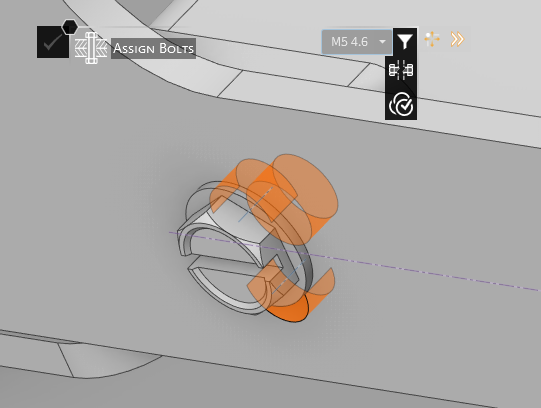
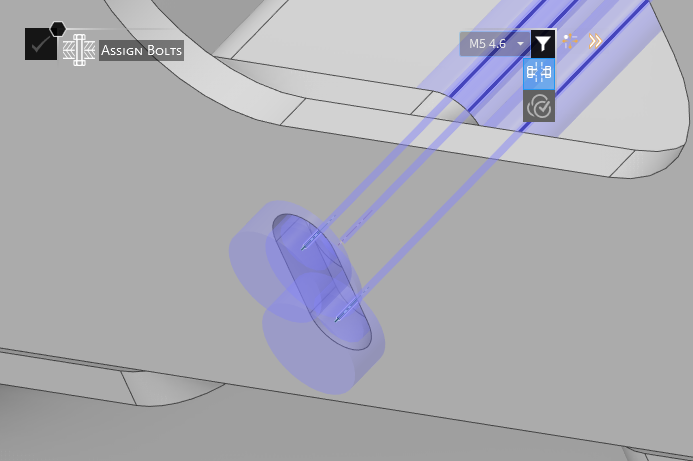
      I'm having issues using the bolt tool with a slot and thru hole. The tool doesn't work if I have it set to coaxial. If I set as non-coaxial it makes multiple bolts and does not regonize the length of the bolt.  If this was mechanical I could select the slot walls and it would regonize it as a slot. With the assign bolt in discovery, it does not let me select the walls of the slot and only the rounds. Can someone help me on how to assign a bolt thru an not coaxial slot? 

    • Devendra Badgujar
      Forum Moderator

      Hello, 

      Let me check this and get back to you. 

      Regards,

      Devendra 

    • Devendra Badgujar
      Forum Moderator

      Hello, 

      Its not possible to define bolts by selecting the walls. It can only select the bolt hole. You can refer this Structural Simulation using Bolt Idealization | Ansys Knowledge

      Regards,

      Devendra 

    • harley.b.long.civ
      Subscriber

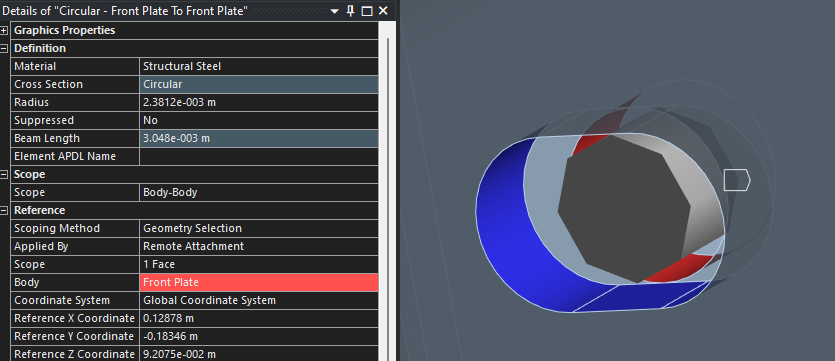
      Thank you for responding. Below is a use case example of me using the face/walls of a slot to create a 'bolt' when a slot is in use in mechanical. Regardeless, the response does not address my question. How can I create a bolt when a slot is being used in discovery? The link provided does not address this.

Viewing 3 reply threads
  • You must be logged in to reply to this topic.
[bingo_chatbox]