-
-
March 28, 2020 at 10:02 pm
wmontoya
Subscriber Hey everyone! First post here

I've been trying for at least a period of two weeks to complete the meshing of my fsae mock up model but haven't had any luck. I don't know if it's a geometry issue but I cannot compute the volume region in my enclosure.Â
I'm using fluent meshing
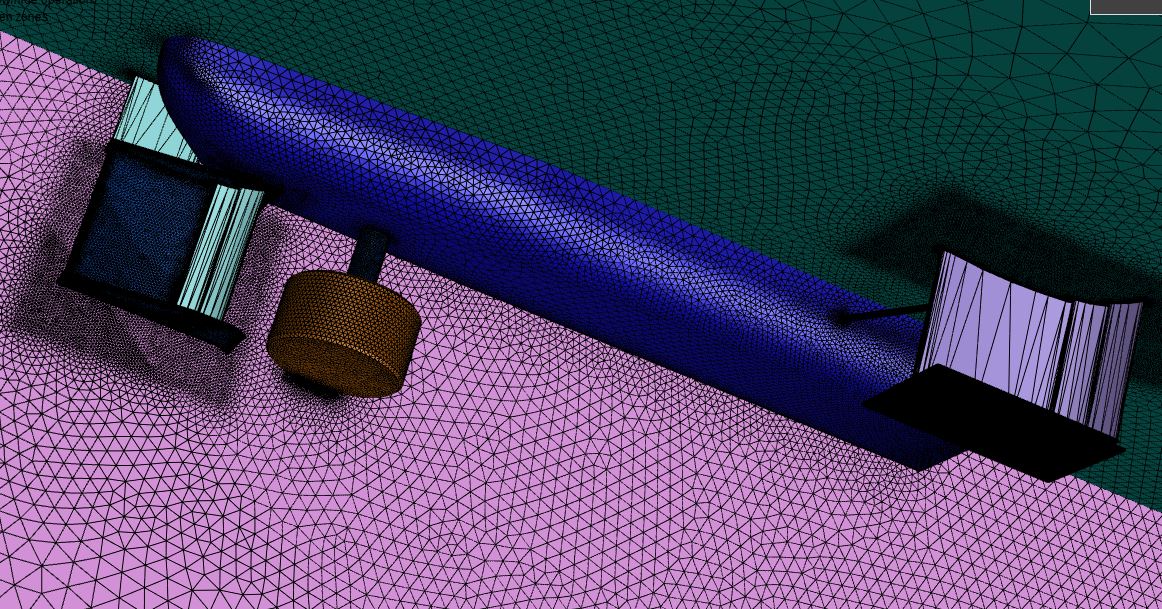
I followed a video by leap australia in youtube and after i re-import the size field, my front wing and rear wing convert into free faces.Â
Essentially I do scope sizing, re-mesh, look at the mesh, export size field, re import size field. Cannot compute volume, check for leaks and self-intersections, external baffles 11 (..Â
The image is how the front and rear wing look after importing the size field. They mesh normally beforehand but even if I try to compute the volume region without importing the size field it does not work.Â
I can share the file no problem.Â
I would really appreciate the help.Â
-
March 30, 2020 at 7:43 am
Keyur Kanade
Ansys Employeeyou need to mesh wings.Â
please check free faces in the surface mesh. you have free faces option at the top menu bar.Â
Regards,
Keyur
Â
If this helps, please mark this post as 'Is Solution' to help others.
Guidelines on the Student Community
How to access ANSYS help links
Â
-
March 30, 2020 at 7:44 am
Keyur Kanade
Ansys Employeeyou can also check
https://www.youtube.com/watch?v=ttHmvYuVHWU
https://www.youtube.com/watch?v=zFsa1Ezot8Y
https://www.youtube.com/watch?v=EZ0ukx3zpJI
Regards,
Keyur
Â
If this helps, please mark this post as 'Is Solution' to help others.
Guidelines on the Student Community
How to access ANSYS help links
Â
-
March 30, 2020 at 3:55 pm
wmontoya
SubscriberThank you! I've used those videos as references as well but for some reason it still doesn't work. Previously I was using a more complex geometry imported from solidworks but the model on the image above is as simple as possible made as an assembly in SpaceClaim. The wings appear to be as free faces only after I import the size field. I try to fix it with the quality and connectivity option but it does not work.Â
-
March 31, 2020 at 4:42 am
Keyur Kanade
Ansys Employeefor computing volumetric region, you will have to get connected surface mesh.Â
if you have any free surfaces, then volumetric region will fail. please fix free faces first.Â
Regards,
Keyur
Â
If this helps, please mark this post as 'Is Solution' to help others.
Guidelines on the Student Community
How to access ANSYS help links
Â
-
October 17, 2020 at 11:02 pm
MSol
SubscriberHello Wmontoya, were you able to solve the issue of the mesh changing when improting the geometry with the size field? I am currently having the same issuen
-
- The topic ‘Need help (Cannot compute volume regions)’ is closed to new replies.
-
5874
-
1906
-
1420
-
1306
-
1021
© 2026 Copyright ANSYS, Inc. All rights reserved.