-
-
March 25, 2020 at 4:09 pm
douniaextra1
SubscriberHello everyone,
I'm trying to simulate the dust disposition on a PV panel using ANSYS FLUENT, to do that I'm using the discrete phase model.
in the article that I'm trying to validate with, said that:
<<Â In this study, total five dust particle forces were considered in the simulation: the drag force, the gravity force, the buoyancy force, the Brownian force and the Saffman's lift force >>
I only found how to enable the Saffman's lift force in the discrete phase model as shown in the picture below.
can someone of you please show me how to enable the drag and the Brownian forces...
I truly appreciate any comments or answers from you
Thanks in advanced,
Best wishes,
Dounia
-
March 25, 2020 at 4:11 pm
-
March 25, 2020 at 9:00 pm
RK
Ansys EmployeeHello,Â
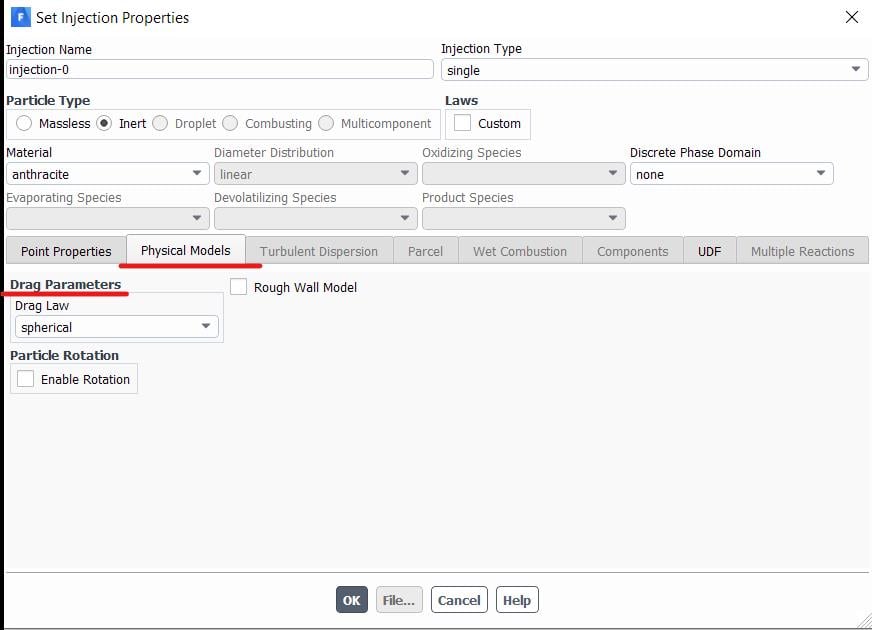
The Drag parameters tab can be found in the Injection properties window, under Physical models

The Brownian motion option is available only when the Energy equation is enabled and Stokes - Cunnigham drag law is selected. For more information, please refer to the following link.Â
Regards,Â
RahulÂ
-
March 25, 2020 at 9:45 pm
douniaextra1
SubscriberThank you so much Rahul, I really appreciate it.
the link is not working for me, because I don't have a customer portal login, and that is because I don't have a licence I'm just working with student version.
Can you please send me the file in that link, that will be a huge help for me,
Thank you so much in advanced,
Best wishes,
DouniaÂ
-
March 25, 2020 at 9:59 pm
-
March 26, 2020 at 12:01 am
douniaextra1
SubscriberThanks a lot
Best wishes,
Dounia
-
- The topic ‘how to enable the drag force and the brownian force in ANSYS FLUENT?’ is closed to new replies.

-
5649
-
1885
-
1404
-
1303
-
1021
© 2026 Copyright ANSYS, Inc. All rights reserved.