-
-
March 12, 2020 at 10:30 am
swasthik456
SubscriberI want to use inistate command to give initial stresses. The initial stresses are due to welding and cutting and i have the distribution over the area but i am not able to give it to the model can some one help with how to give these stresses to the system i am using an I Section and i am using shell elements i also tried with beam elements but it did not work. I want to get the critical buckling load of a column with geometrical and material imperfections.
-
March 12, 2020 at 6:15 pm
Wenlong
Ansys EmployeeHi,
I guess you probably have referred to this website for examples:Â https://ansyshelp.ansys.com/account/secured?returnurl=/Views/Secured/corp/v201/en/ans_adv/Hlp_G_INSTAPPL.html?q=inistate.
But can you please share an image of the error messages in Solver oupout?Are you using Mechanical or APDL?
Thanks,
Regards,
Wenlong
-
March 12, 2020 at 7:59 pm
swasthik456
Subscriberhi,
i am using mechanical apdl but i am using the user interface of apdl only when i want to change something i use editor my first question is i have a i section and i have residual stresses distributed throughout the section i want to use beam elements 188 for non linear analysis
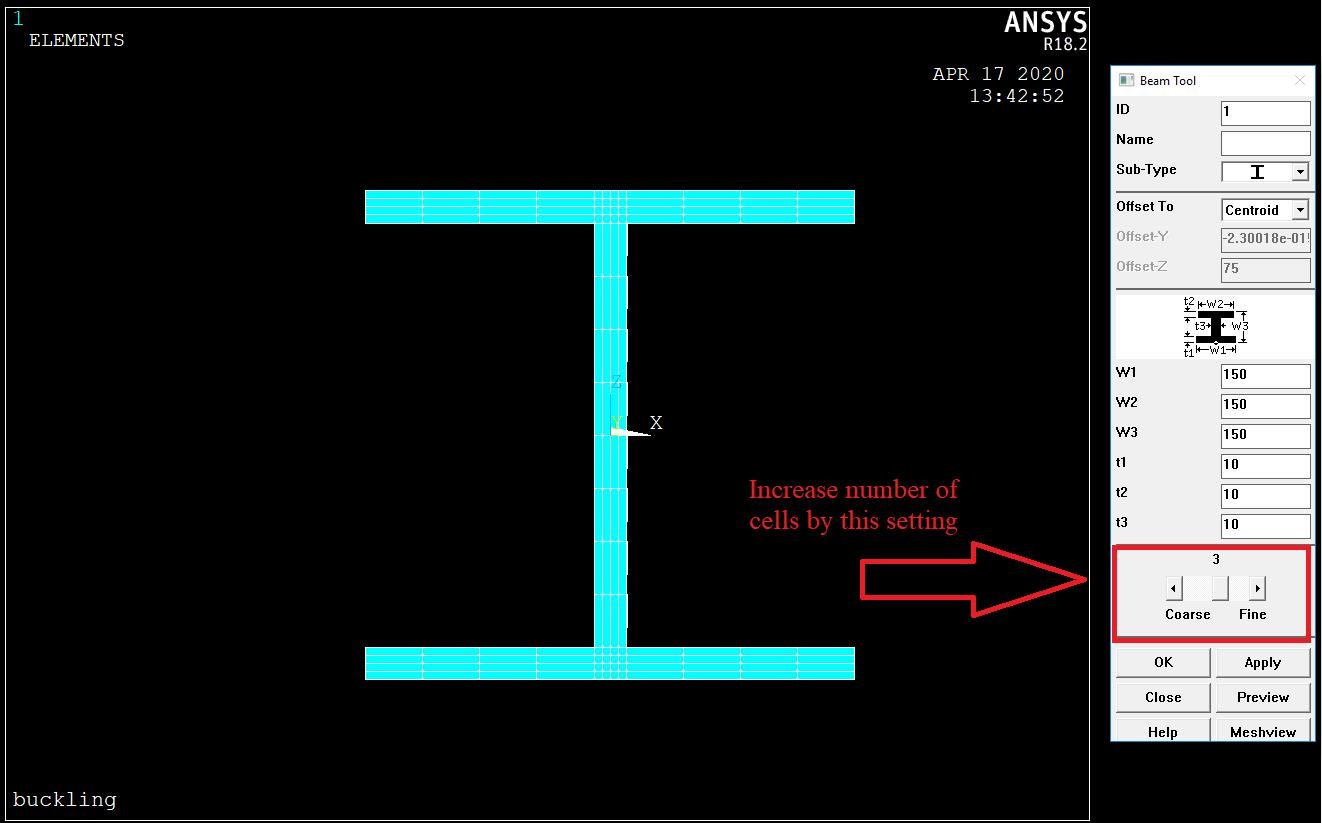
my question is for beam 188 inistate can be given to cells but i do not know how many cells are there in my i section how to find out how many cells i have in my i sectionÂ
Â
-
March 16, 2020 at 1:56 pm
swasthik456
Subscriberhi i have successfully used inistate command to get my critical buckling load but now i want to do the non linear analysis i have written a code for it can some one see why it is not converging and how to converge my non linear solutionÂ
-
March 17, 2020 at 2:29 pm
Wenlong
Ansys EmployeeHi,
Please provide more information about the simulation as simply knowing "it is not converging" can't help us give you related suggestions.Â
Regards,
Wenlong
-
May 5, 2020 at 8:58 am
swasthik456
Subscriberhi I am not able to send you my text file how can I do thatÂ
-
May 5, 2020 at 8:59 am
swasthik456
Subscriberplease have a look what is my mistake why it is not convergingÂ
Â
PrasannaÂ
-
May 9, 2020 at 3:48 pm
swasthik456
Subscriber hi i am using arc length method but it is not converging can you please check my code and tell me what mistake i am doingÂ
/SOLÂ Â Â Â !! arc-length olmadan nonlinear cozum
ANTYPE,0
PSTRES,ONÂ Â
NLGEOM,1
NSUBST,1000,10000,1Â
AUTOTS,0  !!! 0: Auto time step kapali  1: Autotimestep acik Â
CUTCONTROL,CRPLIMITexp,0.2,0
CUTCONTROL,CRPLIMITimp,0.2,1
CUTCONTROL,PLSLIMIT,0.5Â
LNSRCH,1
NEQIT,25
PSTRES,1
STABILIZE,CONSTANT,ENERGY,0.0015,NOÂ
SOLVEÂ Â
-
May 25, 2020 at 2:58 pm
Wenlong
Ansys EmployeeHi Prasanna,
Sorry about my late reply. Your code above looks fine to me. Could you please attach all your code as you did above? That way I can run it and see where goes wrong.
Regards,
Wenlong
Â
-
May 25, 2020 at 3:29 pm
swasthik456
Subscriber! S690 Major and Minor AxisÂ
FINISH ! Exits normally from a processor
/CLEAR,START ! Clears the database
/TITLE,Buckling
/FILNAME,file,0
/PREP7 ! create and set up the model
BCSOPTION,,DEFAULT ! Sets memory option for the sparse solver
bw = 16 ! (mm)Â
bf = 26 ! (mm)Â
B1 = 150 ! (mm)
B2Â = 150 ! (mm)
DÂ = 150 ! (mm)
t = 16 ! (mm)Â
LÂ = 4000 ! (mm)Â
E = 210000 ! (N/mm2)Â
v = 0.3 !
fy= 690 ! (N/mm2)Â
N1Â Â = 2 ! NO FOR OFFSET CONTROL
Umax = 60 ! (mm) DISPLACEMENT, STOP CRITERIO IN ARCTRM
imp = L/1000 ! INITIAL IMPERFECTION
TM = 21
! ********************************************************** !
! DEFINE BEAM 188 ELEMENTS
! ********************************************************** !
ET,1,BEAM188 ! Define the element of the beam to be buckled Defines a local element type from the element library
! ********************************************************** !
! MATERIAL
! ********************************************************** !
MP,EX,1,E ! Defines a linear material property as a constant
MP,PRXY,1,v ! Defines a linear material property as a constant
! ********************************************************** !
! SECTION
! ********************************************************** !
SECTYPE ,1,BEAM, I,,2 ! Associates section type information with a section ID number
SECOFFSET , CENT ! Defines the section offset for cross sections
SECDATA,B1,B2,D,bf,bf,bw,0,0,0,0,0,0
! ********************************************************** !
! SET 'KEYPOINTS' COORDINATES
! ********************************************************** !
K,1,0,0 ! Define the geometry of beamÂ
K,2,0,L
K,3,0,L/2
K,4,0,L/4
K,5,0,3*L/4
Â
! ********************************************************** !
! DEFINE LINES
! ********************************************************** !
!Defines a straight line irrespective of the active coordinate system
!L,1,2 ! Draw the line
LSTR,    1,    4 Â
LSTR,    4,    3 Â
LSTR,    3,    5 Â
LSTR,    5,    2 ! Defines a straight line irrespective of the active coordinate system
! ********************************************************** !
! PROFILE MESH
! ********************************************************** !
ESIZE,L/40 ! Set element size to 83 mm
LMESH,ALL,ALL ! Mesh the line
! ********************************************************** !
! COMPLETE PRE -PROCESSING
! START PROCESSING
! ********************************************************** !
FINISH ! Exits normally from a processor
/SOLU ! Enters the solution processor
ANTYPE,STATIC ! Specifies the analysis type and restart status
PSTRES,ON ! Prestress can be accounted for - required during buckling analysis
! ********************************************************** !
! SUPPORT
! ********************************************************** !
DK,1,UX
DK,1,UY
DK,1,UZ
DK,1,ROTY ! Constrain the bottom of beam
DK,2, UX
DK,2, UZ
DK,2, ROTY ! Constrain the top of beam
!Defines DOF constraints at keypoints
! ********************************************************** !
! FORMULAES
!********************************************************** !
FK,2,FY,-1 ! Load the top vertically with a unit load.
! This is done so the eigenvalue calculated
! will be the actual buckling load, since
! all loads are scaled during the analysis.
! ********************************************************** !
! CONFIGURE ELASTIC LINEAR ANALYSIS
! ********************************************************** !
ANTYPE,STATIC ! Specifies the analysis type and restart statusÂ
PSTRES,ON ! Specifies whether prestress effects are calculated or included.
SOLVE ! Starts a solution
FINISH ! Exits normally from a processor
Â
! ********************************************************** !
! CONFIGURE ELASTIC STABILITY ANALYSIS
! ********************************************************** !
/SOLU ! Enters the solution processor
ANTYPE,BUCKLE ! Specifies the analysis type and restart statusÂ
BUCOPT,LANB,2 ! Specifies buckling analysis options
SOLVE ! Starts a solution
FINISH ! Exits normally from a processor
/SOLU ! Enters the solution processor
EXPASS,ON ! Specifies an expansion pass of an analysis, ON - An expansion pass will be performed.
MXPAND,2,0,0,1,0.001, ! Specifies the number of modes to expand and write for a modal or buckling analysis
SOLVE ! Starts a solution
FINISH ! Exits normally from a processor
/POST1 ! Enters the database results postprocessor
SET,LIST ! Defines the data set to be read from the results file
SET,LAST ! Defines the data set to be read from the results file
PLDISP ! Displays the displaced structure
FINISH ! Exits normally from a processor
/POST1 ! Enters the database results postprocessor
PLNSOL,U,SUM ! Displays results as continuous contours
Â
-
May 25, 2020 at 3:30 pm
swasthik456
SubscriberÂ
! ********************************************************** !
! INITIAL IMPERFECTION (BUCKLING MODE)/FILNAME,Plate,0
! ********************************************************** !
!!!! Prepare for nonlinear analysisÂ
/PREP7 ! create and set up the model
   Â
*SET,NONSUBST,2Â Â Â Â Â Â Â Â Â ! HERE BE CAREFULL WHICH MODE YU CHOOSE AS INITIAL DEFL.Â
UPGEOM,imp,1,NONSUBST,file1,rst  ! update geometry for initial deflections ! Adds displacements from a previous analysis and updates the geometry of the finite element model to the deformed configuration
CDWRITE,db,file,cdb ! Writes geometry and load database items to a file
FINISH ! Exits normally from a processor
Â
/POST1 ! Enters the database results postprocessor
PLDISP,0 ! Displays the displaced structure
Â
Â
Â
Â
Â
!NonLinear Buckling
Â
! These two commands clear current data
Â
/TITLE, Nonlinear Buckling Analysis
/PREP7 ! Enter the preprocessor
Â
Â
!The procedure for inistate command must be like this:Â
Â
! First set initial state datatype, you will implement stressÂ
Â
inistate,set,dtype,stre ! here we tell the program we will implement stress data
Â
! Then implement the initial stress to the cells of associated element.Â
*SET,nel,40
*do,i,1,nel ! loop over the elements (nel: number of elements).Â
Â
Â
inistate,define,i,,1,,+0,08*fy ! here you will input cell number and stress value with direction (sxx, syy etc.).
inistate,define,i,,2,,-0,408*fy
inistate,define,i,,3,,-0,408*fy
inistate,define,i,,4,,+0,9*fy
inistate,define,i,,5,,+0,9*fy
inistate,define,i,,6,,+0,9*fy
inistate,define,i,,7,,-0,408*fy
inistate,define,i,,8,,-0,408*fy
Â
inistate,define,i,,9,,+0,08*fy
inistate,define,i,,10,,+0,08*fy
inistate,define,i,,11,,-0,408*fy
inistate,define,i,,12,,-0,408*fy
inistate,define,i,,13,,+0,9*fy
inistate,define,i,,14,,+0,9*fy
inistate,define,i,,15,,+0,9*fy
inistate,define,i,,16,,-0,408*fy
inistate,define,i,,17,,-0,408*fy
inistate,define,i,,18,,+0,08*fy
inistate,define,i,,19,,+0,08*fy
inistate,define,i,,20,,-0,408*fy
inistate,define,i,,21,,-0,408*fy
inistate,define,i,,22,,+0,9*fy
inistate,define,i,,23,,+0,9*fy
inistate,define,i,,24,,+0,9*fy
inistate,define,i,,25,,-0,408*fy
inistate,define,i,,26,,-0,408*fy
inistate,define,i,,27,,+0,08*fy
inistate,define,i,,28,,+0,9*fy
inistate,define,i,,29,,+0,9*fy
inistate,define,i,,30,,+0,9*fy
inistate,define,i,,31,,-0,15*fy
inistate,define,i,,32,,-0,15*fy
Â
Â
inistate,define,i,,33,,-0,15*fy
inistate,define,i,,34,,-0,15*fy
inistate,define,i,,35,,-0,15*fy
inistate,define,i,,36,,-0,15*fy
inistate,define,i,,37,,-0,15*fy
inistate,define,i,,38,,-0,15*fy
inistate,define,i,,39,,-0,15*fy
inistate,define,i,,40,,-0,15*fy
inistate,define,i,,42,,-0,15*fy
inistate,define,i,,43,,+0,9*fy
inistate,define,i,,44,,+0,9*fy
inistate,define,i,,45,,+0,9*fy
inistate,define,i,,46,,+0,08*fy
inistate,define,i,,47,,-0,408*fy
inistate,define,i,,48,,-0,408*fy
inistate,define,i,,49,,+0,9*fy
inistate,define,i,,50,,+0,9*fy
inistate,define,i,,51,,+0,9*fy
inistate,define,i,,52,,-0,408*fy
inistate,define,i,,53,,-0,408*fy
inistate,define,i,,54,,+0,08*fy
inistate,define,i,,55,,+0,08*fy
inistate,define,i,,56,,-0,408*fy
Â
inistate,define,i,,57,,-0,408*fy
inistate,define,i,,58,,+0,9*fy
inistate,define,i,,59,,+0,9*fy
inistate,define,i,,60,,+0,9*fy
inistate,define,i,,61,,-0,408*fy
inistate,define,i,,62,,-0,408*fy
inistate,define,i,,63,,+0,08*fy
inistate,define,i,,64,,+0,08*fy
inistate,define,i,,65,,-0,408*fy
inistate,define,i,,66,,-0,408*fy
inistate,define,i,,67,,+0,9*fy
inistate,define,i,,68,,+0,9*fy
inistate,define,i,,69,,+0,9*fy
inistate,define,i,,70,,-0,408*fy
inistate,define,i,,71,,-0,408*fy
inistate,define,i,,72,,+0,08*fy
Â
Â
Â
Â
Â
Â
Â
Â
Â
Â
Â
Â
*enddo
  Â
Â
Â
Â
! ********************************************************** !
! CONFIGURE NON LINEAR ANALYSIS
! ********************************************************** !
/PREP7 ! create and set up the model
TB,BISO,1,1,2 ! Activates a data table for material properties or special element input
TBTEMP,0 !
TBDATA,,fy,TM,,,, ! Defines data for the material data table.
Â
/SOLU ! Enters the solution processor
N1 = NODE(0,0,L/2) !Â
Â
DK,3,UX
DK,4,UX
DK,5,UX
DK,2,ROTX
DK,1,ROTX
Â
ANTYPE,STATIC ! Specifies the analysis type and restart status
NLGEOM,ON ! Includes large-deflection effects in a static or full transient analysis
OUTRES,ERASE ! Controls the solution data written to the database
OUTRES,ALL,ALL ! Controls the solution data written to the database
ARCLEN,ON,1,0.0001 ! Activates the arc-length method
! Controls termination of the solution when the arc-length method is used.
ARCTRM,U,Umax,N1,UY
AUTOTS,OFF
DELTIM,100000,50000,200000 ! Specifies the time step sizes to be used for the current load step
CUTCONTROL,CRPLIMITexp,0.2,0
CUTCONTROL,CRPLIMITimp,0.2,1
CUTCONTROL,PLSLIMIT,0.5Â
TIME,9000000 ! Sets the time for a load step
NEQIT,20 ! Specifies the maximum number of equilibrium iterations for nonlinear analyses.
NCNV,2,60,0,0,0 ! Sets the key to terminate an analysis
CNVTOL,U,60,0.05,0,0.0 ! Sets convergence values for nonlinear analyses
Â
/PREP7 ! create and set up the model
FK,2,FX,18000
FK,2,FY,-9000000
FINISH ! Exits normally from a processor
/SOL ! Enters the solution processor
SOLVE ! Starts a solution
SAVE
Â
Â
/POST26 ! Time history post processor
RFORCE,2,1,F,Y ! Reads force data in variable 2
NSOL,3,2,U,Y ! Reads y-deflection data into var 3
XVAR,3 ! Make variable 3 the x-axis
PLVAR,2 ! Plots variable 2 on y-axis
Â
/AXLAB,Y,LOAD ! Changes y label
/AXLAB,X,DEFLECTION ! Changes X label
/REPLOT
Â
!*IF,ARG1,EQ,0,THEN
!NSEL,S,D,U,-1E20,+1E20
!WhatNodes='CONSTRAINED'
!*ELSEIF,ARG1,EQ,1,THEN
!WhatNodes='SELECTED'
!*ENDIF
Â
!*GET,NumNodes,NODE,0,COUNT
Â
!/POST1
!i=0
!MaxRForce=-1E20
!MaxNode=0
!*DO,n,1,NumNodes
!i=NDNEXT(i)15:56 16/05/2020
Â
!*GET,RForceY,NODE,i,RF,FY
!*GET,RForceX,NODE,i,RF,FX
!*GET,RForceZ,NODE,i,RF,FZ
Â
Â
!RForce=SQRT(RForceX**2+RForceY**2+RForceZ**2)
Â
!*IF,RForce,GT,MaxRForce,THEN
!MaxRForce=RForce
!MaxNode=i
!*ENDIF
!*ENDDO

Â
-
May 25, 2020 at 3:30 pm
swasthik456
Subscriberplease help me this is a code for major axis buckling with residual stress and geometrical imperfectionsÂ
-
May 25, 2020 at 6:21 pm
Wenlong
Ansys EmployeeHi Prasanna,
One issue I can see is in your nonlinear buckling analysis input, you are trying to read in the initial geometrical imperfections from file1.rst, but that file1 does not exist.Â
To solve this, I think it will be easier if you can:
1. Read the linear buckling input (the first input you shared) into APDL, then click on "preprocessing" on the manual panel --> Archive model --> Write, and save a cdb file.
2. In Workbench, insert an External model component, and import that cdb file you just generated.(make sure the unit system of the external model is correct)Â
3. Link that external model to a static structural analysis, then link the solution of that static structural analysis to an eigenvalue buckling analysis.
4. Run that eigenvalue buckling analysis, you will generate a file.rst file. You can find it by opening the eigenvalue analysis in Mechanical, right-click on Solution --> open the result folder.Â
For reference, you can check this website:Â https://www.simutechgroup.com/tips-and-tricks/fea-articles/221-fea-tips-tricks-post-processing-apdl-ansys-workbench
Moreover, you can also use Workbench to add geometry imperfection (and hopefully that will make your life easier). Please refer to this post for more info:Â /forum/forums/topic/thin-walled-3/Â (you will need to scroll down a lot to see a relevant discussion)
If this file1.rst is not your issue, please feel free to follow up.
Regards,
Wenlong
Â
Â
-
May 25, 2020 at 8:36 pm
swasthik456
Subscriberi checked it but can you please check that as i am using arc length method my initial stresses will be neglected ?
Â
Can you check that if residual stresses are correctly applied ?
-
May 26, 2020 at 3:50 pm
Wenlong
Ansys EmployeeHi,
Yes, the Arc-length method can be used with initial stress. And I just run a small simulation to verify that.Â
!
1. In your nonlinear buckling input, there is something I don't understand: you are applying your initial stress to 72 cells of the beam section, how do you know there are 72 cells?Â
2. In your nonlinear buckling input, you have /Prep7 defined after /SOLU. /Prep7 is used to create a model, material, section, and so on and it should be defined before you solve the model.Â
3. In your nonlinear buckling input, you don't have many parameters defined, such as fy and the vertices. And when I run it, it will show errors like "Vertices not defined".
This is what I did in my test model. I was using Workbench Mechanical.
In the last static structural analysis, I inserted a command snippet and pasted part of your inputs like shown below:
/PREP7 ! Enter the preprocessor
inistate,set,dtype,stre ! here we tell the program we will implement stress data
fy=600 !MPa
! Then implement the initial stress to the cells of associated element.Â
*SET,nel,40
inistate,set,dtype,stre ! here we tell the program we will implement stress data
*do,i,1,nel ! loop over the elements (nel: number of elements).Â
inistate,define,i,,,,+0.1*fy ! here you will input cell number and stress value with direction (sxx, syy etc.).
*ENDDO
FINISH
/SOLU
ARCLEN,ON,, ! Activates the arc-length method
DELTIM,0.01,0.0001,0.1 ! Specifies the time step sizes to be used for the current load step
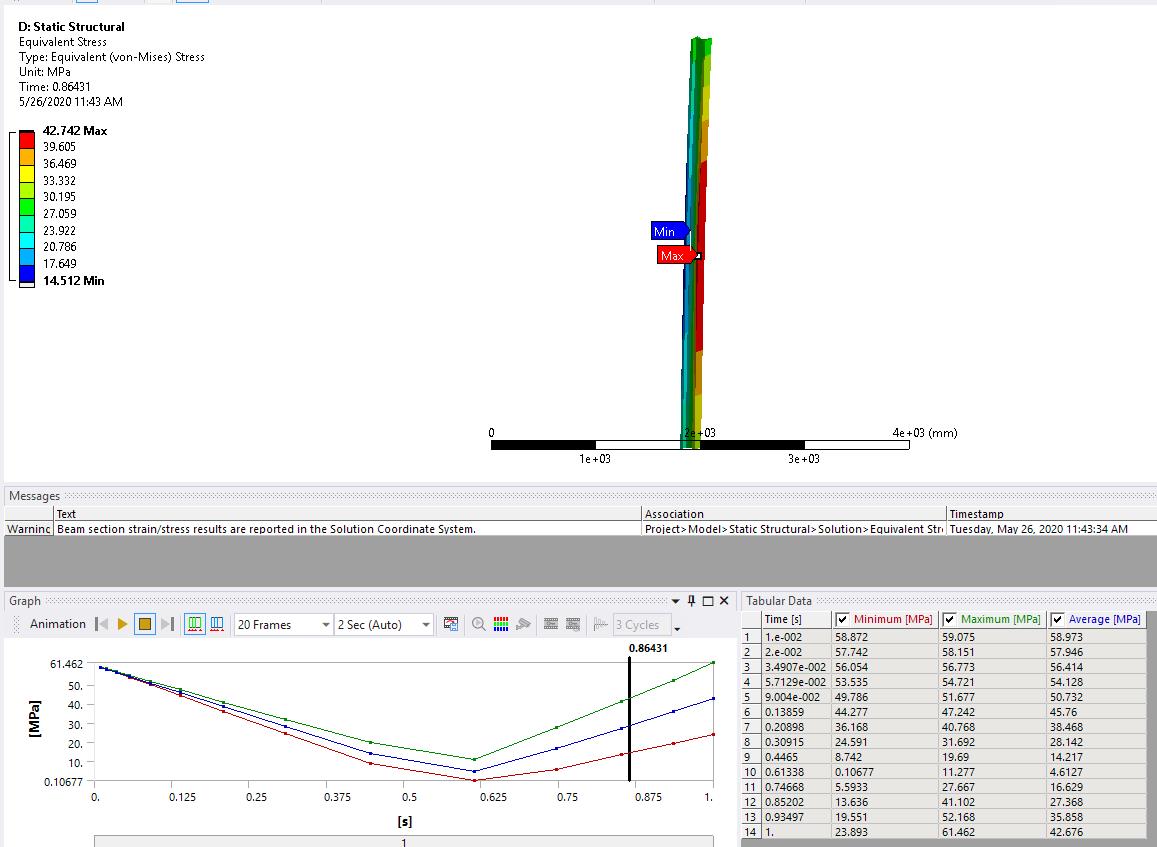
And the stress plot looks like below, you can see the initial stress effect taking place.Â
To get your input up to running, I suggest you start simple (instead of applying that many INISTATE to every cell, you can apply all the cell the same initial stress, just as a test), start with a small load, and only include necessary solution control commands (like ARCLEN, NLGEOM and DELTIM). Once you get your code running, you can start adding complex behaviors.Â
Hope this is helpful.
Regards,
Wenlong
Â
-
May 27, 2020 at 4:09 pm
swasthik456
Subscriberthanks i am very thankful to you just a small question when i apply initial stresses to the system when i change the pattern but if they are in equilibrium why my ultimate column strength is not changing i mean residual stress distribution should have a effect on the ultimate critical buckling load can you explain why ?
-
May 27, 2020 at 4:24 pm
Wenlong
Ansys EmployeeHi,
Can you make sure your initial stress is applied properly? You can do a small test without any loading, just give enough constraint, then after running the simulation, request a stress plot, does the column have stress at the beginning? I agree that applying initial stress should affect the buckling load.Â
Regards,
Wenlong
Â
-
May 27, 2020 at 5:40 pm
swasthik456
Subscriberi did that but my displacements are in 10-6 and alsoÂ
can you send me a snippet to check for residual stressesÂ
PrasannaÂ
-
May 28, 2020 at 9:28 am
-
May 28, 2020 at 9:30 am
-
May 28, 2020 at 1:52 pm
Wenlong
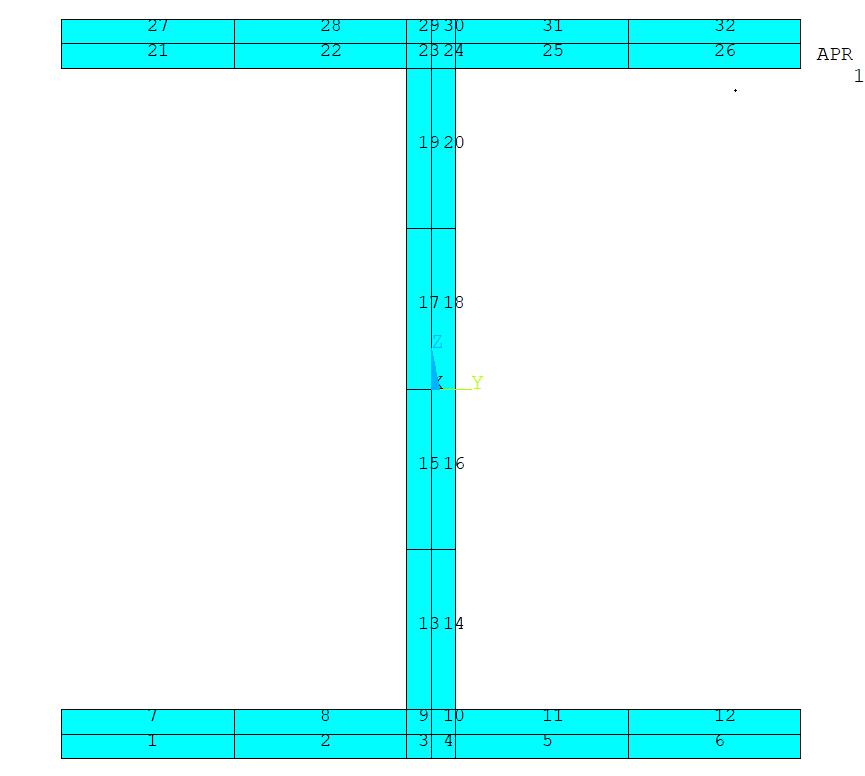
Ansys EmployeeOk, so you have a total of 32 cells. In your input, can you make the INISTATE stop at "inistate,define,i,,32,,-0,15*fy".
Also just making sure, did you correct your input to move /prep7 before /solu ?
Regards,
Wenlong
Â
-
May 28, 2020 at 2:57 pm
swasthik456
SubscriberhiÂ
Â
no 32 cells was just an example as you asked me why i am doing it to 72 cells and how do i know where are these cells can you please do a small model run with two different residual stresses to get the buckling loads and check if they are the same or not as for me they are coming sameÂ
prasannaÂ
-
May 28, 2020 at 3:05 pm
Wenlong
Ansys EmployeeHi Prasanna,
Sure, I am running a small test and will send the input back to you soon.
Regards,
Wenlong
Â
-
May 28, 2020 at 3:14 pm
Wenlong
Ansys EmployeeHi Prasanna,
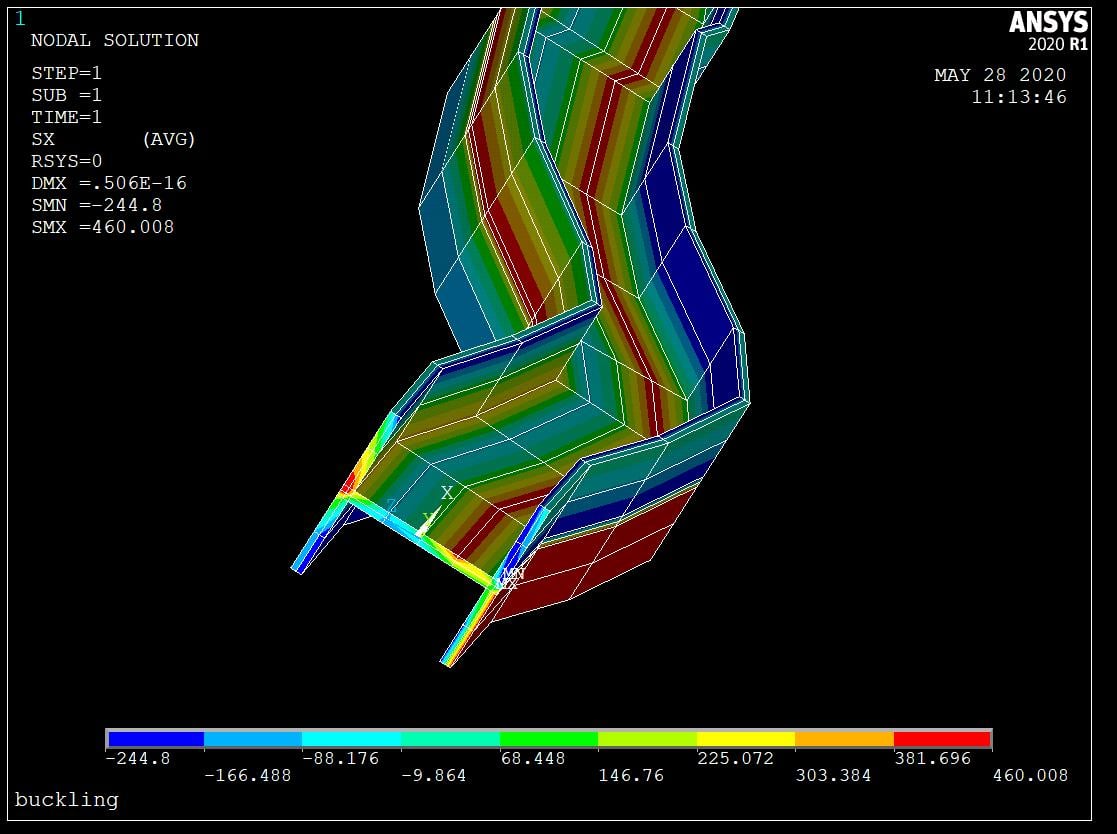
I found the issue in your code, in your INISTATE, you accidently put 0.15*fy as 0,15*fy. After correcting it, the INISTATE works fine now. I attached a small test where I applied INISTATE, hold both ends of the beam and run, now you can see the beam deform under the initial stress, and the stress distribution at different cells.Â
!ANSYS Command Listing
!Test the INISTATE
FINISH ! These two commands clear current data
/CLEAR
/TITLE,buckling
/PREP7 ! Enter the preprocessor
ET,1,BEAM188 ! Define the element of the beam to be buckled
MPTEMP,,,,,,, MPTEMP,1,0
MP,EX,1,210000 ! Young's modulus (in MPa)
MP,PRXY,1,0.3 ! Poisson's ratio
TB,BISO,1,1,2 TBTEMP,0
TBDATA,,460,21,,,
SECTYPE, 1, BEAM, I, mysec, 1
SECOFFSET, CENT
SECDATA,150,150,150,10,10,10,0,0,0,0,0,0
K,1,0,0 ! Define the geometry of beam (3000 mm high)
K,2,0,3000
L,1,2 ! Draw the line
CM,_Y,LINE
LSEL, , , , 1
CM,_Y1,LINE
CMSEL,S,_Y
ESIZE,300 ! Set element size to 300 mm
LMESH,ALL,ALL ! Mesh the line
fy = 600
*SET,nel,10
*do,i,1,nel ! loop over the elements (nel: number of elements).
inistate,define,i,,1,,+0.08*fy ! here you will input cell number and stress value with direction (sxx, syy etc.).
inistate,define,i,,2,,-0.408*fy
inistate,define,i,,3,,-0.408*fy
inistate,define,i,,4,,+0.9*fy
inistate,define,i,,5,,+0.9*fy
inistate,define,i,,6,,+0.9*fy
inistate,define,i,,7,,-0.408*fy
inistate,define,i,,8,,-0.408*fy
inistate,define,i,,9,,+0.08*fy
inistate,define,i,,10,,+0.08*fy
inistate,define,i,,11,,-0.408*fy
inistate,define,i,,12,,-0.408*fy
inistate,define,i,,13,,+0.9*fy
inistate,define,i,,14,,+0.9*fy
inistate,define,i,,15,,+0.9*fy
inistate,define,i,,16,,-0.408*fy
inistate,define,i,,17,,-0.408*fy
inistate,define,i,,18,,+0.08*fy
inistate,define,i,,19,,+0.08*fy
inistate,define,i,,20,,-0.408*fy
inistate,define,i,,21,,-0.408*fy
inistate,define,i,,22,,+0.9*fy
inistate,define,i,,23,,+0.9*fy
inistate,define,i,,24,,+0.9*fy
inistate,define,i,,25,,-0.408*fy
inistate,define,i,,26,,-0.408*fy
inistate,define,i,,27,,+0.08*fy
inistate,define,i,,28,,+0.9*fy
inistate,define,i,,29,,+0.9*fy
inistate,define,i,,30,,+0.9*fy
inistate,define,i,,31,,-0.15*fy
inistate,define,i,,32,,-0.15*fy
*enddo
/SOLU ! Enter the solution mode
ANTYPE,STATIC ! Before you can do a buckling analysis, ANSYS
! needs the info from a static analysis
PSTRES,ON ! Prestress can be accounted for - required
! during buckling analysis
DK,1,UX
DK,1,UY
DK,1,UZ
DK,1,ROTX
DK,1,ROTY ! Constrain the bottom of beam
DK,1,ROTZ ! Constrain the bottom of beam
DK,2,all
SOLVE
FINISH
/SOLU ! Enter the solution mode again to solve buckling
ANTYPE,STATIC ! Buckling analysis
SOLVE
!*
/ESHAPE,1.0
/POST1 ! Enter post-processor
SET,LIST ! List eigenvalue solution - Time/Freq listing is the
SET,FIRST ! Read in data for the desired mode
PLDISP ! Plots the deflected shape
PLNSOL, S,X
Regards,
Wenlong
Â
-
May 28, 2020 at 7:09 pm
swasthik456
Subscriberthanks now my results are betterÂ
-
May 29, 2020 at 7:13 pm
swasthik456
Subscriberhi can you please tell me if i can have 2 material properties in a beam elementÂ
1 for flange and 1 for web but the E modulus of elasticity is different and yield strength alsoÂ
-
- The topic ‘Flexural Buckling of Welded High strength steel columns with I sections’ is closed to new replies.
-
5639
-
1885
-
1403
-
1303
-
1021
© 2026 Copyright ANSYS, Inc. All rights reserved.