Ansys Assistant will be unavailable on the Learning Forum starting January 30. An upgraded version is coming soon. We apologize for any inconvenience and appreciate your patience. Stay tuned for updates.
General Mechanical

General Mechanical

Topics related to Mechanical Enterprise, Motion, Additive Print and more.

Thermal Desktop Intel Fortran Issue

    • sillus.1
      Subscriber

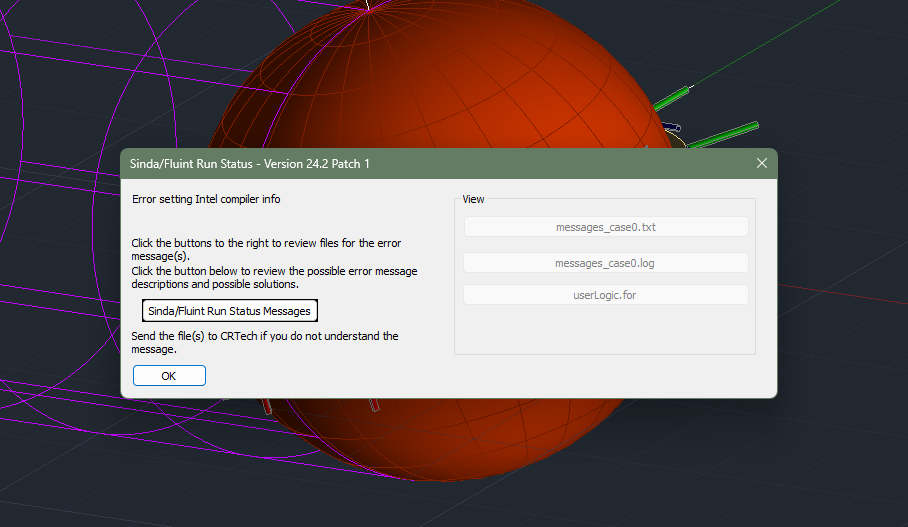
      Hello, I have been modeling in thermal desktop for a few weeks and just tried to run my first case today after finishing my setup. I am getting an error saying Error Setting Intel Compiler Information. This was previously after a message saying my Intel compiler was out of date so I downloaded the most recent one and followed the outlined steps provided to add this to get it to work: Instructions to set DisableUNCCheck for users with Network Intel Compiler Issues 
      1. Go to the start button and enter regedit and hit return. 
      2. Expand HKEY_LOCAL_MACHINE 
      3. Expand Software 
      4. Expand Microsoft 
      5. Select Command Processor 
      6. Right Click as show below to create a DWORD 32 
      7. Enter DisableUNCCheck followed by return 
      8. Double Click on DisableUNCCheck and set the value to 1 
      9. Go back to the Software branch and expand WOW6432. 
      10. Go to Step 4 and stop after Step 8. 

      Image is attached of the error, please help thanks!

    • sillus.1
      Subscriber

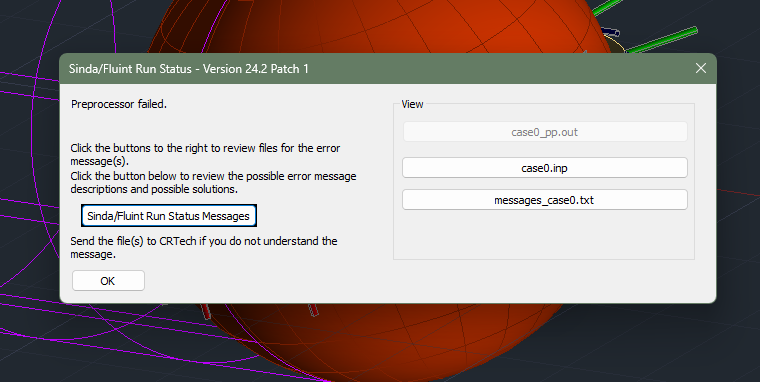
      So to follow up I just turned it off and on again (classic troubleshooting) but now am getting a preprocessor error. I can't look through the pp.out file either to see how to fix it as its grayed out. Please help! I'm using the 2024 version of the compiler so it should be supported.

    • Doug Bell
      Ansys Employee

      What is in the messages_case0.txt file? For others reading this, the Sinda/Fluint Run Status Messages button in the Run Status window opens a file that suggests possible solutions to the error message and where to find more information.

    • sillus.1
      Subscriber

      I opened the log and have this issue:  LOOPCT =               0 The above nodes have no connection to a boundary node nor a plenum. Steady state solutions are not possible. I'm not exactly sure why, I probably set somethign up wrong in the model but am unsure how to fix this. I also ran the beercan.dwg and that worked fine so it's definitely an issue with my connections.

    • Doug Bell
      Ansys Employee

      If the list of nodes appears to be all nodes in your model, you need a boundary node somewhere. A radiation task for radks will generate a space node that is a boundary node. If your general boundary is convection, you need a node that represents that temperature with a conductor (node-to-surface, usually) connecting the model to the boundary nodes.

      If the list of nodes is a subset of nodes, you need to do one or more of the following for that set of nodes:

      • Check the connections to other objects. You can use contactors, merge nodes (for perfect contact), or conductors.
      • Add a radiation analysis group and radiation task to make radiation connections to other objects

      Nothing is automatically connected thermally. You must create conductors, contactors, or radiation tasks.


Viewing 4 reply threads
  • You must be logged in to reply to this topic.
[bingo_chatbox]