TAGGED: error, geometry-editor, mechanical
-
-
January 29, 2025 at 5:47 pm
Gabra
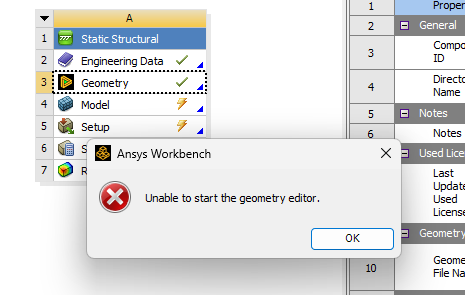
SubscriberI just installed ANSYS 2025R1 (Student Version) on my computer and I get this error message when I try to open the geometry.
I have already tried all these actions without success:
- Rename or delete the appdata and temp folders.
- Remove all registry information related to ANSYS.
- Uninstall and reinstall the tool.
- Install a previous version of the tool.
- Run Product & CAD Configuration.
- Check that the tool has permissions to bypass the computer's firewall.
- Update the graphics card drivers.The model I am trying to open does open correctly on another computer that I have just installed as well.
I can't think of any other actions and I haven't found any more information on the internet.
-
January 30, 2025 at 1:10 pm
George Karnos
Ansys EmployeeHello Gabra,
Under the %TEMP%\WorkbenchLogs directory, you will find log files.
What errors, if any, are listed in the log file?
Also, under:
c:\Program files\Ansys Inc\Ansys Student\
You will find an install.log file
Does that list any errors?
If you look at Windows System Events
Are there any errors listed when trying to open geometry -
January 31, 2025 at 7:17 pm
Gabra
SubscriberHello George,
Thank you for your reply. I give you the information that you asked for:
1 - The logs files in the %TEMP%\WorkbenchLogs directory have the following text:Event log opened 31/01/2025 19:33:10 Hora estándar romance
Product version: 2025 R1
Build version: 25.1.0.0
{31/01/2025 19:33:32} [ProjectReplaced:Project] A new project has been created.
{31/01/2025 19:33:40} [ProjectReplaced:Project] The project has been opened from C:\Users\[USER_NAME]\AppData\Local\Temp\Bolted Nozzle Flange.tmp\Bolted Nozzle Flange.wbpj.
{31/01/2025 19:36:36} [GeomEditorTimeOut:DMAddin] Unable to start the geometry editor.2 - The install.log file, don't list any errors.
3 - I cheked the Windows System Events but didin't found nothing.
Thank you in advance.
-
February 18, 2025 at 6:17 pm
Gabra
SubscriberToday I discovered the solution:
I had to go to I had to go to “Turn Windows features on or off” and enable: ".NET Framework 3.5"
-
- You must be logged in to reply to this topic.
-
5049
-
1759
-
1387
-
1248
-
1021
© 2026 Copyright ANSYS, Inc. All rights reserved.