-
-
November 1, 2019 at 8:38 pm
Bran
SubscriberHello,
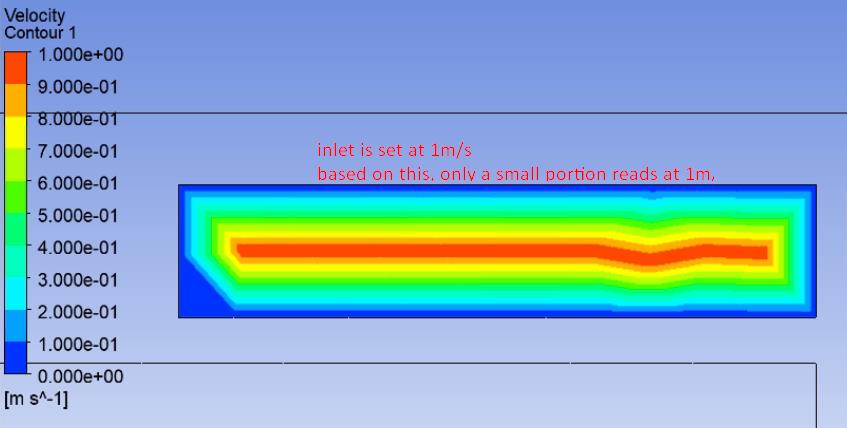
I have been setting a boundary condition, 'velocity-inlet' specified to be 1m/s on a face that is approximately 0.4 m x 0.09 m. The intent of this was to have an inlet of about 75 cfm. Using V = Q / A, I obtained a velocity corresponding to the inlet face and specified volume flow rate. Unfortunately, when I look at the face of the inlet, the whole face does not have 1 m/s applied across it, meaning that the specified CFM is not reached.
I have attached an image to show the result.
 Regards.
-
November 4, 2019 at 9:09 am
Rob
Forum ModeratorTurn node values off.
Thinking about the fluid mechanics, what should the velocity at the wall be?Â
Â
-
November 5, 2019 at 4:14 am
Bran
SubscriberCould you explain how to turn node values off?
Also thanks, is it because of the boundary layer which causes the velocity to differ as it moves away from the wall?
Is there a way I can make this more accurately represent a specific CFM coming out of the inlet? As of right now, it would be reading less than the 75 CFM that I am trying to set.
Â
Regards.
-
November 5, 2019 at 10:10 am
Rob
Forum ModeratorIn Fluent it's on the Contour panel. In CFD Post it'll be on the contour settings, have a look through the advanced options for "face".Â
Correct. Fluent will start to apply the wall boundary layer on the first cell in the domain, so the inlet contour is misleading when smoothing is on. However, you also want to check the mesh as that looks a very deep boundary layer if it's caused by the contour smoothing. You are putting the correct flow into the domain (check using the flux reports) but need to remember to allow the flow to develop into the model when you want to look at the area of interest. Â
-
- The topic ‘velocity-inlet boundary condition not constant throughout surface selected’ is closed to new replies.

-
5899
-
1906
-
1420
-
1306
-
1021
© 2026 Copyright ANSYS, Inc. All rights reserved.