Ansys Assistant will be unavailable on the Learning Forum starting January 30. An upgraded version is coming soon. We apologize for any inconvenience and appreciate your patience. Stay tuned for updates.
General Mechanical

General Mechanical

Topics related to Mechanical Enterprise, Motion, Additive Print and more.

APDL COMMAND IN ANSYS WORKBENCH

    • andimens13
      Subscriber

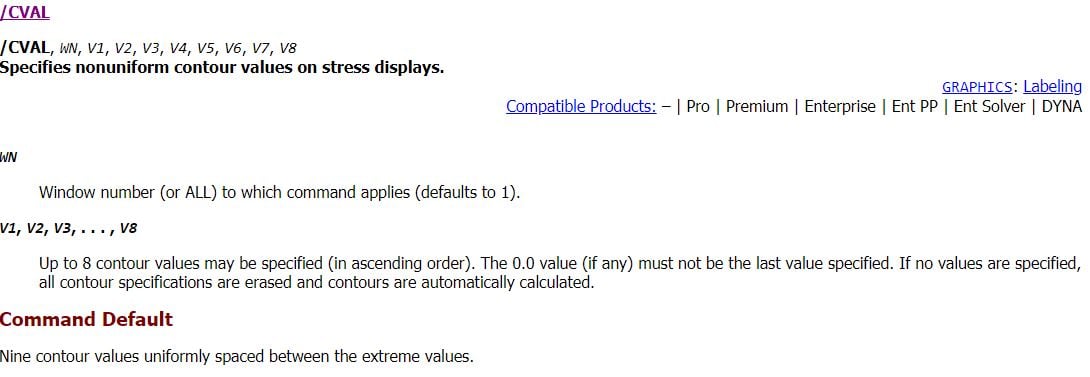
      Hi, I am trying to use an exiting Apdl command in Ansys workbench, the command is meant to change the colours of the contour plot, however, it seems not to execute anytime I try. I am a bit confused if I need to add something to the existing command. I am experimenting ways to get an existing macros to work in workbench. I am new to this as well so any help will be useful. See the command below;


      ! cval sets the contour values
      ! colour sets a clear set of contour colours
      /CVAL,ALL,10,20,30,40,50,55,60,1000
      /COLOR,SMIN,LGRA
      /COLOR,CNTR,LGRA,1 
      /COLOR,CNTR,YELL,2 
      /COLOR,CNTR,GREE,3 
      /COLOR,CNTR,CYAN,4 
      /COLOR,CNTR,BLUE,5 
      /COLOR,CNTR,MRED,6 
      /COLOR,CNTR,ORAN,7 
      /COLOR,CNTR,RED,8  
      /COLOR,CNTR,RED,9  
      /COLOR,SMAX,RED
      /REPLOT

    • sathya
      Subscriber

      Hi,


      For now you can play with this setting.


      I am trying to fix it by running from my end.


    • sathya
      Subscriber

      Hi,


      I think the issue might be due to licensing.


    • andimens13
      Subscriber

      Hi,


      Thanks for the information, I have learnt something new. However, is there any command you may suggest that can help modify the contour plots to individual preference?

    • peteroznewman
      Subscriber

      I don't know much APDL but you might have to start the command with  /POST1 or  /POST26

    • sathya
      Subscriber

      Hi,


Viewing 5 reply threads
  • The topic ‘APDL COMMAND IN ANSYS WORKBENCH’ is closed to new replies.
[bingo_chatbox]