Ansys Products

Ansys Products

Discuss installation & licensing of our Ansys Teaching and Research products.

Ansys Student does not install Fluent

    • Feuquay
      Subscriber

      I just installed Ansys Student. Ran the setup.exe as Administrator, but Fluent is not installed. Help.

    • tsiriaks
      Ansys Employee

      You have to be elaborate.

      What package (and version) did you use to install ?

      How do you determine that Fluent is not installed ?

      Do you see any other ANSYS products installed ?

    • Feuquay
      Subscriber

      Thank you for the reply.  I installed the R2 version.  There was no Fluent icon in the apps, and I did not see an executable Fluent file anywhere in the directory.  The only fluent files were the ones extracted from the R2 zip file. 

      Yes there were several other ANSYS applications available for execution. 

    • tsiriaks
      Ansys Employee

      Please provide the exact package name that you used to install.

      Also, open up CMD Prompt, then issue the following command

      "%awp_root194%..Shared FilesLicensingwinx64ansysli_util" -checkout FLUENT_SOLVER

    • Feuquay
      Subscriber

      ANSYSACADEMICSTUDENT_2019R2_WINX64

      Yes I did. Nothing happened.


    • tsiriaks
      Ansys Employee

      Please post the screenshot when you try that command

      Also, post the screenshot of the output of command

      set

      from the CMD Prompt

    • dubcwade
      Subscriber

      Below is my cmd output. I couldn't post a screenshot. 


      Microsoft Windows [Version 10.0.18362.356]

      (c) 2019 Microsoft Corporation. All rights reserved.


      C:WINDOWSsystem32>"%awp_root194%..Shared FilesLicensingwinx64ansysli_util" -checkout FLUENT_SOLVER

      2019/09/20 10:11:49    INFO                Demo license file C:Program FilesANSYS IncANSYS StudentShared FilesLicensingstudent.lic exists.

      FLUENT_SOLVER OUT id=DESKTOP-VSRC53L-dubcw-11260-003966 shared_info=DESKTOP-VSRC53L-dubcw-11260-012693 is_sharable=yes server=54918@127.0.0.1 is_academic=yes has_academic_logo=yes max_h_elem=512000 max_nodes=0 max_struct_nodes=0 max_faces=0 max_bodies=0 max_species=0 min_cell_size=0 max_depth=0

              Resolved by Feature: id=183 feature=aa_t_i product=ANSYS Academic Teaching Introductory


      C:WINDOWSsystem32>

    • dubcwade
      Subscriber

      I'm also having this same issue. Fluent is what I need. It didn't install, but a bunch of other ANSYS products did. Not sure what to do. I restarted my machine as well. below is my cmd output from the above instructions from tsiriaks.


      Microsoft Windows [Version 10.0.18362.356]

      (c) 2019 Microsoft Corporation. All rights reserved.


      C:WINDOWSsystem32>"%awp_root194%..Shared FilesLicensingwinx64ansysli_util" -checkout FLUENT_SOLVER

      2019/09/20 10:11:49    INFO                Demo license file C:Program FilesANSYS IncANSYS StudentShared FilesLicensingstudent.lic exists.

      FLUENT_SOLVER OUT id=DESKTOP-VSRC53L-dubcw-11260-003966 shared_info=DESKTOP-VSRC53L-dubcw-11260-012693 is_sharable=yes server=54918@127.0.0.1 is_academic=yes has_academic_logo=yes max_h_elem=512000 max_nodes=0 max_struct_nodes=0 max_faces=0 max_bodies=0 max_species=0 min_cell_size=0 max_depth=0

              Resolved by Feature: id=183 feature=aa_t_i product=ANSYS Academic Teaching Introductory


      C:WINDOWSsystem32>

    • tsiriaks
      Ansys Employee

      Thanks for the info.

      Do you see Fluent module if you launch Workbench ?

      What if you run 

      "%awp_root194%fluentntbinwin64fluent.exe" -r19.4.0 -shortcut

    • dubcwade
      Subscriber

      Tsiriaks

      Thanks for prompt response. It is in my workbench, however it doesn't seem to launch properly. 

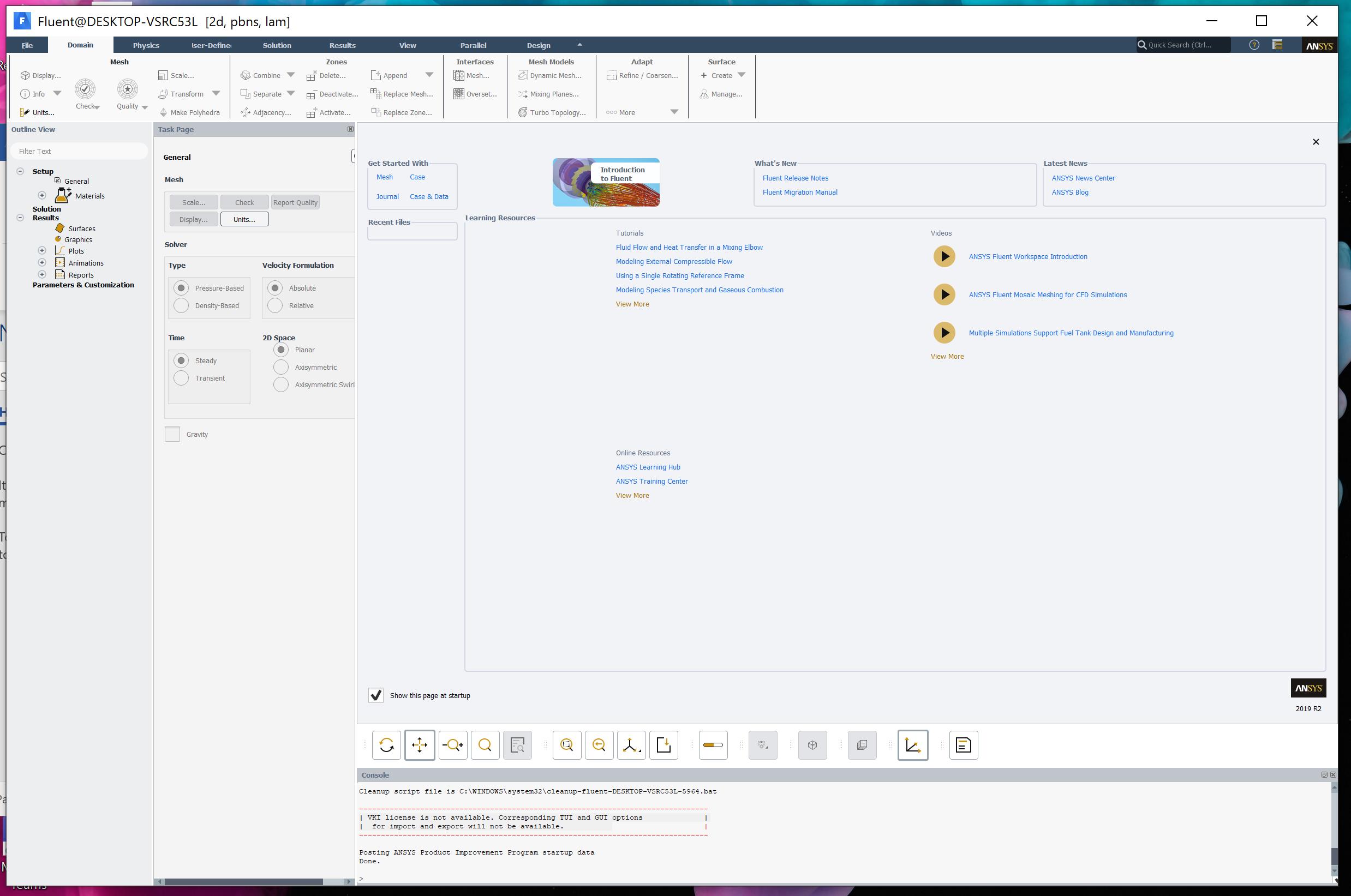
      I ran the link in your above comment. It found and launched fluent R2 2019. So we're making progress

      I'm getting an error regarding the liscensing at the bottom. "| VKI license is not available. Corresponding TUI and GUI options |

      | for import and export will not be available. "

      Also the resolution is super tiny on my Surface. 

      Thoughts? Thanks!


      Also, windows defender keeps 
       

      [

      Microsoft Windows [Version 10.0.18362.356]
      (c) 2019 Microsoft Corporation. All rights reserved.

      C:WINDOWSsystem32>"%awp_root194%fluentntbinwin64fluent.exe" -r19.4.0 -shortcut

      C:WINDOWSsystem32>


      ]

       

    • dubcwade
      Subscriber

      It ran, but not perfectly. What should I do? I placed more detail in the thread. 

    • tsiriaks
      Ansys Employee

      What error message(s) do you see when you try to launch Fluent from Workbench ?

      You can neglect the VKI thing, it's just a warning. It should not prevent you from using the software.

      For the resolution issue, the UHD monitor is not officially supported, I recommend to adjust the resolution on your monitor to not exceed 1920x1200 or you can try to play around with settings like in this thread

      /forum/forums/topic/installation-issues/

      or in the Windows Advanced Display Settings. See what work best for you.

      Thanks,

      Win

    • dtgibbins
      Subscriber

      Hi,

      I have just installed Ansys 2019 R2. I can open Fluent through the workbench, however, Fluent doesn't show up on my start menu under the Ansys folder.


      When I had Ansys 18.1 the Fluent app was in my start menu and when I launched it from there, it brought up the Fluent launcher menu which allowed me to changes things such as: dimensions (2D or 3D), whether I wanted double precision or meshing mode selected, how many solver processes etc.


      If I now launch Fluent through the workbench, it doesn't bring up this menu and I'm unsure how to change these details.


      Can anyone help please?


      Thanks

      David

    • tsiriaks
      Ansys Employee

      For shortcut issue, I'm not sure if it's the same but you can first check this post
      /forum/forums/topic/ansys-student-19-2-installation-error/

      For Workbench launching Fluent directly without going through Launcher, in the Workbench GUI, once you have Fluent system, right click on the Setup cell -> Properties , there should be an option for you to select to 'Show Launcher at Startup'

      Thanks,

      Win

    • TZH
      Subscriber
      .

       Go to C:Program FilesANSYS IncANSYS Studentv(your version)commonfilesconfigswinx64config and run the AnsConfigFLUENT.exe, using right-click -> Run as administrator? That solved my case.

      .
Viewing 14 reply threads
  • The topic ‘Ansys Student does not install Fluent’ is closed to new replies.








