-
-
July 10, 2019 at 3:50 pm
vighnesh
SubscriberThanks a lot rwoolhou!!!! got the result as expected. One last question please help me out. As i mentioned above the elbow pipe, what if i want to calculate pressure difference i.e. P2-P1 at every sec for 2000sec at a random inlet velocity[m/s].
Tabular column be likeÂ
Time- 0 to 2000sec
I/p velocity- X m/s to Y m/s
Delta P-
Hope u got what i meant.
Â
-
July 10, 2019 at 3:54 pm
Rob
Forum ModeratorIf you mean determine the dP for a range of velocity inputs, you could use a transient model or several steady state models. Read up on parameters (input and output) in Fluent and Design Points in Workbench.Â
-
July 11, 2019 at 4:10 am
vighnesh
SubscriberHello rwoolhou..
Sorry I am quite new to this. Could you please elaborate or just post the links/ videos so that i can go through it.That would be of great help.
Regarding the issue above i need to find the change in pressure at both point every sec with random change in i/p velocity. In short as i run the simulation i need to import the value into excel sheet having 3 column.Time, i/p velocity and delta p.
Thanks
-
July 11, 2019 at 6:47 am
DrAmine
Ansys EmployeeYou can create two report definitions:
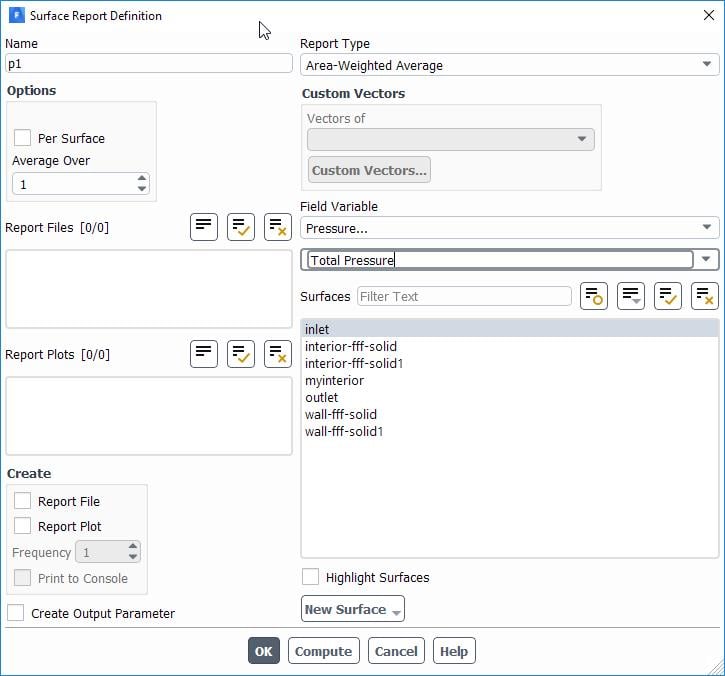
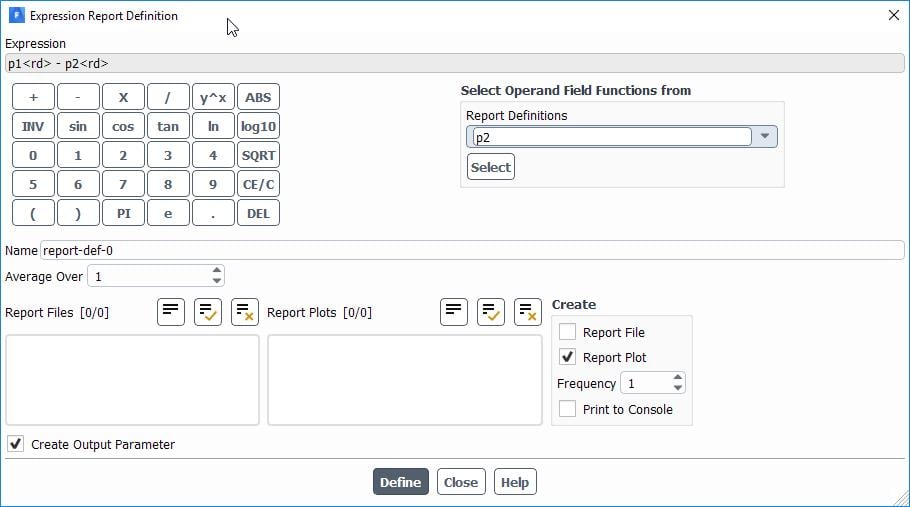
Area Average of Pressure at P1 Level and Area Average of Pressure at P2 level then you create an Expression Report Definition which is doing the subtraction and then let Fluent write that for you.
Â
Check the standard tutorials to get started.
-
July 12, 2019 at 10:13 am
vighnesh
SubscriberPlease attach any source where i can learn about Expression Report Definition. Actually i am very new to ANSYS. Once the points are created what should be done?
-
July 12, 2019 at 10:17 am
DrAmine
Ansys Employee1/create first report Definition at plane 1. It computes area average of total pressure
2/Same at plane 2
3/Create an Expression type Report definition. Here make the report from step 1 minus report from two. Enable report plot.
Check standard tutorials if you want to learn something. -
July 12, 2019 at 10:50 am
-
July 12, 2019 at 10:51 am
DrAmine
Ansys EmployeeI hope now is clear: just under surfaces select the surfaces you want to quantify for total pressure difference!
-
July 14, 2019 at 10:33 am
vighnesh
SubscriberThat was of great help abenhadj!!! Got what exactly I was looking for. I still have few clarification to make.Â
1. In report file (note pad) I get 3 columns "Time Step","flow-time" "Pressure value".Is there any option to get only column 1 and column 3 because I need to export(copy-paste) these value to excel file. It would be better if I can directly save these file in excel rather than saving it in note pad then exporting it to excel.Any thoughts??
Below is the notepad file values:
("Time Step" "flow-time" "report-1")
0 0 0.4458514639155288
1 1 0.5374640014902027
2 2 6.915726260764512
Â
2.As u mentioned above regarding P2-P1. I exactly need the difference between P2 and P1. To be specific bigger value minus smaller value.Is there anything i am missing??
Thanks.
-
July 15, 2019 at 5:00 am
DrAmine
Ansys EmployeeYou can try removing them but i guess tgat would not work. You just open the out file in Excel directly and do there directly what ýou want. If you want a particular export you can write small UDF. -
July 15, 2019 at 5:02 am
DrAmine
Ansys EmployeeYour second point: I do not understand you can do whatever you want with the within thqt expression. -
July 15, 2019 at 5:17 am
vighnesh
Subscriber1. If i export notepad file to excel it takes all the columns from notepad as 1 column in excel. So i need to remove/edit it manually.(have 1000+ values)
2. When I subtract P2 for P1, P1 values need not be greater than P2. If not then i need to do P2 -P1. In short i need to substract smaller value p2/p1 from bigger value p2/p1. Say for example P1 = 1,2,3,4,5. and P2 is 2,1,4,3,5. P2-P1 =1,-1,1,-1,0. p1-p2=-1,1,-1,1,0. what i need is substract smaller value from bigger Delta p= 1,1,1,1,0. Hope u got my point.
Â
Thankyou.Â
-
July 15, 2019 at 10:26 am
Rob
Forum ModeratorUse a modulus function: that'll always return the positive value. Or SQRT ( (P1-P2)^2) Â
-
July 15, 2019 at 11:43 am
DrAmine
Ansys EmployeeAbs, SQRT, a lot of ways...
Â
Regarding the export:  You just open the out file in Excel directly and do there directly what ýou want. If you want a particular export you can write small UDF. As this is not an Office forum I won't comment on that but that is pretty straightforward if you go the Menu data in Excel.Â
-
July 16, 2019 at 4:58 am
vighnesh
SubscriberThanks rwoolhou,abenhadj!!!!
-
July 24, 2019 at 6:03 am
vighnesh
SubscriberHello there,
can anyone help me in writing a UDF program ??
IÂ need to calculate Change in pressure and with change in inlet velocity at given time interval in a pipe.Pipe description is as mention in above comments.
@abenhadj and rwoolhou, as you people suggested, i got expected result. Which was like..
Once done with the geometry and meshing,in setup create the point P1 and P2. in models,materials,cell zone conditions and boundry conditions do the necessary changes.In solution-->report definations for P1 and P2 and then in monitors,generate report files as explained in above comments (/forum/forums/topic/calculate-pressure-difference/?order=all#comment-22db4f04-ee3b-48ba-b8bb-aa8800b2b566).
In this solution i was manually changing the inlet velocity and calculating P1-P2 everytime after required time step for say 'T' sec.
What I need is how can i write a UDF program so that all the variable parameters are addressed in one program i.e calculate p1-p2 with varieing inlet velocity for regular interval of time say for first 100 sec velocity is v1 next 100 sec velocity is v2 and so on for 2000sec.
any comments or data materials will help..
Â
Thanks.
Â
-
July 24, 2019 at 9:53 am
DrAmine
Ansys EmployeePlease create a new thread with your new question.
-
- The topic ‘Calculate pressure difference’ is closed to new replies.
-
5879
-
1906
-
1420
-
1306
-
1021
© 2026 Copyright ANSYS, Inc. All rights reserved.