Preprocessing

Preprocessing

Topics related to geometry, meshing, and CAD.

Hexahedral swept mesh with rectangular face meshing

    • vriabov
      Subscriber

      Hello,


      I am trying to sweep mesh  the body shown on the picture with all-hexahedral mesh:


      I would like the face mesh to be with all rectangular elements, similar to the one shown on the picture below:


      Mesh controls that I use


      - I assign a sweep method to the body All-Quad surface mesh, "Source" assigned to the front face and "Target" assigned to the back face.


      - I add (one) face meshing control to the front and back faces with "Internal Number of divisions" set to 2.


      - I also add 2 edge sizing controls :


      - One to the outer edges of the source with Number of Divisions = 30;


      - One to the inner edges with Number of Divisions = 26.


      When the behavior is set to Hard on both Edge Sizing controls, the mesher fails with two error messages:


      "An error occured during sweeping meshing a face. Changing element sizing parameters might help.


      A mesh could not be generated using the current meshing options and settings."


      If I set the behavior to "Soft" on the inner edge the resulting mesh is shown on the figure below, that is not what I want.
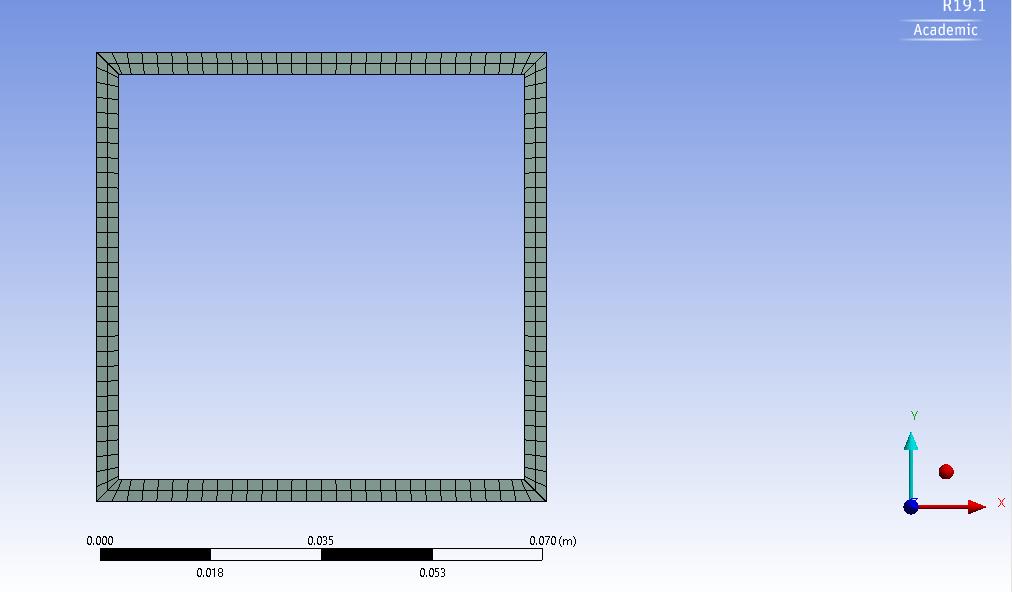


      Is there a way to achieve what I want without geometry sectioning or insertion of virtual topology ?


    • Rob
      Forum Moderator

      Yes, check mapped mesh faces and also vertex definitions. The latter may allow you to set how the corners of the domain are treated. 

    • vriabov
      Subscriber

      Can you elaborate, please? Where do I check mapped mesh faces ? 


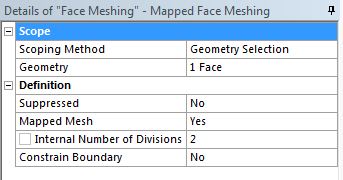
      The Face Meshing Details window looks like this:


      Thank you

    • peteroznewman
      Subscriber

      If you don't need a longer element edge length along the sweep direction and can tolerate cubic elements, try not using any edge or face mesh controls. Set the global Mesh element size to half the wall thickness and use a Method of Multizone, you might even try to select a side face (not an end face) as the Source.  If that doesn't work, try Hex Dominant mesh.

    • vriabov
      Subscriber

      The suggested method have worked to the satisfactory extent. 


      However, Is there any other approach to suitable to create hexahedral elements with low skeweness on such geometry, that could be wide and long ? - For the sake of the global number of element reduction. (This is a part of a much larger geometry...)

Viewing 4 reply threads
  • The topic ‘Hexahedral swept mesh with rectangular face meshing’ is closed to new replies.