Hello,
I have generated a structured mesh around an airfoil but I am still unable to get accurate results (I suspect due to the lack of a tight enough mesh close to the airfoil wall). I tried using an inflation around the airfoil wall but it generated bad elements and won't even export into fluent for this reason. Is there any other way I can generate more elements around the airfoil wall, maybe subdividing the elements into even smaller elements or creating another region around the airfoil where I can refine the mesh even smaller?.


close view of the mesh near the airfoil.
Also, although the inflation layer has been deactivated, is there any way I can actually make the inflation work with the face meshing and multi-zoning such that the mesh has no degenerate or bad elements?

I have noticed that using the mesh with the inflation on (face meshing, multi-zoning off) yields the same lift and drag coefficient values as when the case is reversed (inflation off, face meshing and multi-zoning on) even though both values are not correct ( correct Cl value = 0.5 at 4 degrees AoA for NACA 23012 airfoil, I am getting Cl = 0.34...)
To ensure flow similarity, I ensured my Reynolds number was 1,000,000 (velocity=14.207 m/s and chord length=1m). I used both the Spalart -Allmaras and Reynold SST turbulence models and they both give the same (inaccurate) Cl values of 0.34... . Top and Bottom - Stationary Wall with Specified Shear components set at 0
Outlet - 0 Gauge pressure outlet
Here is a graph showing the difference between the experimental Cl results for Reynolds number of 1,000,000 and my own values.
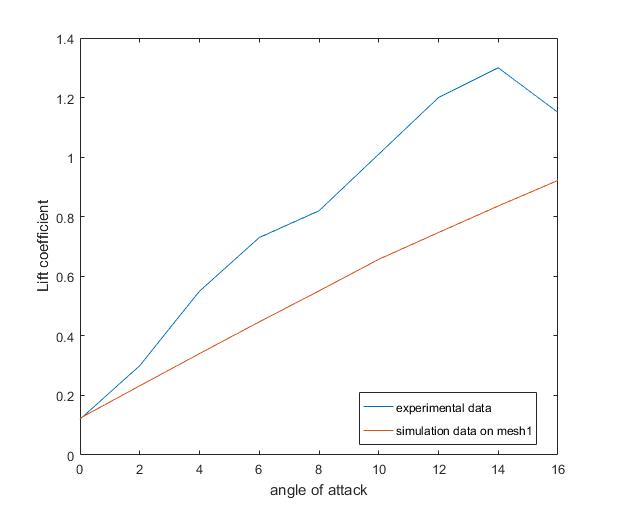
You can see that at AoA of 0 degrees the Cl values are about the same, however, the error begins to grow as the airfoil angle of attack increases, (forgive the jaggedness of the experimental value line, I read it from a graph that is not quite clear)
This work is a final year project and I am running out of time, I really need the help
Thanks.


















 You are navigating away from the AIS Discovery experience