Ansys Assistant will be unavailable on the Learning Forum starting January 30. An upgraded version is coming soon. We apologize for any inconvenience and appreciate your patience. Stay tuned for updates.
Ansys Free Student Software

Ansys Free Student Software

Topics cover installation and configuration of our free student products.

Slow analysis

    • Glass
      Subscriber

      Hi friends. computer features: i7-8750h NVIDIA GTX 1050Ti 265gb SSD. But while analysis application Student Ansys Workbench so Slow. 


      How can I speed up my analysis? Thanks. I'm sorry for my bad English

    • peteroznewman
      Subscriber

      Hi Glass,


      You don't say what analysis you are performing.  You say Workbench is so slow, compared with what?  Which part of the overall workflow do you find slow, is it waiting for the solution to compute?  There are ways to reduce the time spent waiting for a solution that involved making a model that is more efficient at giving you the answer you want. Going from 3D to 2D or changing from Solid elements to Shell elements. You don't say how many GB of RAM is in your computer. The Solver Output from a Structural model will say how much RAM was required for the model you solved.  If you don't have enough RAM, you might be able to increase that to speed up the solve time.

    • Glass
      Subscriber

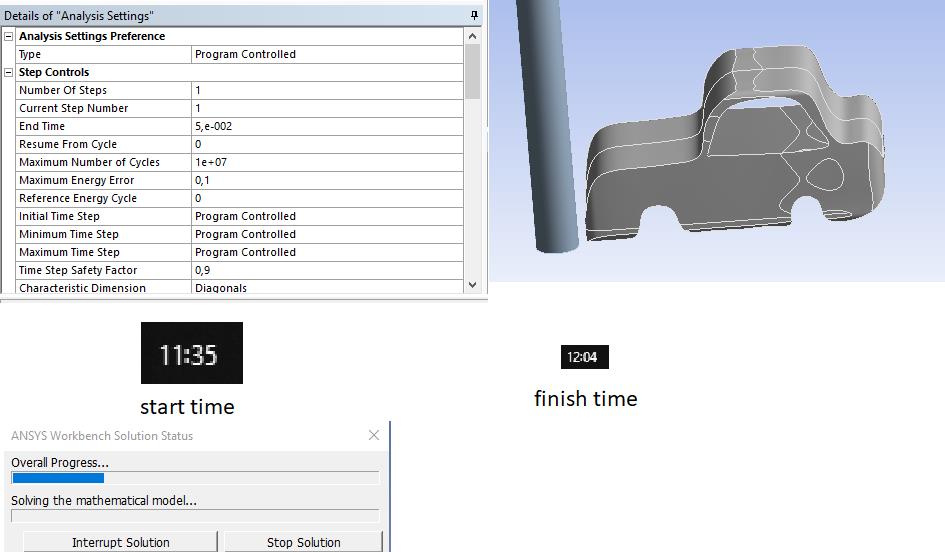
      8gb ram available. Static Structural, Transient Structural, Explicit Dynamics slow analysis. For example, I drew the car with Explicit Dynamics and hit it on a pole. I want to do a 0.05-second analysis, but the time to do the analysis is a bit much. I'm looking for ways to reduce this time. 


      {Start time: 11.35 and finish time: 12.04}


    • peteroznewman
      Subscriber

      Read this discussion.


      Explicit dynamics calculates a maximum time step according to the formula shown. The two ways you can speed up the computation are


      (1) Increase the size of the minimum characteristic edge length in the mesh. You do this by using mesh controls in order to prevent small elements from forming. You might also do this by adjusting the geometry, merging faces, etc. If you double the characteristic edge length, the maximum time step will double and the solution will take approx. half as long.


      (2) Increase the density of the material. This will change the physics of the problem, but if you want to get faster results, doubling the density will double the maximum time step and cut the solution approx. in half.  Just like finding the smallest element described above, there is a trick called Mass Scaling that finds the smallest elements and increases the density of material only in those small elements. This is much better because you get the benefit of a larger maximum step size without significantly changing the physics of the problem.


      Those two changes combine, so if you get a factor of two for the element size and a factor of two from increasing density, the solve time will be faster by a factor of four.


      I would not call a 30 minute solution a long time to wait for an Explicit Dynamics model. I have seen models that run for tens of hours.


    • Glass
      Subscriber

      Thank you for taking the time to help. I'il try your suggestions.

Viewing 4 reply threads
  • The topic ‘Slow analysis’ is closed to new replies.
[bingo_chatbox]