Ansys Assistant will be unavailable on the Learning Forum starting January 30. An upgraded version is coming soon. We apologize for any inconvenience and appreciate your patience. Stay tuned for updates.
Ansys Free Student Software

Ansys Free Student Software

Topics cover installation and configuration of our free student products.

Troubleshooting Ansys Workbench

    • DAVULURU GOUTHAM
      Subscriber

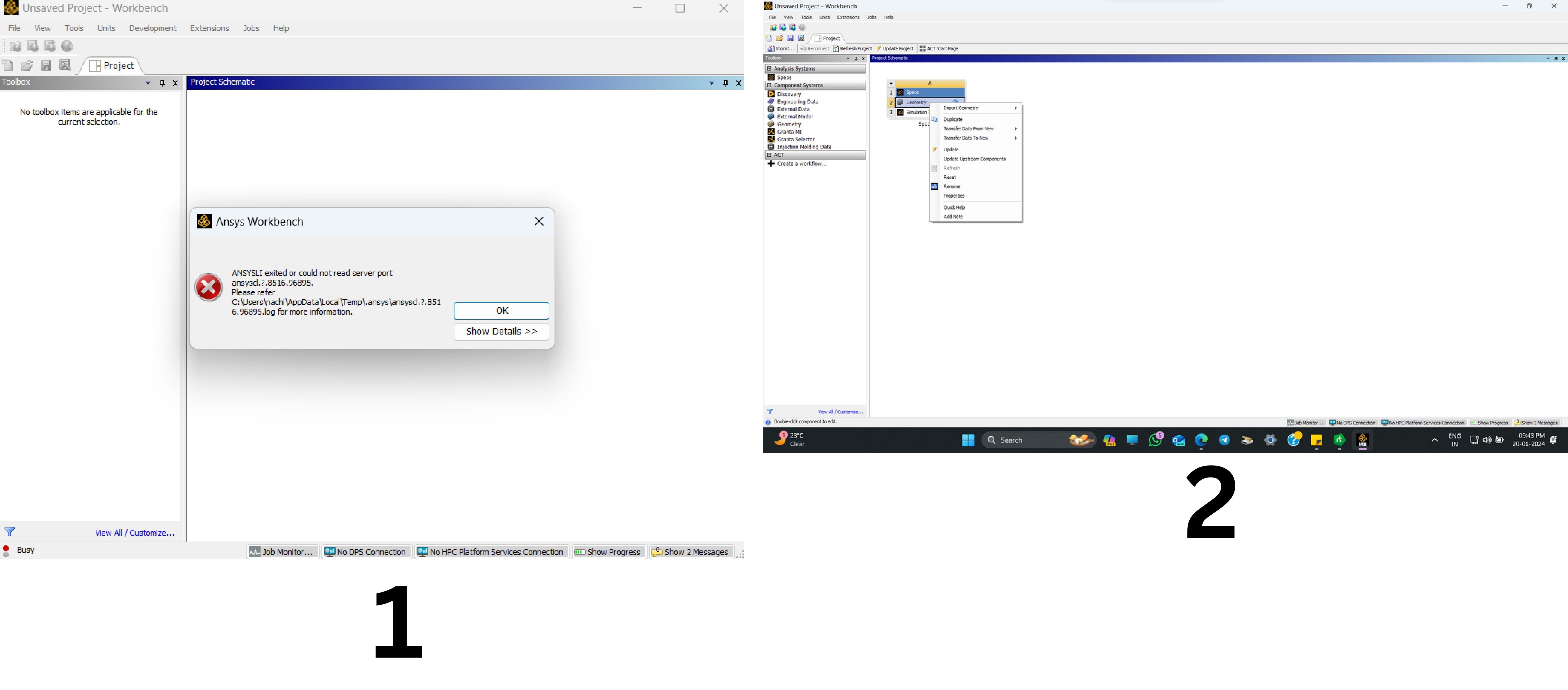
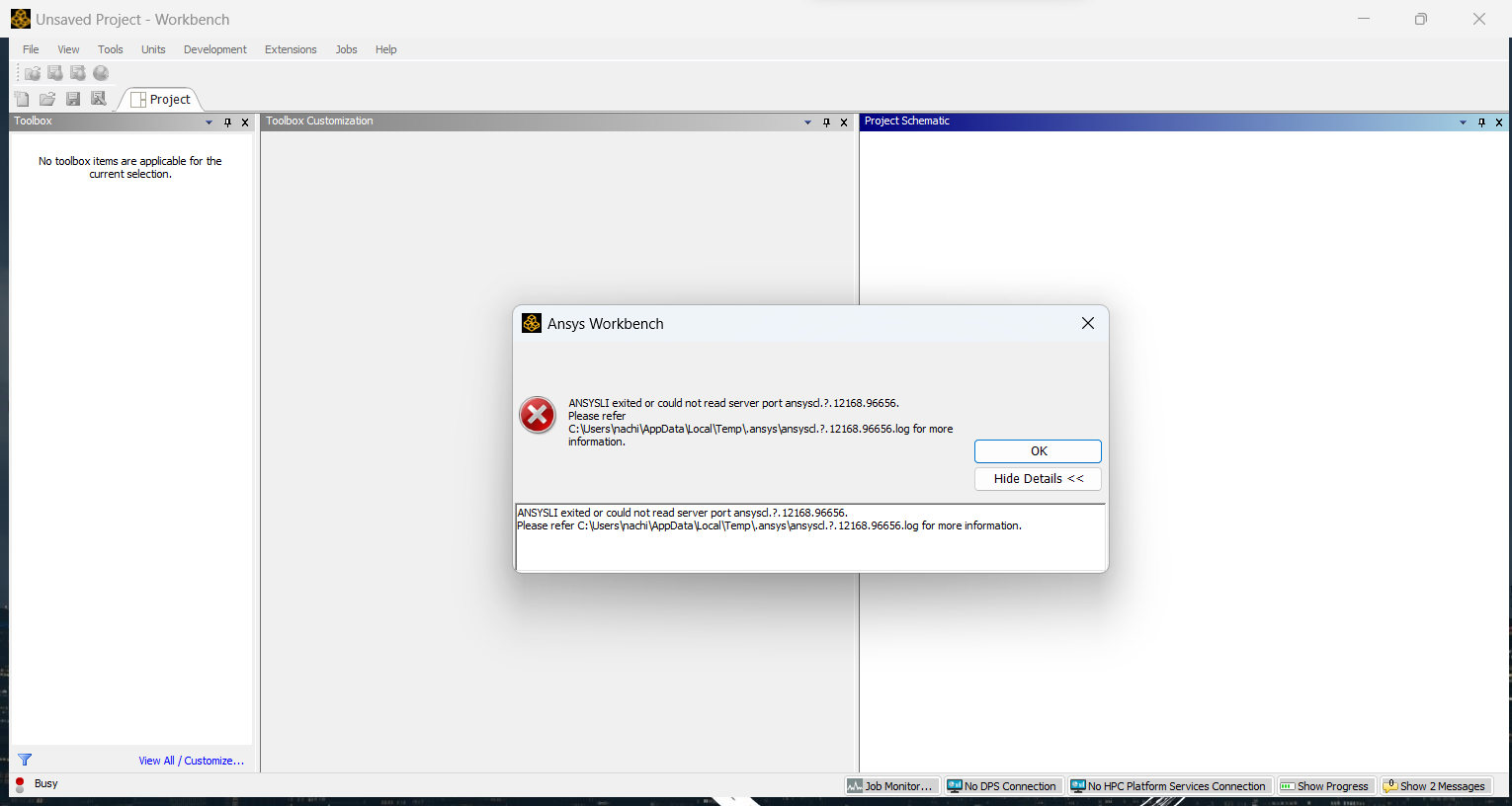
      I have downloaded ANSYS WORKBENCH R1, which is a student licence. However, I am encountering the following issue: 1- When I launch the ansys workbench (as an administrator), the following error appears. The first picture illustrates that error. 2- When I dismiss the error and proceed to the application, I cannot see the various options under the ANALYSIS SYSTEMS menu and I am unable to open the DESIGN MODELER, as when I right-click on the GEOMETRY, the design modeller option is not visible. (The second picture is also attached below)

      Does anyone have a solution for the errors that I am experiencing? Please advise me on how to rectify them.

    • peteroznewman
      Subscriber

      Did you extract the contents of the .zip file before you ran setup.exe?

      In the folder where the contents were extracted to, did you Run as Administrator setup.exe?

    • DAVULURU GOUTHAM
      Subscriber

      Yes, I did. But still, I am unable to see the types under ANALYSIS SYSTEMS except "SPEOS", I tried opening the installed folder-going to licences-and finding the "student" notepad folder, but the student folder itself is not there. I have done this almost 4 to 5 times still the problem is same. below I have posted the error that I am getting when I start the workbench application. please look into this problem and guide me through the rectification. Indeed, I have endeavoured to access the types enlisted under ANALYSIS SYSTEMS, however, I am incapable of perceiving anything beyond "SPEOS". I have attempted to locate the "student" notepad folder by initiating the installed folder and navigating to the license directory, yet I have been unsuccessful in my quest to locate the aforementioned folder. I have undertaken this process four to five times but to no avail. Alas, an error message impedes my progress when I endeavour to commence the workbench application. I would be deeply obliged if you could guide me on this issue.

    • peteroznewman
      Subscriber

      I am not the expert in this area but I did some searching and have a few things to try. Someone from Ansys who knows more might have better ideas.

      The ? in the error message suggests that the software can’t handle the computer name. Maybe due to special characters in a non-English language.  Change the computer name to use only English characters. Restart computer.

      Where does the computer environment variable TEMP point to?  It can be a problem if TEMP points to a network drive or a location where it does not have write privileges. Change it to point to C:\Temp.

      In a Windows File Explorer, type %appdata% and you will see a list of folders. Delete the Ansys folder. Go up a level and down into the AppData\Local folder and delete the Ansys folder there also. Test Workbench.

      Turn off the Firewall and test Workbench.

Viewing 3 reply threads
  • The topic ‘Troubleshooting Ansys Workbench’ is closed to new replies.
[bingo_chatbox]