-
-
April 8, 2019 at 5:52 am
James02dai
SubscriberHi, there, I had problems with my linear buckling analysis by using line body model. I applied force on the end and applied fixed support on the other end. I found that the force is consistent even though I changed the model length. Can anyone point out the mistakes I made in my analysis? Below picture shown the model of I created.
.jpg?width=690&upscale=false)
-
April 8, 2019 at 8:16 am
jj77
SubscriberIt looks very strange (deformation). I would not use both a displacement and a force (use one of them) in the linear static analysis, use just one or the other (fixed support is OK).
-
April 8, 2019 at 8:29 am
James02dai
SubscriberHi,jj77, I used displacement because I want to make a buckling model of one end fixed, one end is simple support. If I did not apply displacement , then may I know what constraint should be used for the simple supported end?
-
April 8, 2019 at 10:17 am
jj77
SubscriberIf you attach your model I will have a look - use the attach button next to your previous post to attach and archived model .wbpz which can get by going to File/Archive in WB.
-
April 8, 2019 at 11:07 am
-
April 8, 2019 at 11:10 am
James02dai
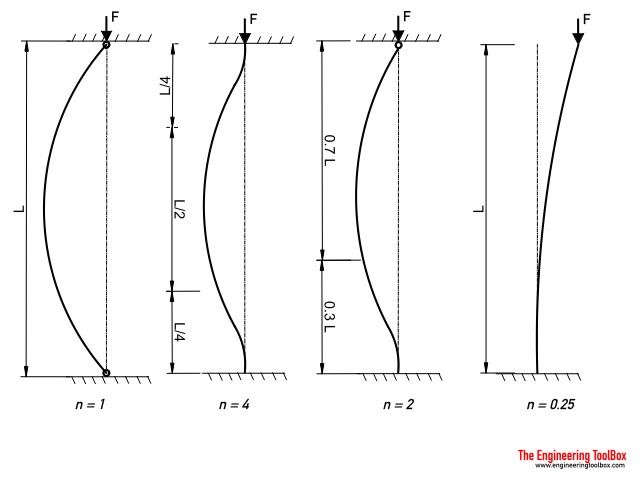
SubscriberN=2 is the one that I had attempted.
-
April 8, 2019 at 11:48 am
jj77
SubscriberWell it works OK for a square section, which gives the same results as expected as the Euler buckling load formula (K=0.7) - but it does not give same results for I section
-
April 8, 2019 at 12:28 pm
James02dai
SubscriberSo what is the method for the I beam?
-
April 8, 2019 at 12:34 pm
jj77
SubscriberNot sure what you mean but as I said and as you can see yourself from your analysis it does not produce correct results - perhaps someone else has some more feedback, but I do not know exactly whyÂ
-
April 8, 2019 at 12:46 pm
James02dai
SubscriberOkay, thanks for your comment. As I am quite new to this software , I thought that the I section should be the same for the square section but it does not generate correcte results. Anyway thanks very much.
-
April 8, 2019 at 12:53 pm
jj77
SubscriberWell not sure what you mean with "I thought that the I section should be the same for the square section".
Â
But an I section is different to a square section in terms of the sectional properties (Ixx.Iyy, Warping conts., J,Area,....).Â
Â
And Eluler load is proportional to Ixx,Iyy,.. so they will of course be different buckling loads for a square section (SS 200mmX200mm) and an I section (say UB 203mmX102mmX23mm)
Â
Also look on the buckled mode shape that you show it does not make any sense what so ever so it is not me saying it only, just look on your screen and be critical

-
April 8, 2019 at 1:10 pm
James02dai
Subscriberwhat I mean is the boundary condition applied to square section beam should be the same for I section beam. Thanks for the comment. -
April 8, 2019 at 3:19 pm
jj77
SubscriberIf one restrains the rotational dof then it is OK (not sure 100% why that is).
Â
Add a command snippet in analysis settings - where you define loads and BC:
Â
nsel,all  ! selects all nodes
d,all,ROTY,0 Â Â ! fix ROT dof which is rotation about Y axis which points along beam -
April 15, 2019 at 10:58 am
James02dai
SubscriberI had tried higher mode ,and it works for I section column,
-
- The topic ‘The linear buckling analysis’ is closed to new replies.
-
6369
-
1906
-
1457
-
1308
-
1022
© 2026 Copyright ANSYS, Inc. All rights reserved.