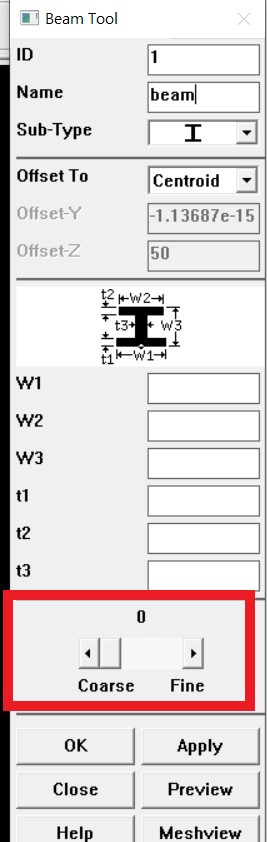
-
-
April 6, 2019 at 4:39 pm
-
April 6, 2019 at 6:55 pm
jj77
SubscriberHave in mind a line is 1D and can only subdivided along the length (similar for a beam element which is subdivided along the length).
There are 5 divisions and thus 5 elements on each line, so both ver. columns and hor. beams are subdivided into 5 finite elements. Obviously your element size is longer for the beams since these members are longer than the ver. columns (say each hor. beam member is 10 m long then each beam element there is 2 m long, while if the columns are say 5 m long, then each element on the column will be 1 m long).
It is easier perhaps for you to understand the subdivison if you plot the mesh without rendering the I beam cross section (this is only graphics is is still a beam element)
Â
Â
-
April 6, 2019 at 7:38 pm
wh05
SubscriberThank you so much. I get your point. I will increase my number of element division.
Btw, can you explain what is the mean of the "size: element edge length" ? (in the above first picture) Do I need to revise it?
-
April 6, 2019 at 7:44 pm
jj77
SubscriberThat is instead of saying 5 subdivision which in the example I made would result in 1 m element length in the columns, and 2 m in the beams, one can give the actual element size in meters. In this example if we set an element size of 1 m, then we would get 5 elements on the columns and 10 elements on the beams (since the line is 10 m long there say).
Â
I would also strongly recommend to take a course, especially related to beam elements and their application in structural engineering.
The edx course covers that a bit, and is free to take:
Â
https://www.edx.org/course/a-hands-on-introduction-to-engineering-simulations
-
April 6, 2019 at 10:41 pm
wh05
SubscriberSorry, I might misunderstanding your mean.Â
The beam is 6m long and column is 3m long in my model. My steel member section is 192.8mm width x 467.2mm depth.
I increased my number of element division to 200. But why still cannot increase the horizontal line in beam and vertical line in column ? (below picture)
Â
Thanks for your link. Do you have any video tutorials for APDL as well? because there is workbench tutorial in the link.
-
April 7, 2019 at 12:19 pm
jj77
SubscriberVery confusing, because you do not specify which mesh you talk about and you are not aware how beams are used in an FEA software.
I think you talk about the cross section mesh, but normally when people say mesh they mean along the length of a beam, and not the sectional mesh (which is used by the solver for NL calculations, stress calculations and showing results).
Â
That is changed at the cross section level, thus it can be done when you define the cross section. See below how that can change from a default of 4 (2X2) elements for a square solid beam to 8 X 8 elements .
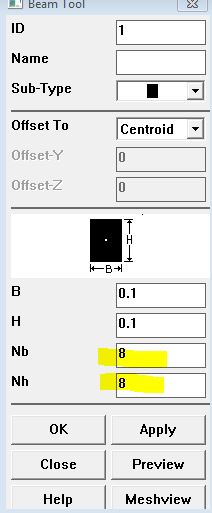
Â
-
April 8, 2019 at 7:55 am
-
- The topic ‘How to create 5 x 5 meshing in ANSYS APDL?’ is closed to new replies.
-
5939
-
1906
-
1420
-
1307
-
1021
© 2026 Copyright ANSYS, Inc. All rights reserved.