Ansys Assistant will be unavailable on the Learning Forum starting January 30. An upgraded version is coming soon. We apologize for any inconvenience and appreciate your patience. Stay tuned for updates.
Ansys Free Student Software

Ansys Free Student Software

Topics cover installation and configuration of our free student products.

Fluent application failed to start

    • Reece99
      Subscriber

      When i try to open fluent within workbench it fails with the prompt fluent application fails to start. when i try to open fluent by itself it opens but never really loads. 

    • tsiriaks
      Ansys Employee

      Hi Reece99,


      The error says it can't read certain file in the installation directory.


      Did you install ANSYS with 'run as admin' ?


      Check the permissions on your installation directory and make sure your username at least has read permission.


      A potential temporary workaround might be to run Fluent with 'run as admin' .


      Thanks,


      Win

    • Reece99
      Subscriber

      I'm pretty sure i installed with run as admin and that my username have admin privilege. I got the same results when i ran fluent with run as admin 

    • tsiriaks
      Ansys Employee

      Something is wrong with your permissions. Please uninstall this and manually remove D:ANSYS Inc folder afterwards. Then re-install again, make sure you 'run as admin' and see if the issue persists.


      Thanks,


      Win

    • Reece99
      Subscriber

      I uninstalled and re downloaded ansys and it getting the same result 

    • tsiriaks
      Ansys Employee

      If you look at the console text output, this is now a different issue. It can now go farther but Fluent is still not completely launched , so the screen is still grey.


      Try launching it with this mode


      Processing Options : Parallel


      Processes : 0


      Does this help ?


      Also, open CMD Prompt and issue this command


      ping %computername% -4


      and post the screenshot of the output of i


    • Reece99
      Subscriber

      fluent opened fully when i ran it parallel. Here is the command prompt 

    • Reece99
      Subscriber

      When i try to run it in workbench it opens and then the second i try to do anything it fails 

    • tsiriaks
      Ansys Employee

      Can you elaborate on this 'fail' ?


      Is there any error message ?


      Does it crash ?


      What if you specify


      Processing Options : Parallel


      Processes : 2

    • Reece99
      Subscriber

      For both using processes: 0 or 2 i receive the same error each time:


      fluent failed to start 


    • tsiriaks
      Ansys Employee

      Now, I'm confused.


      What do you mean when you said "fluent opened fully when i ran it parallel."


    • Reece99
      Subscriber

      From what I could tell it appeared as though fluent opened and fully loaded, but once i tried to do anything the program crashed. 

    • tsiriaks
      Ansys Employee

      If you launch stand-alone Fluent, do you have any issue (try both 0 and 2 processors) ?


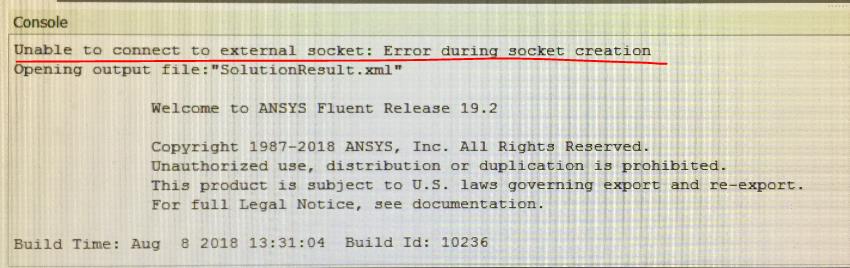
      Your issue with Workbench-Fluent is because of that error "unable to connect to external socket, error during socket creation" . This is likely because Firewall or Anti-virus software on the machine is blocking this.


    • Reece99
      Subscriber

      Ok so It open and ran fine when i used o processors but i received this when I ran 2 processors


      if the error on workbench is a problem with my firewall or anti-virus software, how would i fix that?


    • tsiriaks
      Ansys Employee

      so there is no graphics-related issue here (which was one of the main culprits I was thinking about)


      All of these issues are related to your Firewall or Anti-virus software. Just for a test, turn every security software on your machine off temporarily and see if it works. If it works, then turn them back on one-by-one and see which one is the one that causes the issue, then make sure you add ANSYS Inc folder to the 'exclusions' list of that software.

    • rchristensen
      Subscriber

      I have been having the same issue with ANSYS 19.2 and 2019 R2. I have turned off the anti-virus as well as the firewall. But I still get the issue which states "Unable to connect to external socket: Error during socket creation". 


      Thanks,
      Rich

    • tsiriaks
      Ansys Employee

      Hi Rich,


      I would recommend to create a new thread for your own.


      There is still something blocking socket connections. Are you on VPN ? Are you using any remote desktop visualization tool ?


      Do you see the same error if you launch it in non-GUI mode, something like


      "%awp_root194%fluentntbinwin64fluent.exe" -r19.4.0 3d -g


      Thanks,


      Win

    • rchristensen
      Subscriber

      Hello Win,
      I read on another forum that this can be solved by trying you use the fluent stand-alone from the "Component Systems" and then importing the model/mesh from another study. I did that and this resolved the problem. 

      Since then, the application is finding looking up the correct license and is not giving me any issues. I don't know why this worked, but it seems to have resolved the issue for me. 


      Thanks,
      Rich

    • tsiriaks
      Ansys Employee

      Hi Rich,


      That's very odd. Thank you for sharing the resolution.


      Thanks,


      Win

    • mohanpannirselvam08
      Subscriber

      Hallo everyone, I faced this same problem for past two weeks and finally solved it.


      My Fluent keep pointing the error " Fluent application failed to start".


      and in the Fluent log box says "Unable to connect to external socket: Error during socket creation Opening output fil".


      Based on this I assumed there is a connection failure between a Host and client.


      My set Up is a Client Side on Windows 10 with a VPN (Cisco) where i am receiving the license for Anysy from my university.


      I did everything as mentioned turning off firewall, reinstalling as admin, reconfiguring my VPn. but neither was working.


      Solution


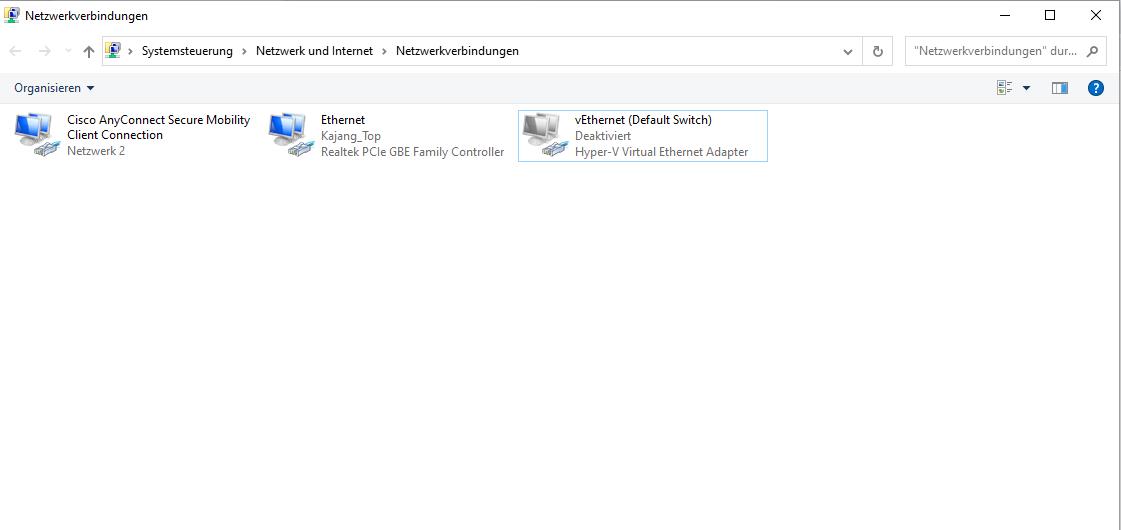
      In the end , i traced back the problem to my Hyper-V Virtual Adapter Ethernet. If you are a Android Studio developer most probably you have this one too.


      Deactiavte it as i showed in this image. After that restart the pc and all error will not show again.




Viewing 19 reply threads
  • The topic ‘Fluent application failed to start’ is closed to new replies.
[bingo_chatbox]