Hello,
I am doing an FSI simulation with transient mechanical and fluent. First I test the mechanical side with all the pressures exerted on the structure to make sure it can solve - and it does solve just fine. But when I couple with fluent through system coupling I get solver errors of the type: "An element has become highly distorted."
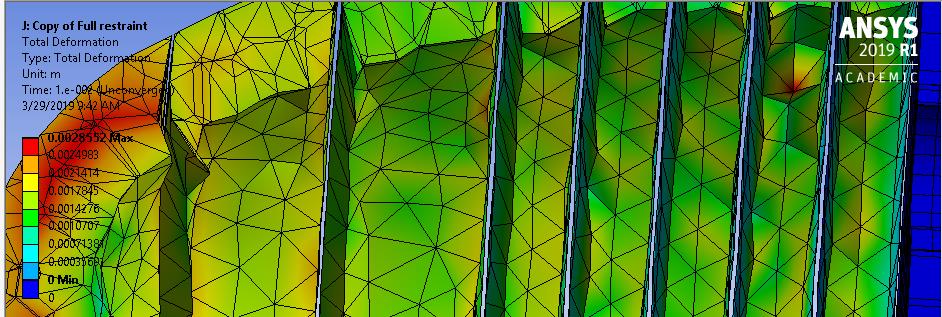
When I investigated, I found that several contact regions were becoming separated, as shown in the below picture (true scale). The element listed as the one that became highly distorted is adjacent to these regions. These contacts are listed as Bonded, as they were created in DM by slicing a solid geometry.
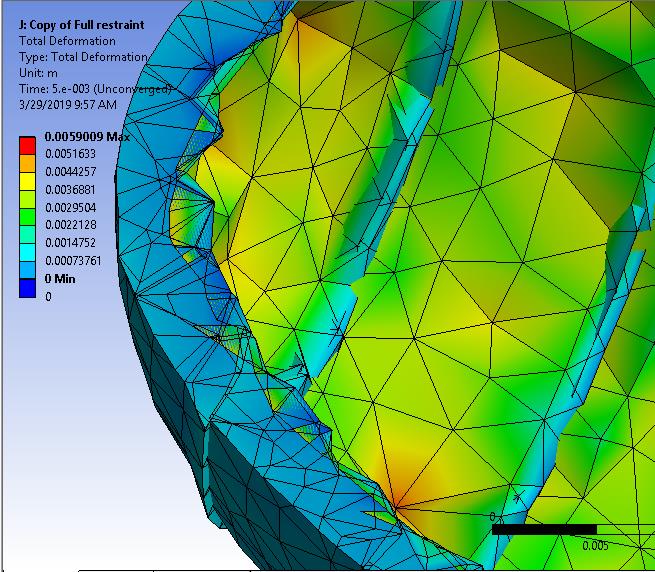
So I switched from Bonded to No Separation and I get the same error. The element listed as the one that is highly distorted is on the contact boundary, just like before. The new failure looks like the contacts are still slipping around (I know this is expected. I did this for diagnostics).
How can I make sure these contact zones behave? What settings should I look at? Does anyone know why the solution works just fine before coupling, but after coupling the solution cannot converge even after 2 iterations of the coupled solver?
In Structural:
- Solver: Direct
- Substeps: 100
- Nonlinear: On, Unsymmetric
- All Pressures ramped by time
In fluent:
- Remeshing
- Smoothing
- One outlet with zero gauge pressure
In System Coupling:
Ramped Data Transfer and under relaxation factor set to 0.75


















 You are navigating away from the AIS Discovery experience