TAGGED: Ansys Discovery
-
-
December 22, 2023 at 12:26 pm
Kacper Wagner
SubscriberThe issue concerns Discovery, regardless of the version.
After changing the settings related to mesh/accuracy of results (e.g., changing fluid-solid interface tolerance, fidelity, or even convergence), the program shuts down with the following message:
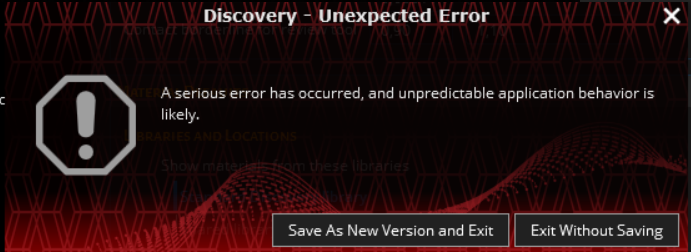
Upon attempting to restart Discovery, the following message appears:
To launch Discovery, customer need to revert to the factory settings.
Computer specifications:
- Quadro RTX 4000
- Xeon W-2245 3.90 GHz
- 64GB RAM
- Win10 Pro
In the graphics settings, Discovery is set as High Performance.
What could be the cause of this error? Is there any known solution?
Â
-
December 22, 2023 at 5:00 pm
Atharv Joshi
Forum ModeratorHi Kacper,Â
Please check if the graphics card driver are updated to the latest release.Â
Updated it from the manufactures site Official Drivers | NVIDIATry disabling the intel graphics card and check if the error still appears. Let me know if any of this solves the issue, else I will reach out to you for log files.Â
Thanks and Regards
Atharv -
January 5, 2024 at 9:23 am
Kacper Wagner
Subscriber -
January 5, 2024 at 9:25 am
Kacper Wagner
SubscriberHi Atharv,Â
The graphics card driver is up to date, and there is no Intel graphics card. However, the error still appears.Â
BR
Â
-
- The topic ‘Unexpected Error’ is closed to new replies.
- Project lines/edges into a face with the direction normal to the face
- No preview in explorer with scdox file
- Add-in Error Excel
- Spaceclaim problem
- Using SpaceClaim scripts vs recorded blocks for parametric optimization workflow
- Different Body Naming and Extra Surfaces after Importing Solid Edge Part
- New Computer
- Inconsistent Script
- MISSING SIMULATION SECTION/RIBBONTAP
- Unable to attach to geometry file 2025R2
-
4618
-
1530
-
1386
-
1210
-
1021
© 2025 Copyright ANSYS, Inc. All rights reserved.









