-
-
March 20, 2019 at 9:43 am
tubiy
SubscriberHi,
I want to plot  Mass Flow Rate vs Time in a specific plane.
The specific plane defined during the Meshing process
A special emphasis is that I already calculated my simulation and saved data any 10sec.
I know that there is an option to make file report before running the simulation and so but it's not relevant now.
Â
I try 2 ways:
1. Through Fluent Results-->XY plot but there is no option to define the X-axis as Time.
2. Through Results-->location-->creat plan-->Chart. The problem is when I tried to choose this plane in the locations tag the plane not exist.
I attached pictures for option 2 (the gray plane is the plane that I made). Â
Â
I will be very glad if someone can help me with this. It's a very basic thing so I am sure there is an easy way to do this.
Thanks,
Tubi

-
March 20, 2019 at 11:50 am
DrAmine
Ansys EmployeeYou need to define that as report and enable report-plot. You can then see that during the run and read it back as file plot.
-
March 20, 2019 at 2:30 pm
tubiy
SubscriberHi Amine,
I know that I can do it like this, but as I mentioned I already have the simulation results.
The simulation ran for about a month, so it's not relevant for me to run it again from the beginning.
I hoped there was another way to create this plot, you have another way?
Thanks.
-
March 20, 2019 at 3:56 pm
DrAmine
Ansys EmployeeIf you have a couple intermediate data you can do that in easy way in CFD-Post. Do you have transient intermediate data files?
-
March 20, 2019 at 8:01 pm
tubiy
Subscriber yes, I have.Â
I saved data any 5 seconds through Autosave Dialog Box.
I succeed to create a point and plot Temperature/ Velocity vs Time in CFD-Post at a specific point by using
chart -->XY - Transient or Sequence.
But If I'm not mistaken it's impossible to use "XY - Transient or Sequence"Â for a surface, it's just for a point,
and I didn't find any way to make a plot of average temperature or Mass Flow Rate that requires a surface.
What the process for this?
Â
Best regards,
Â
Tubi.
Â
'
-
March 21, 2019 at 8:53 am
DrAmine
Ansys EmployeeFor a surface you need to create an expression where you define area average for example of temperature and then use that expression for the transient chart.
For mass flow rate just use massflow()@your surface for your expression.
Â
Â
-
March 22, 2019 at 1:27 pm
tubiy
SubscriberÂ
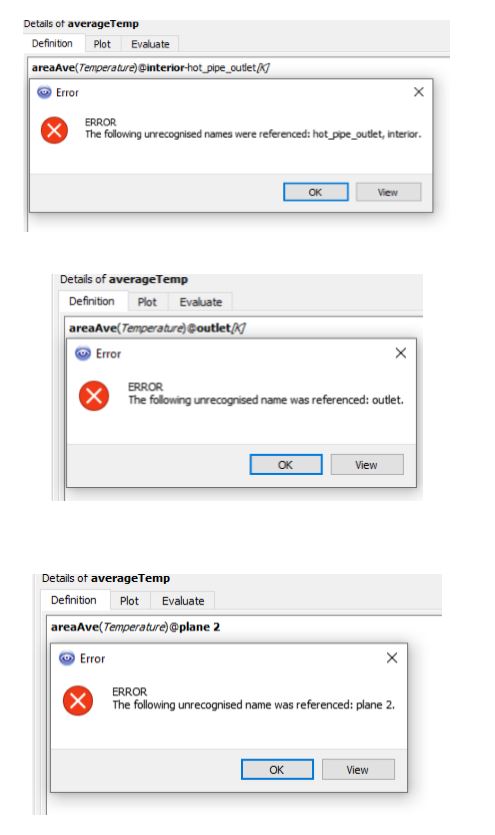
I tried to define the  expression as you suggest but it always gave me an error, I tried to change the name of the surface or to
create a new surface at CFD-Post (plane 2) but it does not work out (I've attached a picture of the error)
I defined the expression according to Anays manual.
Can you explain to me where I'm wrong? Or write down the exact Syntax?
The name of my surface as it is defined in FLUENT is:
"interior-hot_pipe_outlet(id=16)"Â
and for example, I want the average of the temperature on the surface.
Â
Best regards,
Tubi.
Â
-
March 22, 2019 at 2:14 pm
DrAmine
Ansys EmployeeYou need to use the available surfaces and planes in CFD Post. Best to RMB within the expressions and select the locators from that menu. -
March 23, 2019 at 7:20 pm
tubiy
SubscriberThanks now it works.
I will just add to those who don't know, that the expression is case sensitive. so when I defined the mass
flow expression it was like this:
massFlow()@location
Â
Best regards,
Tubi.
Â
-
July 11, 2020 at 10:10 am
LinjoRejoy
SubscriberIs it possible to plot this expression, massFlow()@Location with timesteps as x axis. I have already done the transient flow analysis.
Thanks in advance
Linjo
-
July 13, 2020 at 5:21 am
DrAmine
Ansys Employeeyes pos -
July 13, 2020 at 5:21 am
DrAmine
Ansys EmployeeYes just add a transient chart.
-
- The topic ‘Plot Mass Flow Rate vs Time’ is closed to new replies.
-
6219
-
1906
-
1452
-
1308
-
1022
© 2026 Copyright ANSYS, Inc. All rights reserved.