Ansys Assistant will be unavailable on the Learning Forum starting January 30. An upgraded version is coming soon. We apologize for any inconvenience and appreciate your patience. Stay tuned for updates.
Fluids

Fluids

Topics related to Fluent, CFX, Turbogrid and more.

Problem UDF Compilation

    • Max4
      Subscriber

      Hi,


      When I try to compile a UDF, I have the following message:


      Moreover, when I open another file for which there is a libudf folder, the simulation works, even if I have the following message:


      Maxime

    • Keyur Kanade
      Ansys Employee

      Could you please download a copy of visual studio from the link below and install it?


      https://www.visualstudio.com/post-download-vs/?sku=xdesk&clcid=0x409&telem=ga


      In addition, if the library fails to load again, please delete the old library folder and compile the UDFs again. 


    • Max4
      Subscriber

      I have followed this link to install Visual Community 2017 with packages: /forum/forums/topic/problems-loading-udf-for-moving-mesh-in-fluent/


      It had worked with my old computer, but it gives problem with the new.


      I had tried it with a file for which there is a libudf folder, but normally I delete the old folder before a build a new.


      Maxime

    • Max4
      Subscriber

      I have open Fluent through the command prompt tool, and the build of the libudf had worked. The problem is that I have an Error 193 when I tried to Load it.


      May I have to set the environments variables? I have read that it exists an application in the ANSYS Folder named "setenv". Do you think that it can solve the problem?


      Regards,


      Maxime

    • DrAmine
      Ansys Employee

      Is it compiling of of the cross tools CMD prompt of VS?

    • Max4
      Subscriber

      I have opened Fluent thanks to this command:
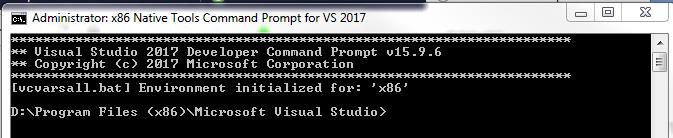


      May I have to install Visual Studio Community 2017 first, and then ANSYS or inversely?


      Visual Studio have to be installed in Program Files and not Program Files x86 is it right ?


      Finally, ANSYS and VS must be installed on the same hard drive ?


      Maxime

    • DrAmine
      Ansys Employee

      First of all we are not from Microsoft so if any issues are appearing you need to get in touch with the support of Microsoft. Generally it is not important  in which order you install the software. As non-IT specialist I  recommend to use default directories.


      Now if you are able to compile from Fluent launched in the Cross Tools of VS (x68-64) then you can check the environment variables there and append them to the system variables. I recommend not to have overlapping versions of VS: It is best to remove any VS distribution before installing the new ones.


    • Max4
      Subscriber

      May I have to add some environment variables? If yes, which ones?


      I have removed all the version of VS before installing the new ones.


      Regards,


      Maxime

    • DrAmine
      Ansys Employee

      Are you able at first to compile from Fluent launched in the cross tools?

    • Max4
      Subscriber

      I can Build the libudf when I launch Fluent from cross tools, but Load doesn´t work. I have error 193.


      Regards,


      Maxime

    • Max4
      Subscriber

      Problem solved. ANSYS and VS must be installed on the same hard disk.


Viewing 10 reply threads
  • The topic ‘Problem UDF Compilation’ is closed to new replies.
[bingo_chatbox]










