General Mechanical

General Mechanical

Topics related to Mechanical Enterprise, Motion, Additive Print and more.

Non-linear-analysis: Solution magnitude exceeded

    • kkvv2
      Subscriber

      Hey,


      I'm trying to run a non-linear analysis in Ansys Workbench 18.1, but the solution is not succesfull. I tried many things out to make it work. Besides I run a very similar model with exact the same boundary conditions and forces and this works. I don't understand what I'm doing wrong.


      The following error is displayed: An internal solution magnitude limit was exceeded. (so there is movement somewhere?)


      I have tried closing the gap in the contact, apply the load in 5 substeps instead of 1, but it still won't work and I don't know what to try more.


      Does anybody know what I could try furthermore to make the simulation work?


      Thank you very much.


      Regards, Kim

    • jj77
      Subscriber

      Unfortunetaly I can not run this since I only have a node limited student licence.


      The error is that things are flying away. Most likely it is the part where the load is applied, or that the load is too high.


      (Also rotational restrains on bricks are a bit odd, even though it might work since you are using a remote displ., need to try this out, did and it works, since the constraint equations there, will transfer the rotations to eq. translations)


      So to try this out please, do the following:


      Change the frictionless to a bonded contact, and use only a 1 N force. Use also weak springs, under analysis settings.


      If this does not work, then it might be the contacts not working, so insert a contact tool under connections to see the status (closed, open, etc..)

    • kkvv2
      Subscriber

      Thank you for your fast reply.


      If i change the contact to bonded contact and only use 1N force (with weak springsN), the model works.


      How can I fix now the frictionless contact?

    • Ashish Khemka
      Forum Moderator

      If there is a gap at start try adding a displacement to close the gap or use adjust to touch.

    • kkvv2
      Subscriber

      I already use "adjust to touch" to close the gap, but I have still problems to solve the simulation..

    • jj77
      Subscriber

      OK now we know that the contacts work.


      In order to be 100 % sure, remove the weak springs and run again.


      If that works, then change the contact to frictional (and set a frictional factor).


      If that works then try to apply the full load.


    • peteroznewman
      Subscriber

      kkvv2,


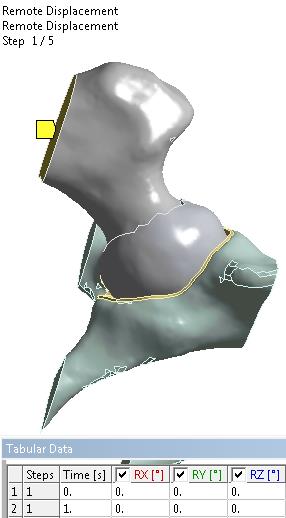
      I understand the zero rotations on the cut face. You want the ball and socket joint to be free to translate in any direction as the load normal to that same cut face is applied.


      I changed the Frictionless contact to Frictional and used a small value for the COF of 0.05.


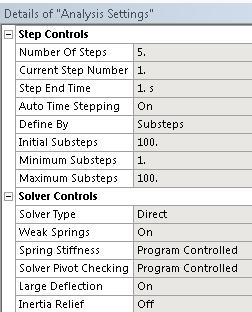
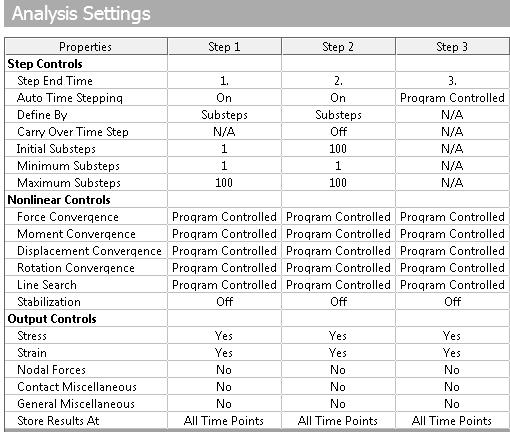
      I changed the Analysis settings as shown below:


      Step 1 is now solving.


      This is much better than what you had. I don't know if it will complete to the end of Step 5, but you can find out.


      Regards, Peter


    • kkvv2
      Subscriber

      Hey Peter,


      Thank you very much for your detailed answer. I tried exactly the same as you did (first only 1 step) with frictional contact of 0.05 and interface treatment of "Adjust to touch". The Weak Springs and large Deflection ON and with substeps and direct solver. But I still get an error: "An error has occured in the Distributed Sparse Matrix Solver while factoring the matrix. error code = 18." Am I doing still something wrong?


      Regards, Kim

    • peteroznewman
      Subscriber

      Hey Kim,


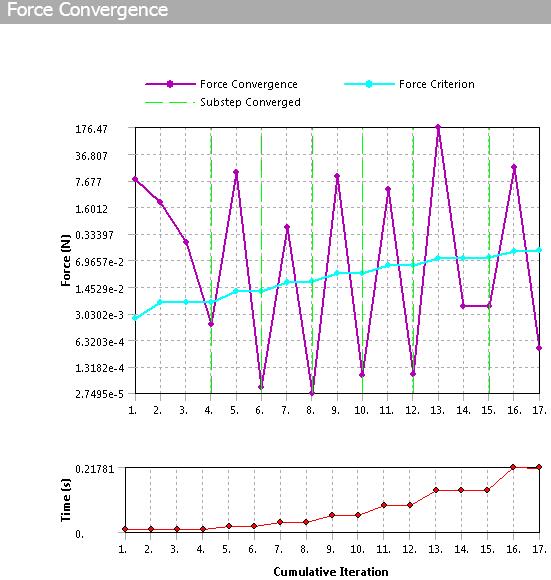
      While my advice above was a good next try and seemed to make progress, the progress was illusory. The convergence was only against the weak springs and the proper contact did not develop.  The first converged substep had a displacement of 10 m!


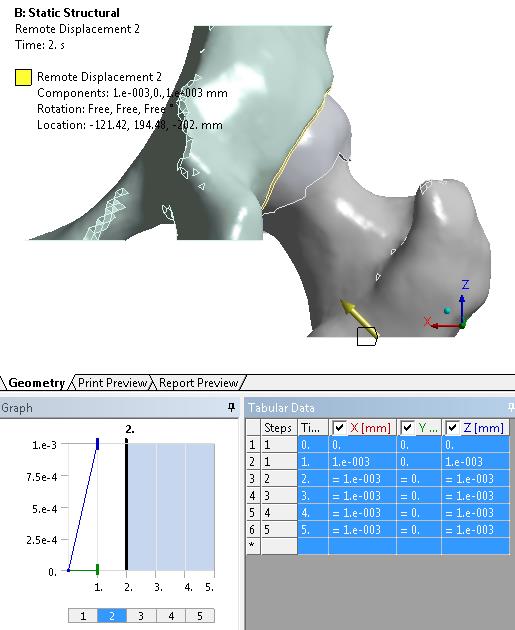
      The next try is to Promote to Remote Point the first Remote Displacement, then add another Remote Displacement BC (scoped to the Remote Point) to hold the translational DOF on the remote point for an initial, very small displacement and let the proper contact develop, then deactivate that BC and continue the solution. I turned Weak Springs off for this to prevent the illusion of progress from being displayed.  Step 2 will need Auto Time Stepping set On and Initial Substeps set to 100.


      This method allowed the first step to converge. The trick is to get the second step to converge, which is not yet working.


      Regards, Peter

    • kkvv2
      Subscriber

      Ok I'll try this, thank you very much! Do I understand you right, if I let the system as it was and just add the second remote displacement, that you proposed? Or how can I let the first remote displacement promote to the remote point before adding a second remote displacement?


      Best regards, Kim

    • peteroznewman
      Subscriber

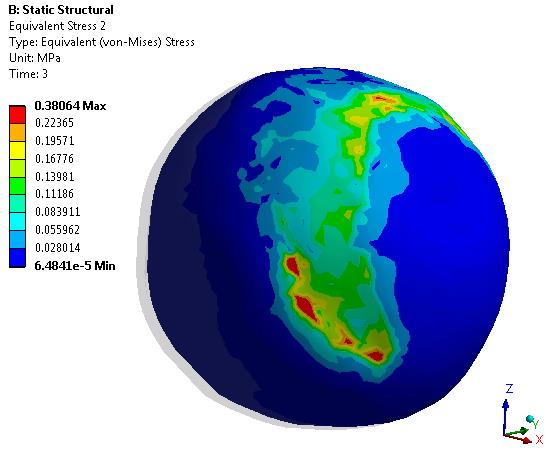
      It's working now on a 3-step simulation  Here are the analysis settings for the first 3 steps:


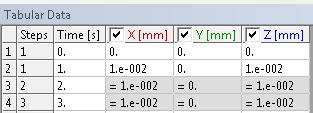
      Here is the Remote Displacement 2, which is only active in Step 1 and deactivated for all other steps.


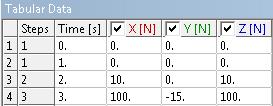
      Here is the force:


      Attached is the ANSYS 18.1 archive


      Regards, Peter

Viewing 10 reply threads
  • The topic ‘Non-linear-analysis: Solution magnitude exceeded’ is closed to new replies.