Ansys Assistant will be unavailable on the Learning Forum starting January 30. An upgraded version is coming soon. We apologize for any inconvenience and appreciate your patience. Stay tuned for updates.
General Mechanical

General Mechanical

Topics related to Mechanical Enterprise, Motion, Additive Print and more.

Boundary condition “vertex scoping and node scoping”

    • Rashi
      Subscriber

      I'm trying to simulate rotating hollow shaft with several geometrical variations. At the two ends of the shaft I have added two cylinders which are used to give the boundary conditions.


      In these two cylinders I have split the body so that there will be a vertex at the center of the cylinder. At the two end vertex I have given two "remote displacements" to define the boundary condition. 


      I have used two methods for scoping for the "remote displacement".


      1. center vertex.


      2. center node.


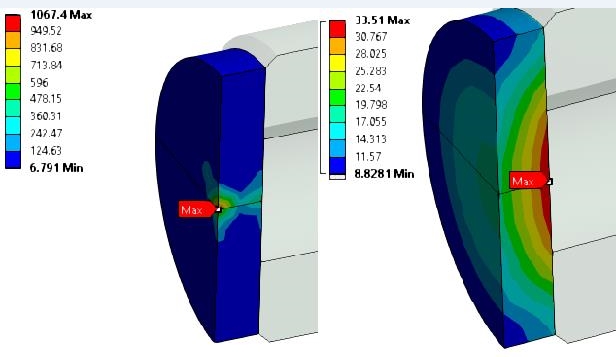
      Maximum stress is occurred in the shaft, between the two cylinders where there is some geometrical difference. For both two scoping methods the maximum stress is equivalent in magnitude and the position.


      How ever when I check the stress at the two cylinders For both scoping method the magnitude and the location of the stress is very different. How can this be possible?


      Even if we select vertex for scoping it should apply the constrain equation for the corresponding node right?


      I have attached an image of the stress results for the two methods of scoping. (Left : Vertex scoping, Right: Node scoping)


    • jj77
      Subscriber

      There is from the images a clear difference, on how the constraints (rigid or not, say RBE3 type or RBE2 type), are created in these two cases. If you look on the actual constraints, they should look different between them (say if you import model into apdl, or if you look in the solution info, and graphics and look on the model (you would see red lines for the beams/links it has created).


      In your case the left image looks like the constraints are very localised in the centre, while in the other they are more spread over the top face. This is my guess as I do not have a model to look at.


      In any case when you use this, results (stresses) are wrong there with either options, and that is fine as long as your results elsewhere are correct like you mention (St Venants). If thus these blocks are an area of interest then the BC should be modelled in details.

    • Sandeep Medikonda
      Ansys Employee

      Rashi,


      One way to visualize constraints is shown in this article. Check if this looks the same for the 2 cases you are considering.


      Solution Information>Graphics


      Regards,
      Sandeep

    • Rashi
      Subscriber

      Dear jj77 and Sandeep,


      Thank you for your reply. I checked the solution information and found the following. 


      1. When "vertex scoping" is used, at the vertex "beam" element is used for the "remote displacement" boundary condition.


      2. When "node scoping is used". a "constrain equation" is used for the "remote displacement" boundary condition.


      I would like to know how can i force ANSYS to use "constrain equation" even for when I use a vertex for scoping.


      Best Regards,


      Rashiga


    • jj77
      Subscriber

      Say for constraint eq. (CE), it could be of rigid type (using e.g., RBE2, or rigid link, CERIG type of CE), while the beams would be used in a flexible formulation. Make sure you have the same behaviour, rigid on both or flexible on both, that is the only thing I can think of.

    • Rashi
      Subscriber

      Dear jj77,


      Thank you for the detailed explanation. 


      But according what I observed I got bit mixed up results. 


      Vertex scoping - Beam elements is used- But the results are highly constrained. (When vertex scoping is used there is no option to select the behavior as rigid or deformable)


      Node scoping - CE - Distributed load can be noticed. (However behavior is set to "deformable" as you have mentioned which can explain the reason for the result.)


      I wonder if there's a way to make the vertex scoped remote displacement "deformable" since it will give me a more realistic result. 


      Best Regards,


      Rashiga


    • jj77
      Subscriber


      In my world (Strand7), at a vertex, there is a node, thus if I restrain a vertex , a restrain a single node, which will result in a very localised stress at that point.


      Now even if a put a beam/rigid link, CE, between the vertex and a remote node/point somewhere, there is still a local effect on that vertex.


      So in reality typically restraints cannot be on a single node or vertex, since that does not have a spatial dimensions (just a single point in space).


      (In ansys I think when you chooses vertex that option/deformable goes away)


      Thus it is better to put displacements and restraints over an area, rather on a point.


      On the side, normally I define (Strand7) all of the constraints and all the rigid links and restrains manually myself (on the finite element not on geometry), a bit old school perhaps (but then I know what exactly is done on the model).


      Hope this is not confusing you, and sorry for not being able to help you out. Hopefully someone else can.


    • Rashi
      Subscriber

      Yes jj77, I understand what you are meaning, since I'm using workbench I'm not much familiar with the APDL smipets.


      Basically I'm using this kind of boundary condition is to find the effect of rotational inertia for a cylindrical body. My idea is to fix DOF in two end points along the rotational axis.


      I understand using this kind of localized not suitable, but is there any other way to constrain a rotating body? 

      Also do you have any idea why ansys use beam elements when vertex is used for scoping and use CE to constrain a node?


      Best Regards,


      Rashiga


    • jj77
      Subscriber

      I do not know, I would ask the ansys guys in the forum, perhaps they might know how it works.

    • peteroznewman
      Subscriber

      Rashi,


      ANSYS employees are not permitted to download attachments, so I have inserted your image from the first post below. Please do likewise in the future.


      When comparing two stress plots, I generally make the values on the top and bottom of the scale equal so that the appearance of the contours can be compared. If you replot both images with 5 on the bottom and 40 on the top, then a visual comparison will be easier.


      My observation is that you have solid elements, which don't have rotational degrees of freedom. That means that if you hold a node fixed, you are only fixing translations and not rotations.


      I almost never create BCs on nodes. I only scope to geometry so that the model can be remeshed easily.


      You found a remote displacement scoped to a vertex used a beam element. A beam element does have rotational degrees of freedom at its nodes. ANSYS meshing is clever enough to know that when a beam element is connected to the node of a solid element, it automatically creates a "spider" of connection elements to grab adjacent nodes to be able to transfer torque. However, the nodes are very close to the vertex and cause a stress concentration.


      I would not have scoped to the vertex. I would not have even split the body to make a vertex. I would have used a Remote Displacement and scoped to the outside edge of the end cap. That would have created a spider of elements from the center of the circular edge out to each node on the edge. The control node that was created, which can be promoted to a Remote Point, can have a fixed rotation and will not cause a stress spike because it is distributed over all the nodes of the edge.


      Regards, Peter

    • Rashi
      Subscriber

      Dear Peter,


      Thank you for your suggestions I will do as you explained in future when asking questions.


      Also thank you for the explanation regarding my question.


      Best Regards,


      Rashiga


Viewing 10 reply threads
  • The topic ‘Boundary condition “vertex scoping and node scoping”’ is closed to new replies.
[bingo_chatbox]