-
-
January 15, 2019 at 4:56 am
NajjibGuerra
SubscriberHi,
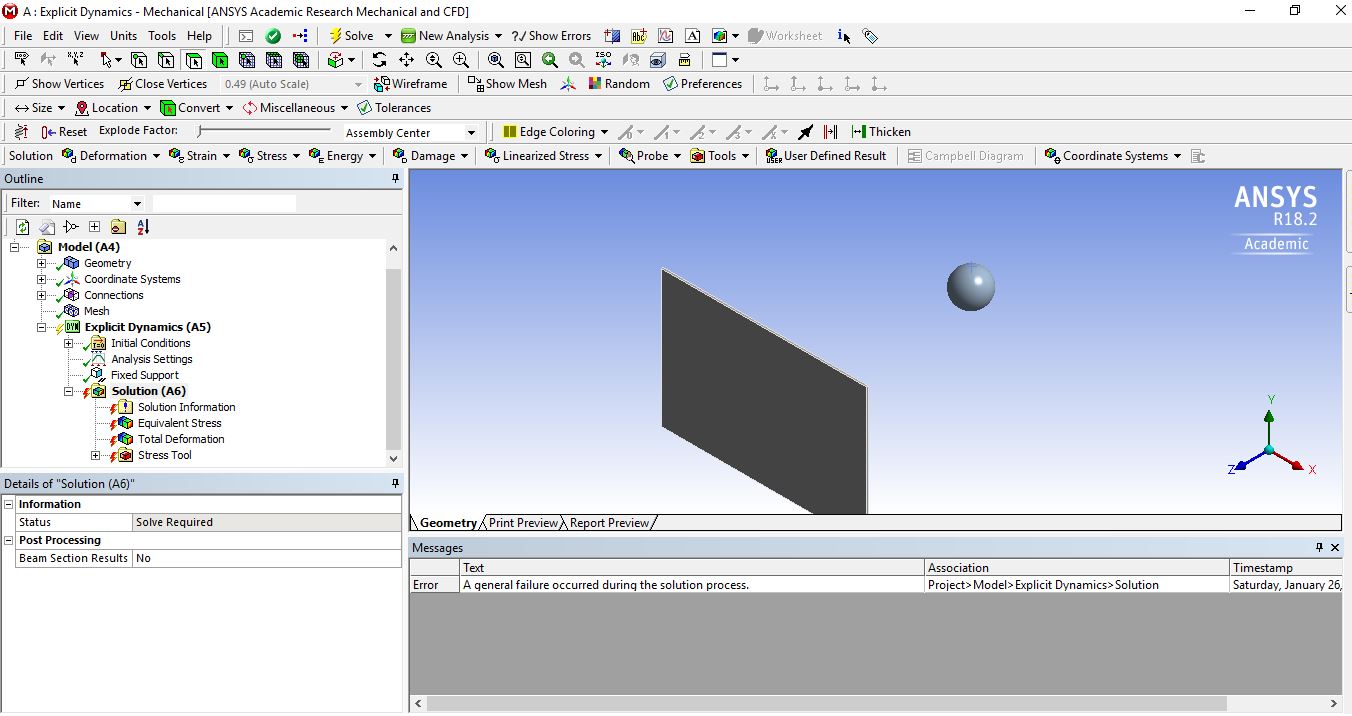
 I´m performing an explicit dynamics analysis on my computer, all the analysis setups, the geometry, and model are correct, but, when I try to solve the analysis an error message pops up telling me "
A general failure occurred during the solution process",Â
I´ve already changed the VPN settings and allow certain ports ( 8145 and 9145.) because I saw in a forum that the solution was that, it actually didn´t work, the question to you guys is, do you know the solution to this problem?
Â
Thanks!
Â
-
January 15, 2019 at 6:32 pm
tsiriaks
Ansys EmployeeHi Najjib,
I believe you have tried completely disabling VPN with no luck, right ?
What if you setup your analysis to solve with 1 core ?
Does this issue happen to every project ?
Thanks,
Win
-
January 15, 2019 at 11:53 pm
NajjibGuerra
SubscriberHi Win,
Yes, I´ve already disabled the VPN, and it didn´t work.
I´ll try to solve the analysis with 1 core, and I´ll let you know if the problem persists.
Actually, I´ve only tried the analysis with this project, I´ll try with another one, and I´ll let you know.
Â
Thanks, Win
-
January 16, 2019 at 12:41 am
NajjibGuerra
SubscriberHi Win,
I´m sorry, but do you know, how could I set up my analysis to 1 core?
Â
-
January 16, 2019 at 1:01 am
tsiriaks
Ansys EmployeeHi Najjib,
In Mechanical GUI -> Tools -> Solve Process Settings -> Advanced... -> uncheck the 'distribute solution' and change the cores to 1
Thanks,
Win
-
January 16, 2019 at 5:09 am
NajjibGuerra
SubscriberHi Win,
I´ve just changed the cores to 1 and unchecked the "distribute solution" box, and the problem still persists.
I hope we can find another way.
Thanks,
Najjib Guerra
-
January 16, 2019 at 3:33 pm
JakeC
Ansys EmployeeHi NajjibGuerra,
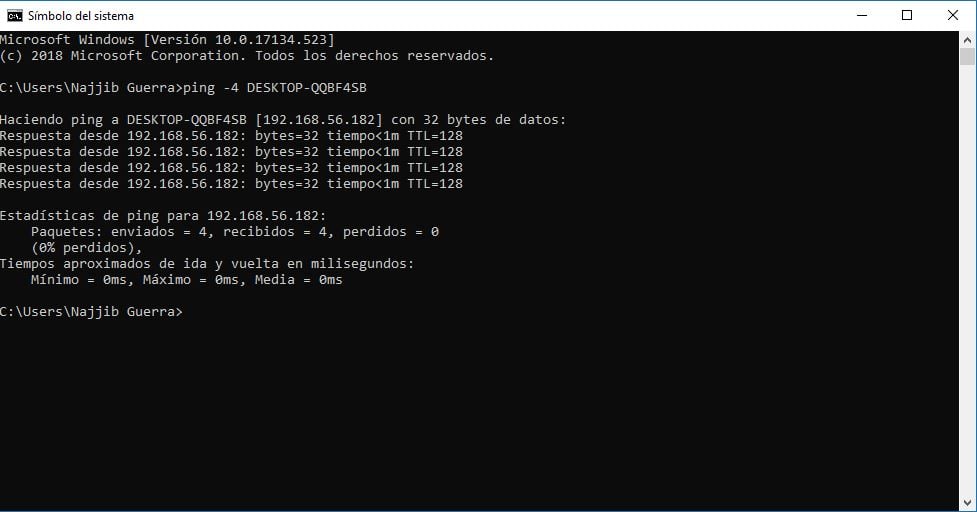
While connected to the VPN please try from the command prompt:
ping -4 %COMPTERNAME%
and also
ping %COMPTERNAME%
and post a screenshot of the results.
Â
Additionally if you run by right clicking on it in the start menu and selecting "Run As Administrator" does it make a difference?
Â
Thank you,
Jake
Â
Â
-
January 17, 2019 at 9:05 pm
NajjibGuerra
SubscriberHi Jake,
Here I attached the screenshots for the commands you told me, while the VPN was connected.Â
Also, about the "Run As Administrator", before starting the ANSYS Workbench, I always do that, and it doesn´t make any difference.
Thanks very much for your help.
Hope to hear from you soon
Najjib Guerra
-
January 17, 2019 at 9:05 pm
-
January 18, 2019 at 4:59 pm
tsiriaks
Ansys EmployeeHi Najjib,
Have you tried this with other projects ?
Thanks,
Win
-
January 21, 2019 at 2:54 am
NajjibGuerra
SubscriberHi Win,
Â
I haven´t, but I will try and I will let you know what happens.
Thanks,
Najjib Guerra
-
January 26, 2019 at 6:43 pm
NajjibGuerra
SubscriberHi Win,
I´ve already tried to solve another project, but I couldn´t, my computer stayed for 12 hours solving the mathematical model, I'll attach an image, where you can see that.
Thanks,Â
Najjib Guerra
-
January 26, 2019 at 6:44 pm
-
January 26, 2019 at 7:00 pm
NajjibGuerra
SubscriberThen I change the mesh settings, to a little bit coarser (5mm), and the same error appears, as the initial one, I´ll attach a photo.
Â
Thanks,
Najjib Guerra
Â
-
January 26, 2019 at 7:00 pm
-
January 28, 2019 at 6:33 am
rawkle1011
SubscriberAn error occurred while processing your request.
Reference #30.5d302b17.1548657102.6bdbc4f
Â
Please help
-
January 28, 2019 at 1:21 pm
JakeC
Ansys EmployeeHi rawkle1011,
Please try it again. There may have been a temporary outage on the download site.
Additionally if the issue persists, please create a new topic as this is unrelated to this topic.
Â
Thank you,
Jake
Â
-
January 30, 2019 at 5:43 pm
NajjibGuerra
SubscriberHi Jake & Win,
Do you have any solution to this problem?
Thanks,
NajjibÂ
-
January 31, 2019 at 5:53 pm
tsiriaks
Ansys EmployeeHi Najjib,
Sorry, I didn't see your posts because this user rawkle1011 posted after you.
My other thoughts on your issue now would be the simulation itself.
Can you check the 'Solution Information' and see if there is any 'error' or 'warning' in there ?
Thanks,
Win
-
February 1, 2019 at 5:08 am
NajjibGuerra
SubscriberHi Win,
No problem about the response,
Ok I´ll check the solution information and let you know if there´s an error
Thanks!
Najjib
Â
-
May 25, 2021 at 9:54 am
Farshid461salehi
Subscriber.Hi. Please help me
An internal solution magnitude limit was exceeded. (Node Number 76742, Body bridge, DOF UX) Please check your Environment for inappropriate load values or insufficient supports. You may select the offending object and/or geometry via RMB on this warning in the Messages window. Please see the Troubleshooting section of the Help System for more information.
.
-
- The topic ‘Explicit Dynamic Error’ is closed to new replies.
-
4673
-
1565
-
1386
-
1236
-
1021
© 2025 Copyright ANSYS, Inc. All rights reserved.