TAGGED: ansys-explicit, explicit-dynamics
-
-
December 28, 2018 at 11:42 am
adkh
SubscriberHi Community,
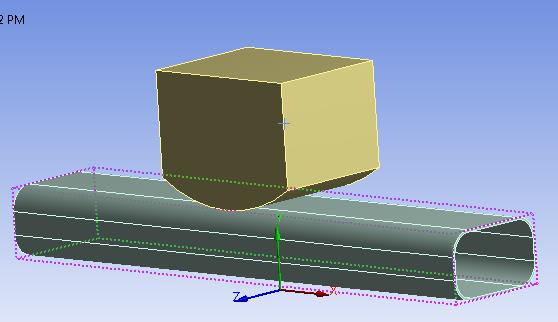
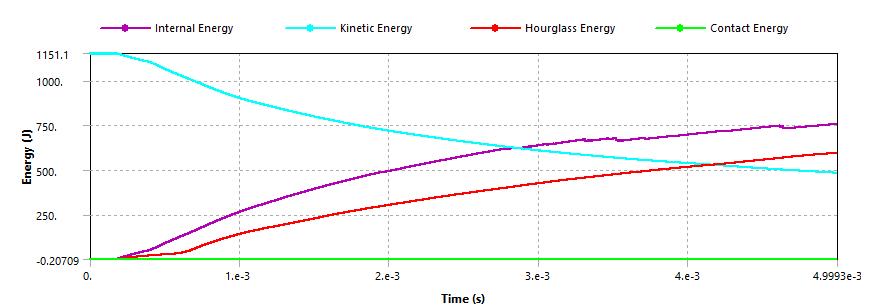
I am facing a problem regarding explicit Dynamics. I have attached a figure in which i am analyzing impact of punch with hollow beam of 2mm thickness fixed at both ends. The beam material is Aluminium and the punch is steel (rigid). But, when i analyze i get too much hourglass energy as evident in the attached figure. For this i tried changing the mesh and refined it, changed the number of data points from 20 to 100, tried different velocities and changed the erosion controls from geometric strain to material failure, but the problem is still not solved.Â
Initially i started with curved beam and i got hourglass energy too much. After that i tried to make the beam straight but still it is the same problem as discussed above. Can anyone help me in this regard. Thanks
-
December 28, 2018 at 2:53 pm
Sandeep Medikonda
Ansys EmployeeHi try using a tet mesh with the NBS formulation and see if it helps?
You can first insert a tet method in the mesh and then under Analysis Setting > Solver Controls > Tet Integration change the formulation to Nodal Strain.
If hex elements are absolutely essential. You can change the Damping Controls > Hourglass Damping to Flanagan Belytschko and play around with the stiffness coefficient.
Regards,
Sandeep
Guidelines on the Student Community -
December 28, 2018 at 2:59 pm
Sandeep Medikonda
Ansys EmployeeAnother thing that might help is if you convert the thin solid body in a shell with appropriate thickness.
-
December 29, 2018 at 11:57 am
adkh
SubscriberHi, Sandeep
1. Thanks for your suggestions. I tried the second method you suggested, i.e, Flanagan Belytschko and changed the stifness coefficient, but the results became worse in terms of hourglass energy.Â
2. The first method you described, i inserted a tet method in mesh but i didn't got the option of "tet integration" in analysis setting. Instead i am getting "hex integtration". Can you please guide me how to apply first method you suggested?
3. How can i know that ansys used the "full integration" or "reduced integration" for the analysis because i couldn't find it in the ansys settings.
Â
Regards,
Adeel
-
December 29, 2018 at 8:37 pm
Sandeep Medikonda
Ansys EmployeeAdeel,
What version of ANSYS are you using? Please upgrade to v19.2 if you are using an older version.
What value's did you use to control the hourglass energy?Â
Hex elements offer 2 types, exact and 1-pt Gauss. You should be able to control them from the analysis settings as well. Please see this section from the help.
If you are using v19.2, you should be able to insert a Body Control and specify the element options in the details as well.
Increasing the number of elements in the through-thickness part of the hollow body should also help.
Lastly, have you tried converting the hollow body to a shell. That should definitely help.Â
Please post images whenever you can to make your case.
Regards,
Sandeep
Guidelines on the Student Community -

December 29, 2018 at 10:40 pm
adkh
SubscriberSandeep,
I am currently using v19.1. About your latest solution of converting it to "shell" did worked and now it is at very minimum and negligible. Thank you so much for your help.Â
Regards,
Adeel
-
- The topic ‘Explicit Dynamics’ is closed to new replies.
-
4663
-
1545
-
1386
-
1230
-
1021
© 2025 Copyright ANSYS, Inc. All rights reserved.