-
-
December 23, 2018 at 5:51 am
Afrah
SubscriberHello,
I want to create the triangular infill as shown in the picture below:Â
.jpg?width=690&upscale=false)
 I've followed this video (
) up to the part where I've imported a triangle and generated my infill, but it just doesn't turn up as expected. Specifically, I'm confused about the "thickness" and "length" it asks for.Â
I've attached the work I've done so far, any suggestions or help would be much appreciated.Â
Some background: I'm attempting to simulate the delamination of a DCB specimen. The actual experiment used a 3D printed specimen shown in the picture above, and I'm trying to match my model as much as possible.Â
Â
-
December 24, 2018 at 3:31 am
Keyur Kanade
Ansys Employeecan you please insert images? as ansys employee, we can not download attachments.Â
you can also check following.Â
https://www.youtube.com/watch?v=8BDoYRm9yf0
Â
-
December 24, 2018 at 7:13 pm
Afrah
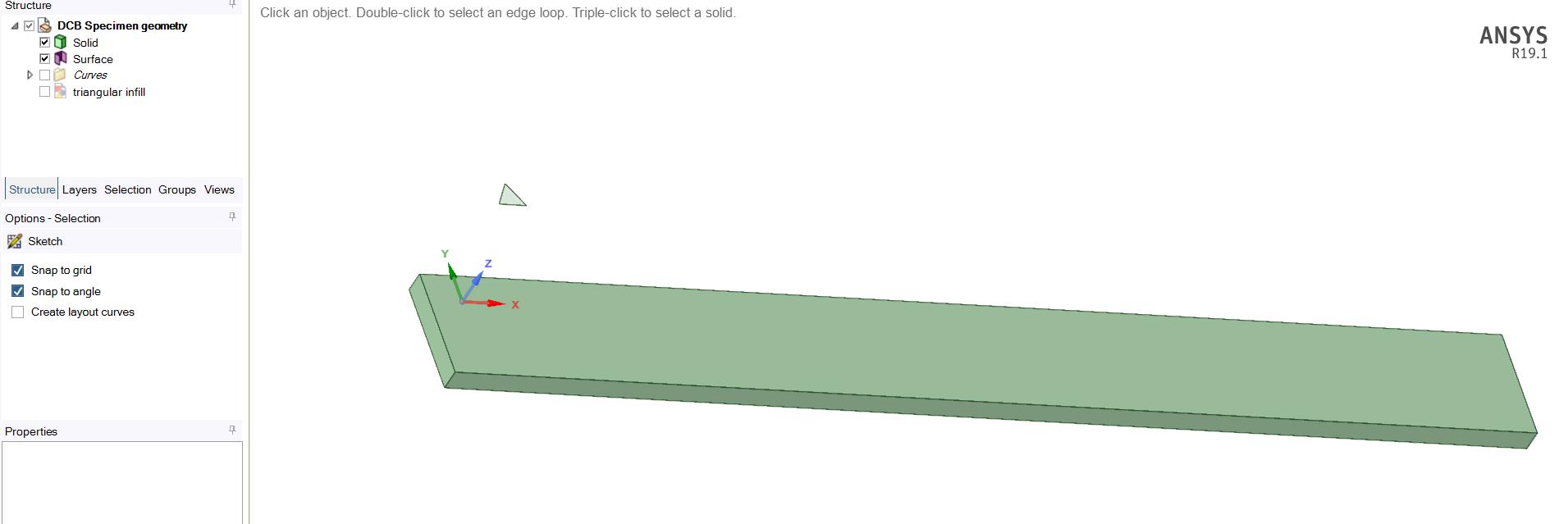
SubscriberYes, here is my geometry ( the triangular surface can also be seen on the top):
Â
Â
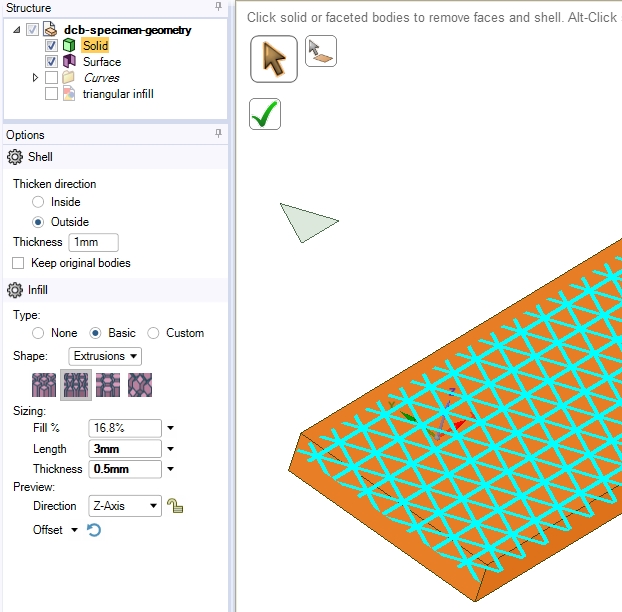
Also, like in the video I posted, the z-axis points in the direction I want (bottom to top). The image below shows the preview after I select a thickness of .5mm.Â
Here's the finished product, which is wrong, but I don't know how to fix:
Â
-
December 26, 2018 at 3:48 am
Keyur Kanade
Ansys Employeeits not very clear to me.Â
first you have geometry - a plate and a traingular surface.Â
then you are working on facets.Â
if i understand it correctly, you can do following.Â
use geometry and not facets.Â
create pattern of traingular surface.Â
pull that traingular surfaces to create holes in the plate.
please check if this helps.Â
-
December 28, 2018 at 11:18 pm
Afrah
SubscriberThe following is my geometry, but it is a faceted body. I need to convert it into a solid, but whenever I do that (right click on faceted body, convert to solid, merge faces), the geometry ends up strange. How can I fix this?
Â
Notice how some of the triangles are not cut. I tried using the Pull tool, but it wouldn't work:
Â
Â
-
December 29, 2018 at 2:56 am
-
December 29, 2018 at 3:08 am
Afrah
SubscriberThat looks perfect! Yes I'm using 19.1, which is provided by my school. Will I have to delete my current version of ANSYS to download 19.2?
Â
-
December 29, 2018 at 3:10 am
peteroznewman
SubscriberYou can install 19.2 and keep 19.1. They will co-exist. But once you save a file in 19.2, you can't open it in 19.1 again.
Regards,
Peter -
December 29, 2018 at 4:20 am
peteroznewman
SubscriberThe statement above is for licenses of the same type: Student or Research or Commercial. I don't know if you can mix license types on the same computer. In the past you could only have one type of license. At work I have a several releases of ANSYS on a computer getting a commercial license from the license server at work. At home I have several releases of ANSYS Student on a computer. I haven't ever mixed license types.
See if your school can provide 19.2 before you install ANSYS Student from this site.
Regards,
Peter -
December 29, 2018 at 4:22 am
Afrah
SubscriberThank you so much for your help! I just downloaded ANSYS Student 19.2 and its working fine.Â
-
- The topic ‘Triangular Infill for a DCB’ is closed to new replies.
- Project lines/edges into a face with the direction normal to the face
- No preview in explorer with scdox file
- Add-in Error Excel
- Fileformats
- Discovery 2025r2 failed to initialize
- Spaceclaim problem
- Using SpaceClaim scripts vs recorded blocks for parametric optimization workflow
- Different Body Naming and Extra Surfaces after Importing Solid Edge Part
- racing royals
- New Computer
-
4597
-
1495
-
1386
-
1209
-
1021
© 2025 Copyright ANSYS, Inc. All rights reserved.

.jpg?width=690&upscale=false)