-
-
December 18, 2018 at 12:58 pm
Phil J
SubscriberGood Morning,
I am building a cantilevered beam piezo model with adjacent resistor to measure power generated. I am using the Piezo and MEMS extension in workbench. While using the example "Piezo fan" with the extension, I am able to run the model with success. I am able to get a voltage response.
Now, I need to add a resistor (CIRCU94) element and measure power being generated during a harmonic response simulation. Attached is my archived WB project. The project shows the successful model without the resistor. It also shows the unsuccessful model with an attempt to add the resistor. Would you please help me figure out how to get the resistor to work?
Thank you,
Phil Jones
Penn State, Erie, PA
-
December 21, 2018 at 11:30 am
Phil J
SubscriberGood Morning,
I am able to get the simulation to run now. However, it is still not recognizing the CIRCU94 element and nodes. Hum. I will attach the latest project schematic for your assistance.
Thank you,
Phil
-
January 8, 2019 at 5:28 pm
Phil J
SubscriberI figured out my error. I just needed to use the nodes already present on the beam element for the resistor. It seems to be working now.
-
March 29, 2023 at 7:17 am
K Jegadeesan
SubscriberHi Phil, I have modelled the beam with PZT using Piezo&MEMS ACT, Also I have created the voltage coupling in the top and bottom of the PZT, and I got the node. I tried to add a resistor using CIRCU94 element, by using the following
ET,5,CIRCU94,0
R=3000
R,1,RTYPE,2E,NTOP,NBOTTOMbut I the values of the voltage is not changing based on the resistance.You mentioned here that you figured out the error, can you help me in this. What i suppose to change.
-
-
February 8, 2019 at 4:18 pm
Punnag Chatterjee
SubscriberHi Jones,
Is it possible to attach the final error free workbench archived file here so I can learn from it and use it for a different application? Thanks in advance.
-
February 9, 2019 at 11:19 am
Phil J
SubscriberSure. The project schematic shows the isotropic modal, the harmonic response without a load resistor, and then there is the anisotropic harmonic response with the load resistor. I hope it helps.
Phil Jones
-
February 9, 2019 at 11:38 am
jj77
SubscriberGreat jonespa87, very interesting.
I did a small example, to show, basically connecting the circu94 to the existing mesh on pzt patch, that was missing initially.
Now it is coupled to the plate via the ACT coupling, very nice.
Thanks again for posting this
-
March 1, 2019 at 3:51 pm
Phil J
SubscriberGood Morning,
I have a new question about the Piezo and MEMS extension usage for energy harvesting.
My workbench model has been running fine. I am able to simulate voltage response using various resistor values on my CIRCU94 element.
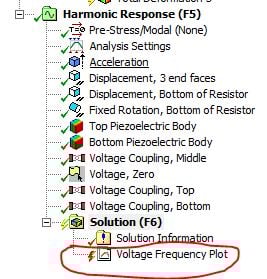
However, when I use a low resistance (for example < 7000 ohms), the simulation solves but the voltage response result has a red lightning bolt and no voltage response plot is generated. It seems as though when it gets close to "closed" circuit, the voltage response will not be produced.
Is there something I need to change in the settings to get a result with low resistance?
Thank you,
Phil
-
June 21, 2019 at 2:11 pm
nilszbh
SubscriberHi,
I am using the same extension to model a piezoelectric harvester, and having some questions in my simulation:
1- I get very high and very low voltages (varying from 10e-6 to 10e6 volts). I have defined a ground voltage node, but still getting weird voltages.
2- voltage is not defined for all the parts of the model. I have the error of:
"The user defined result might not be calculated successfully wholly or in some areas.
There are some elements (or nodes) which do not contain
data for the expression in: 310HARMONIC = VOLT
Note that the result data may not be contained in the result file
or may not be applicable to some element types.
Also note that the solver module can create elements,
such as surface effect or interface elements,
whose results cannot currently be scoped in a contour display."
3- the solver doesn't let me define the ground voltage on the same node that I have voltage coupling with one side of my piezo components. The error I get is :
"Specified constraint not allowed on slave degree of freedom in coupled
set.
Coupled set number 1 First node= 222 Slave node = 31935 Degree of
freedom = VOLT.
Move Move constraint to first node or remove coupling and constrain
all. "
I would appreciate if you could give me any related tips. Thanks in advance!
-
November 28, 2019 at 5:20 pm
Guoyang
SubscriberHi, I met this problem as well. Have you known how to solve it?
-
June 20, 2020 at 11:42 am
MaiRabie
SubscriberHello,
good day!
I am trying to regenerate the same piezoelectric harvester you modeled. However, the voltage output turns to be always zero. Am I missing any information here?
Thanks in advance
Regards,
Mai
-
February 28, 2021 at 10:26 am
Michael578
SubscriberHello jonespa87,ngood day!nI am trying to simulate similar bimorph piezoelectric harvester with above commands. However, the output power and voltage doesn't change with resistor value.nAlso, I tried to check this issue in your model, but the output power doesn't change with resistor value.ET,10,CIRCU94,0 !SET UP RESISTORnR,1,100000 !RESISTANCE VALUEnTYPE,10 !SET ELEMENT TYPEnE,1,2 !CREATE RESISTOR BETWEEN NODES 1 AND 2nnThanks in advancenRegards,n
-
- The topic ‘Energy Harvesting using Piezo and MEMS Extension’ is closed to new replies.

-
6219
-
1906
-
1452
-
1308
-
1022
© 2026 Copyright ANSYS, Inc. All rights reserved.