-
-
December 17, 2018 at 3:35 pm
rwath
SubscriberHi all,
I'm bit new to Ansys and wondering how to parameterize thermal conductivity of a material.
In our simplified model there are two objects in contact, say A (top object) and B (bottom bottom). All faces of the objects except contact faces and bottom surface of object A are exposed to stagnant air.
Material properties of object B remain same. A constant temperature is given to the bottom surface of the material A. A transient Ansys thermal model was already created for this.
In this instance, our idea is to vary the thermal conductivity of Object A and monitor the temperature of the top surface of object B. Based on this simulation we are expected to find a range of thermal conductivities that could justify materials for physical prototyping.
Any line of advice is highly appreciate.
-
December 17, 2018 at 5:03 pm
Karthik Remella
AdministratorHello,
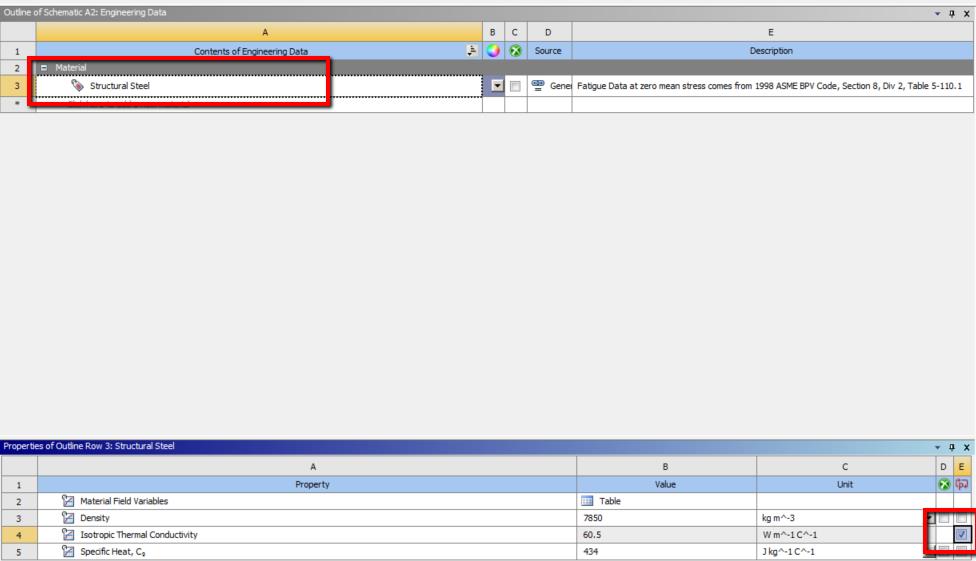
You should be able to parameterize thermal conductivity from Engineering Data. Please see the screenshot below. You should be able to use the check-box at the bottom.
You should be able to go into 'Parameter set' and add additional Design Points to conduct your DP analysis.
I hope this helps.
Best Regards,
Karthik
-
December 20, 2018 at 1:16 pm
rwath
SubscriberMany thanks Karthik. It worked.
-
December 21, 2018 at 9:12 am
DrAmine
Ansys EmployeePlease mark the answer of Karthik as solution so that other students might profit from it.
-
- The topic ‘How to parameterize thermal conductivity of a material’ is closed to new replies.

-
6495
-
1906
-
1458
-
1308
-
1022
© 2026 Copyright ANSYS, Inc. All rights reserved.