-
-
December 14, 2018 at 12:04 pm
Muchanical
SubscriberHello Ansys-Community,
i have a problem and would be really happy if someone can help me. I already searched for a solution but couldn't find anything.
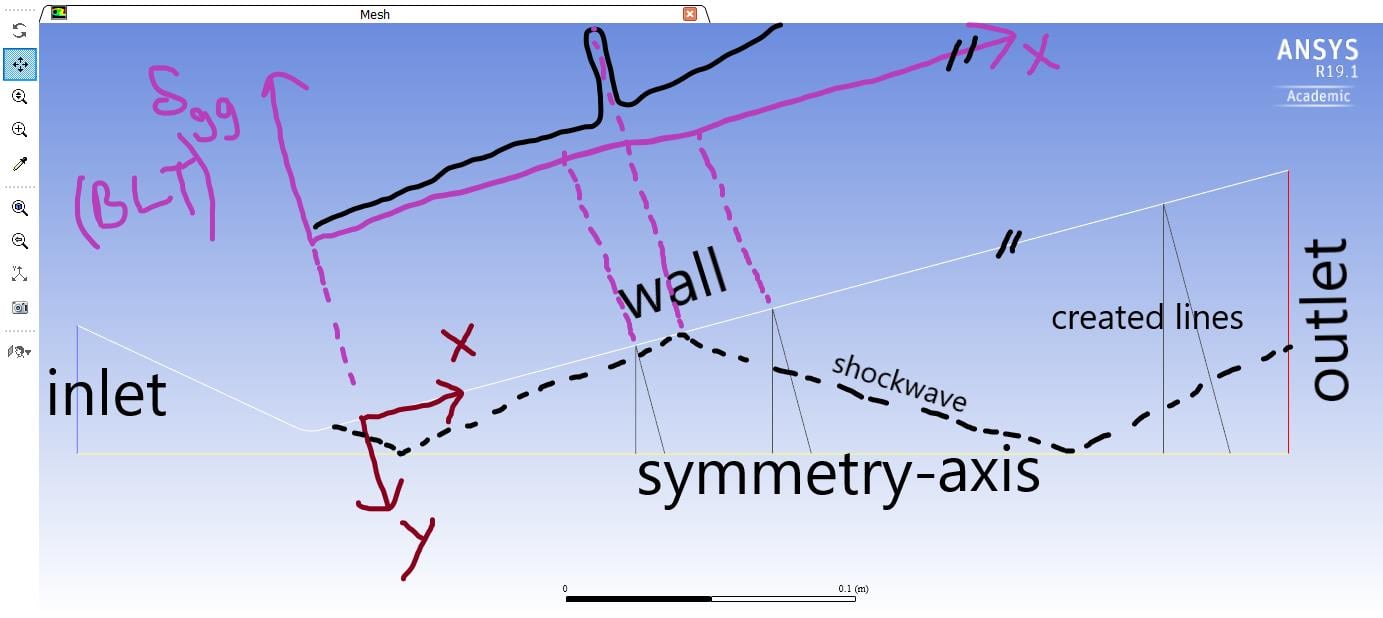
I have simulated a nozzle with a convergent and divergent part. I want to compute the boundary layer thickness (BLT) along the wall (X-axis) with 99 % of the maximum velocity-magnitude. The contour of the wall isn't parallel to the axis of the nozzle. So I am going to create lines which stand normal to the wall/symmetry-axis. I can determine the position of the 99% maximum velocity-magnitude on the created line. The position is the curve length along the corresponding line which starts with zero on the wall (Y-axis) and ends on the symmetry-axis. The direction of the Y-axis depends on the line because the Y-axis is parallel to the lines; it means one time it stays normal to the X-axis and one time to the symmetry-axis. On the next step I want to compare the BLT on both lines (normal to the wall/symmetry-axis on the same starting point on the wall); see screenshot.
However, i need to create manually lines, searching for the maximum speed on the corresponding line and compute the 99% of the maximum speed to get the boundary layer thickness (BLT). I need many lines because the BLT can change within a short x-Distance strongly due to the shockwave. It is very time-consuming to do this work manually.
My solution:
Create lines (perpendicular to the wall and/or sym-axis) with parameters in journal-file or UserDefinedFunctions (UDF). But in Fluent and CFD-Post is no possibility to put parameters in the option "create line". This Option wants just points.
I would start with a parameter like 0.1 and go in 0.01 steps until I reach the X-position on the wall at 0.3 to create automatically many lines. The next step should be writing a script like:
"Compute the position of the 99% maximum speed on the corresponding line. Create a *.txt-file with values for the X-axis on the wall and the BLT for the Y-axis (see diagram in violet in the screenshot)."
So I want a plot like the violet diagram in the screenshot with values:
X-axis (wall)Â Â BLT
0.1Â Â Â Â Â Â Â Â Â Â Â Â Â Â Â Â Â 0.002
0.11Â Â Â Â Â Â Â Â Â Â Â Â Â 0.0023
0.12Â Â Â Â Â Â Â Â Â Â Â Â Â 0.000001Â Â Â Â (maybe here shockwave)
...               ...
0.3Â Â Â Â Â Â Â Â Â Â Â Â Â Â 0.05
END
This work should be work automatically and I tried many things like iso-surface and so on. The problem on an iso-surface is that the maximum of velocity on a corresponding line depends to the line. And the maximum is not every time on the "free steam" position; so not every time on the symmetry axis.
I hope I could explain my problem and hope we can find a clever solution. Thank you in advance.
Best regards
Mustafa
-
December 14, 2018 at 12:36 pm
DrAmine
Ansys EmployeeSo you need to generate automatically some lines or points, isn't it? If yes then you require some Scheme script to allow that automatically in Fluent or Perl script in CFD-Post. All lines will share the same direction vector (perpendicular to the wall) they would differ by always a point. You need then to write a prameterized line function, discretize over certain number of increment, input in a txt /CSV file and read that in ANSYS Fluent via Scheme.Â
Â
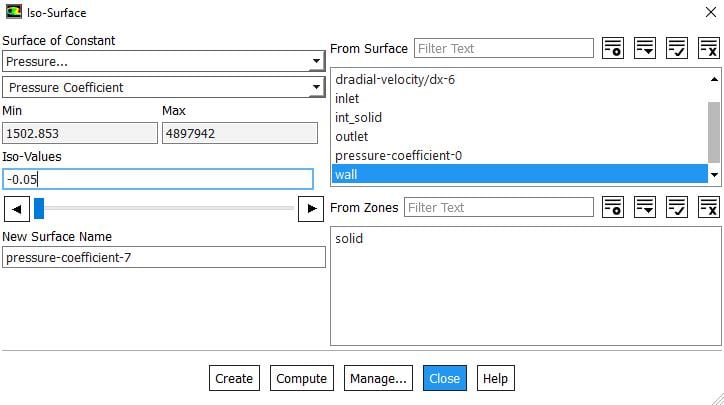
Or using the total pressure loss as indicator for boundary layer. (called health indicator) So you can create an iso-surface for pressure coefficient equal to -0.05 (reference might be the fa field pressure). You can color then that iso-surface with distance from next wall and all this can be exported to a file.
Â
Â
Â
Â
-
December 14, 2018 at 1:36 pm
Muchanical
SubscriberThanks for the fast answer!
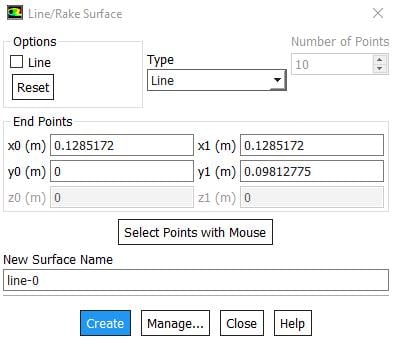
Yes, sir. I need to generate automatically lines. Each line is given by 2 points (see screenshot in the first post). One of the points is on the wall and the other one is on the symmetry-axis. But I can't put a parameter in the option "create surface" (see screenshot below). So I can write a Journal-file to create many lines like:
/surfaceÂ
line-surface line-1 "x0 value of the first point" "y0 value of the first point" "x0 value of the second point" "y0 value of the second point"Â
line-surface line-2 "x0 value of the first point" "y0 value of the first point" "x0 value of the second point" "y0 value of the second point"Â
... and so on
END
I want to define a parameter instead to write a true-value of the 2 points and put the equations for the points along the nozzle geometry like (as you said):
/surface
line-surface line-a "a" "0" "a^2-0.3" "2*a*cos(phi)"
END
The parameter a should start with a value and reaches over a certain increment a maximum value. Maybe I would make a non-certain increment; it depends on the position of the shockwave to have in this area a better resolution. But I can't write such a script and need help here. I even never heart about Perl script and going to search for it.
The next step is to generate the position of the 99% maximum speed on the corresponding line to get a diagram as I explained before. This step should be work automatically too. I need help here too.
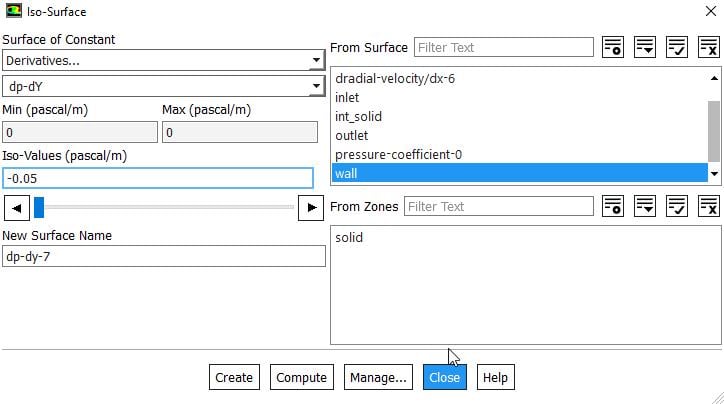
Do you mean with the pressure loss the derivative like dp-dY or dp-dX? But the derivative depends on the direction. So the direction would be the Y direction for the lines which are normal to the wall. But then I need to create a user-defined direction for the lines which are normal to the symmetry-axis. These directions can here normal to the wall, to the symmetry-axis or another angle.
You mean with pressure coefficient c_p=(p-p_ref)/q_ref with q_ref=0,5*rho_ref*v_ref^2? For what stays the "fa" on the fa field pressure? I tried it (screenshot) but it doesn't work because the -0.05 is less than the minimum value.
I know I have many questions. Forgive me for this.Â

Best regards
Â
Â
-
December 14, 2018 at 2:11 pm
DrAmine
Ansys EmployeeI have provided the answer in my first reply. Please read it thoroughly: You will require scheme routine.Â
Â
With pressure loss i Mean Ptot-Pfar-field/dynamic Pressure at farfield.
-
December 14, 2018 at 2:36 pm
Muchanical
SubscriberYes, you are right. I need to write a parameterized script.
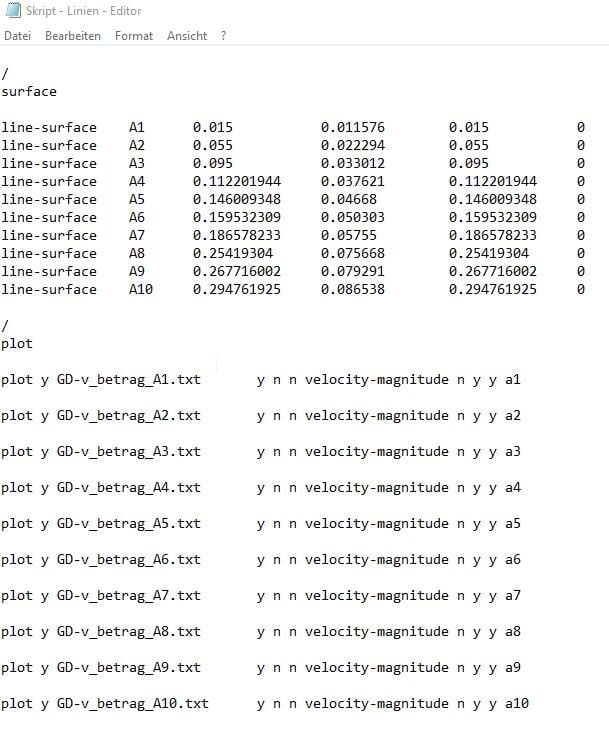
My problem is how to write such a script which allows to compute the boundary layer along the wall (like the violet diagram on the first post). I searched for example-scripts but couldn't find something. I started to define the lines with a text editor (see below). Fluent creates these lines if I read this script as a journal-file but this is not parameterized. Then I can plot the velocity magnitude along a corresponding line. But how to write a script which plots the position of the 99% maximum speed on the corresponding line. Do you know how to parameterize it and can you help me to write a script like this?
It would be very helpful and thanks in advance.
Best regards
Â
Â
Â
-
December 14, 2018 at 3:05 pm
DrAmine
Ansys EmployeeYou need to calculate the flow-averaged / any weighted average or max value for velocity each line. Then export the ratio velocity/max-velocity with coordinates as ASCII file.
You can start by recording a journal from Fluent: This journal will create the line, calculate the average velocity, then export the XY plots. Other methods can be developed how to derive the BL thickness in different way but this is out of the scope of Academic community support.
Â
Â
-
December 19, 2018 at 4:40 pm
-
- The topic ‘Boundary Layer Thickness along a line’ is closed to new replies.
-
6379
-
1906
-
1457
-
1308
-
1022
© 2026 Copyright ANSYS, Inc. All rights reserved.