-
-
November 24, 2023 at 4:03 pm
Jegadeeswaran Sampath
SubscriberI have downloaded the both student softwares "Ansys Student and Ansys LS-Dyna student" and then extracted the files and installed the softwares as in shown in this link
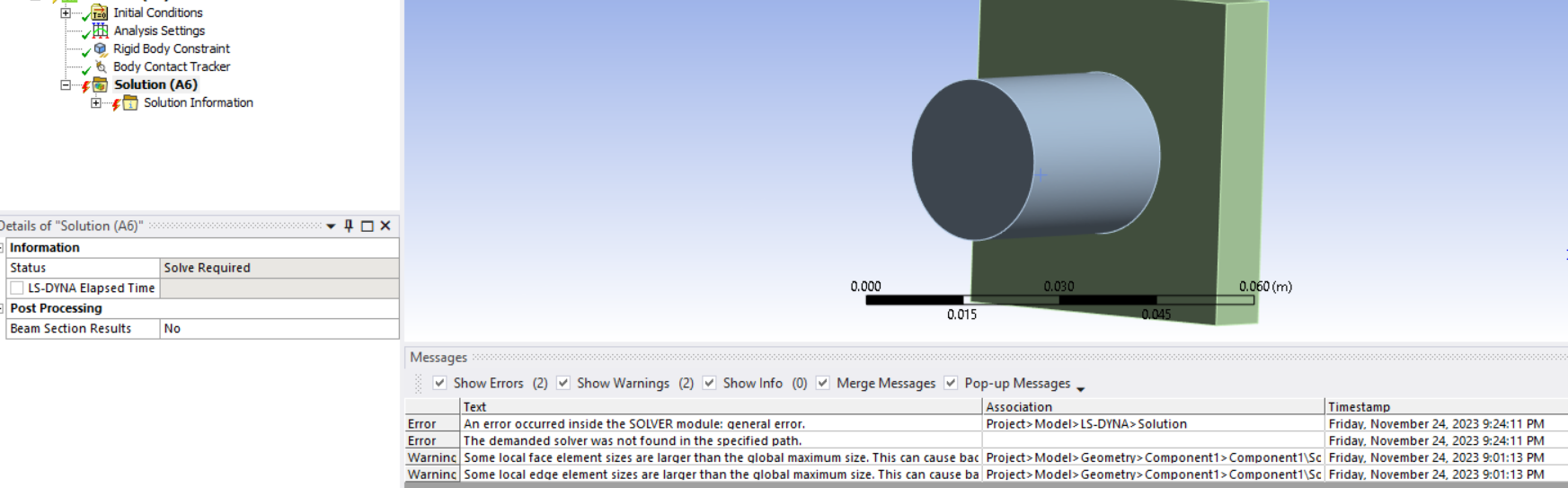
&t=3sBut I am getting the general errors while using LS Dyna - "the demanded solver was not found in the specified path" and “An error occurred inside the SOLVER module: general error.” and I tried to uninstall and install everything completely but still the errors exist as shown below,
I need to know how to download the solver along with the install package.
-
November 29, 2023 at 2:20 pm
VG
Ansys EmployeeI think the problem is by solver path. In Analysis settings, a solver could be selected. But if that solver is not defined or found, then, that error message shows up.
The solution is:
1. Check the analysis settings – solver control – solver version

2. If error shows by selecting a solver, please check “%APPDATA%\Ansys\v232\ACTLSDYNA\lsdyna_solvers.xml”. The solver executables and their paths are defined in that file. Please check the path and make sure that LS-Dyna executable could be found in that path
3. Restart Workbench after a change
-
- The topic ‘“the demanded solver was not found in the specified path” error occurs – regd.’ is closed to new replies.

-
4683
-
1565
-
1386
-
1242
-
1021
© 2025 Copyright ANSYS, Inc. All rights reserved.