Ansys Assistant will be unavailable on the Learning Forum starting January 30. An upgraded version is coming soon. We apologize for any inconvenience and appreciate your patience. Stay tuned for updates.
3D Design

3D Design

Topics related to Ansys Discovery and Ansys SpaceClaim.

Hello, do you have an idea, how to change the set up of Ansys 19.0.

    • Georgiro
      Subscriber

      Hello, do you have an idea, how to change the set up of Ansys 19.0, since it changed to me and I cannot use all the working Graphics, the Tree Outline, the Searching Outbox, etc., unfortunately I do not know how to do it! Only all of them just individually. Thanks

    • Sandeep Medikonda
      Ansys Employee

      Which software do you want to reset? Is it WB?


      Some relevant posts:


      Post 1


      Post 2


      Post 3


      Post 4


      Regards,
      Sandeep
      Guidelines on the Student Community

    • Georgiro
      Subscriber

      Yes, it is a Design Modeler! Thanks for ideas!

    • Georgiro
      Subscriber

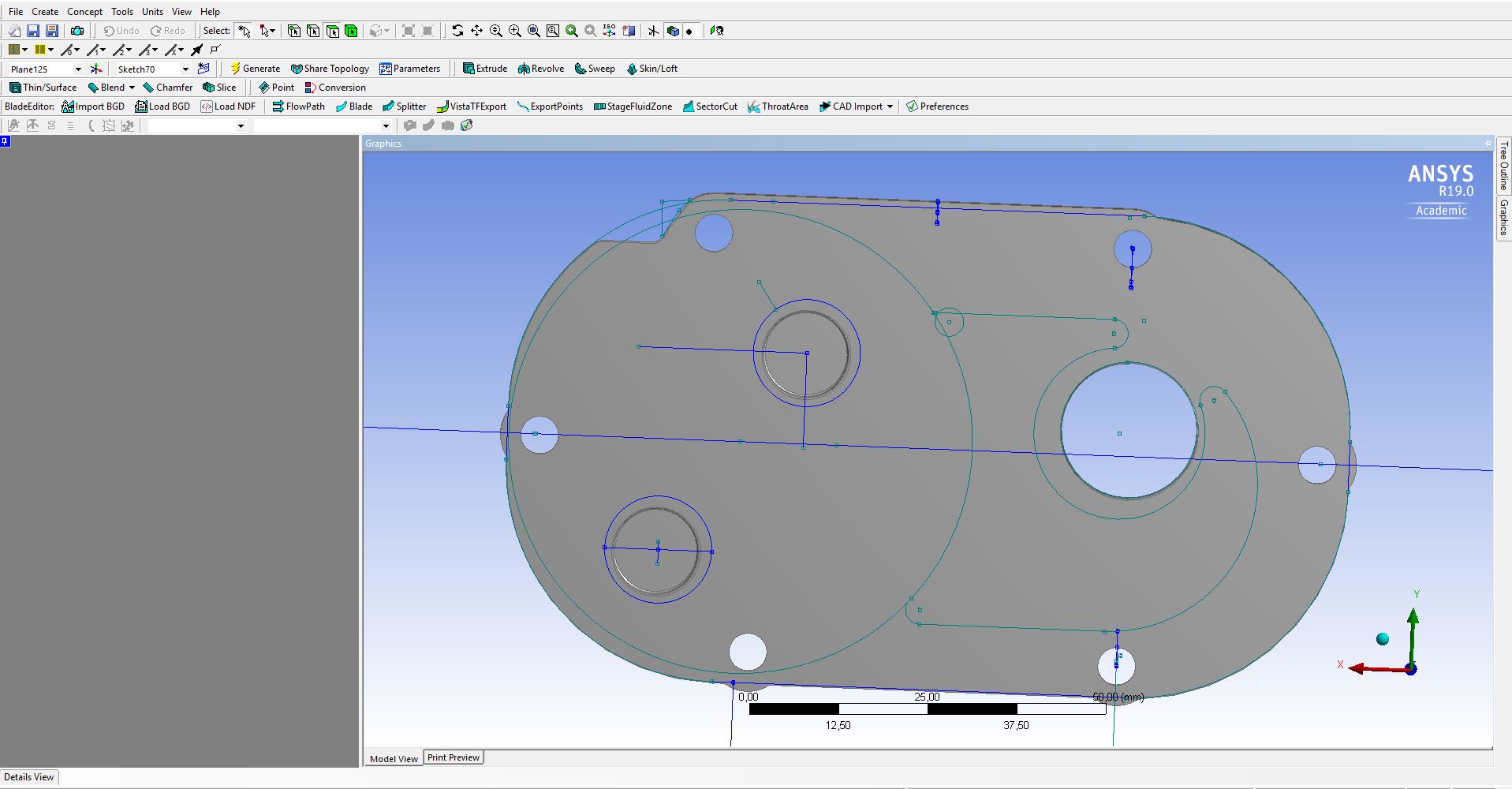
      So I did as you wanted,  but it did not help me at all, I still have the strange organization, that is basically impossible to use!!!

    • Rob
      Forum Moderator

       Please can you post a screen shot?  If the interface is scrambled View -> Windows -> Reset Layout tends to fix most problems. 

    • Sandeep Medikonda
      Ansys Employee

      It nothing helps, resetting the %appdata% should help. See here.


    • Georgiro
      Subscriber

    • Georgiro
      Subscriber

      The point is that I do not have the common parts of the working Graphics, the Tree Outline, the Searching Outbox, etc. It is a shame, since I am not able to find it anywhere? Thanks for your solution. The point is that I have to always tick to a different box and it does not work as it used to be in normal common organization. It is a bit useful, not to work here at all. Thanks

    • Sandeep Medikonda
      Ansys Employee

      Georgio,


      I am not sure how you ended up with that but close WB & Design Explorer, open up file explorer and reset your appdata:


      %appdata%ansys

      and rename the folder of the version you are using, looks like v190 to v190.old or just delete it. Then relaunch and it should work, I am suggesting this because all the relevant graphical settings are stored there. 


      If that did not help, let us know what university you are from and we will reachout to you via your account manager.


       Regards,
      Sandeep

    • Georgiro
      Subscriber

      In general, I just cliced badly on my pad and it ended in this way and I was not  able to change it at all. But when I try to understand you msg, I am also not able to take certain rules to change it, case there is not any. I am trying to find the appdata and have no idea where it should be? Unfortunately, I have no idea to find the needed things.


      Thanks for your help and have a good day.


      Jiri

    • Georgiro
      Subscriber

      Obviously, I cannot delete everything in C:Program FilesANSYS Incv190, this does not make any send, because I will not have any ANSYS 19.0 at all?

    • Georgiro
      Subscriber

      any sence - am I confused, probably yes...

    • Georgiro
      Subscriber

      Everything is stored there in v190, so everything will be deleted!

    • Rob
      Forum Moderator

      The %appdata% is NOT the full install, it's a folder containing all of the graphics and other preferences so can be renamed as Sandeep suggests. Type %appdata% into the folder location part of File Manager & follow the folder names. 

    • Georgiro
      Subscriber

      OK, so I have done it, so I will restart it and it should go normally. I will see and let you know.


      Thanks


    • Georgiro
      Subscriber

      So I did it as you wanted, but it does not change it at all, it still has the crazy view that is impossible to use.

    • Georgiro
      Subscriber

      And I also installed new Ansys 19.0 and nothing has been changed, so it writes it somewhere where I do not know at all!

    • Georgiro
      Subscriber

      So if you tell me the name of the file that will contain the parameters, I will try to find it. Thanks Jiri

    • Rob
      Forum Moderator

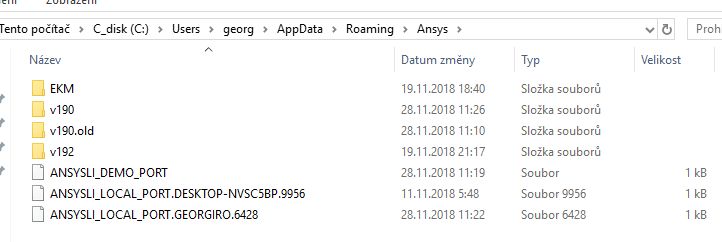
      Can you show us a screen shot of which folder you changed the name of?  

    • Georgiro
      Subscriber

    • Georgiro
      Subscriber

      That is what you have said...

    • Georgiro
      Subscriber

      And before I made one called Ansys I made it to V190.old. The only problem was that I did not see any link/path there, so...??? So it does not seem so non-problematic as I see it...and because I have made a small model and it started to be only as a surface not a volume, I have another huge problem to made it from surfaces to one volume as it was before...

Viewing 21 reply threads
  • The topic ‘Hello, do you have an idea, how to change the set up of Ansys 19.0.’ is closed to new replies.

[bingo_chatbox]