-
-
September 15, 2018 at 5:27 pm
Ondrafida
SubscriberHello,
I have a problem with my last step in ANSYS - Solution (Solve). Geometry, Mesh is fine, but I still getting error:
Text: "An unknown error occurred during solution. Check the Solver Output on the Solution Information object for possible causes."
Association: "Project>Model>Static Structural>Solution"
I already tried everything..
Help me please.
-
September 15, 2018 at 6:05 pm
peteroznewman
SubscriberThere are so many reasons for this. Can you use the Attach button to upload a Workbench Project Archive .wbpz file to your post so I can see it?
-
September 15, 2018 at 6:16 pm
Ondrafida
SubscriberFile is uploaded. Thank you
-
September 15, 2018 at 6:19 pm
peteroznewman
SubscriberWhat version of ANSYS are you using?
-
January 30, 2023 at 3:47 pm
me.creations555
SubscriberMr.peteroznewman. #peteroznewman @peteroznewman
HI SIR, GIVE ME YOUR E-MAIL ID
-
-
September 15, 2018 at 6:24 pm
Ondrafida
SubscriberVersion 19.0 . And I already tried versions 18.2 and 19.1 - same problem. And as you can see model is quite easy ...
-
September 15, 2018 at 6:25 pm
peteroznewman
SubscriberI solved your model on ANSYS 19.1 and it solved without a problem. There is nothing wrong with this model.
The issue is with your installation of ANSYS.
Click on the Solution Information folder and select all the text (Ctrl-A) that appears in the window and copy paste into a text editor and attach that text file to your post above.
-
September 15, 2018 at 6:39 pm
Ondrafida
SubscriberUploaded.
-
September 15, 2018 at 7:05 pm
peteroznewman
SubscriberHere is what you can see in the Solution Output file...
GPU ACCELERATOR OPTION REQUESTED
1 GPU ACCELERATOR DEVICES REQUESTED
RELEASE= Release 19.0 BUILD= 19.0 UP20171214 VERSION=WINDOWS x64
CURRENT JOBNAME=file 20
0:08 SEP 15, 2018 CP= 0.094
*** FATAL *** CP = 0.234 TIME= 20
0:08
While 1 GPU devices have been detected on this machine, no supported
GPU devices have been detected. Only Tesla-series or Quadro
K5000/K5200/K6000/M6000/P5000/P6000/GP100 GPU devices are supported.
Please verify that a supported GPU device is installed on this machine
or rerun without using the -acc command line option.
************************************************************************
The above error is non-recoverable by ANSYS
ANSYS run terminated by the indicated error
Current data base saved if possible.
************************************************************************
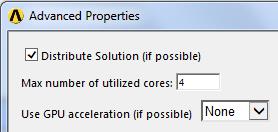
The fix is simple. In Mechanical, Tools, Solve Process Settings..., Advanced...
Set Use GPU acceleration to None then click OK.
This is a one-time fix and should not have to be repeated again.
Regards,
Peter
-
September 15, 2018 at 7:11 pm
Ondrafida
SubscriberThank you!!!
-
October 7, 2018 at 3:33 pm
HAB!
SubscriberHi Peteroznewman,
I am having an error stating that " An unknown error occurred during solution. check the Solver Output on the Solution Information object for possible causes".
I am doing Thermal & Structural analysis on the rocket nozzle. Thermal analysis is successful but structural analysis is showing this error. I am using Ansys workbench 18.2. Can you help me through this?
Thanks.
-
October 7, 2018 at 4:45 pm
peteroznewman
SubscriberHello HAB!
Please copy the text above, create a New Discussion in the Structural Mechanics section and paste in the text, then delete the post above.
This discussion is showing as Solved, which will limit who is going to look at it.
-
August 12, 2019 at 10:57 am
pushkarkawale
SubscriberHello,
I have a problem in ANSYS Workbench Solution. I have made an analysis setting as Store Output Results at last point only to solve the issue related with disk space. Now in solution, it shows following error message.
Text: "An unknown error occurred during solution. Check the Solver Output on the Solution Information object for possible causes."
*** ERROR *** CP = 29929.479 TIME= 21:42
0
The program is unable to open file file.DSP. If the suggestions in the
associated error messages immediately preceding and/or following this
error message do not help resolve the file issue, please send the data
leading to this operation to your technical support provider, along
with the I/O error code of 30 and the system error code of 32, for
help in determining the possible reasons as to why this file could not
be opened.
NUMBER OF WARNING MESSAGES ENCOUNTERED= 1
NUMBER OF ERROR MESSAGES ENCOUNTERED= 1
***** PROBLEM TERMINATED BY INDICATED ERROR(S) OR BY END OF INPUT DATA *****
Help me please for this problem.
-
August 12, 2019 at 11:49 am
Rob
Forum ModeratorLocking to prevent confusion with new topic.
-
March 28, 2021 at 10:55 pm
dioneAssane
SubscriberHello, nI have a problem with my last step in ANSYS - Solution (Solve). Geometry, Mesh is fine, but I still getting error: n nText: An unknown error occurred during solution. Check the Solver Output on the Solution Information object for possible causes.nAssociation: Project>Model>Static Structural>SolutionnI already tried everything.. nI have the same problem in my side . I tried the solution above but nothing works.nHelp me please. n -
March 29, 2021 at 3:27 am
peteroznewman
SubscriberDuplicate question, here is the original post: /forum/discussion/26289/unkown-error-in-ansys#latestn-
April 13, 2023 at 4:59 pm
Shady Sawires
Subscriberplease, could you help me with my question? it is urgent.
-
-
April 13, 2023 at 4:54 pm
Shady Sawires
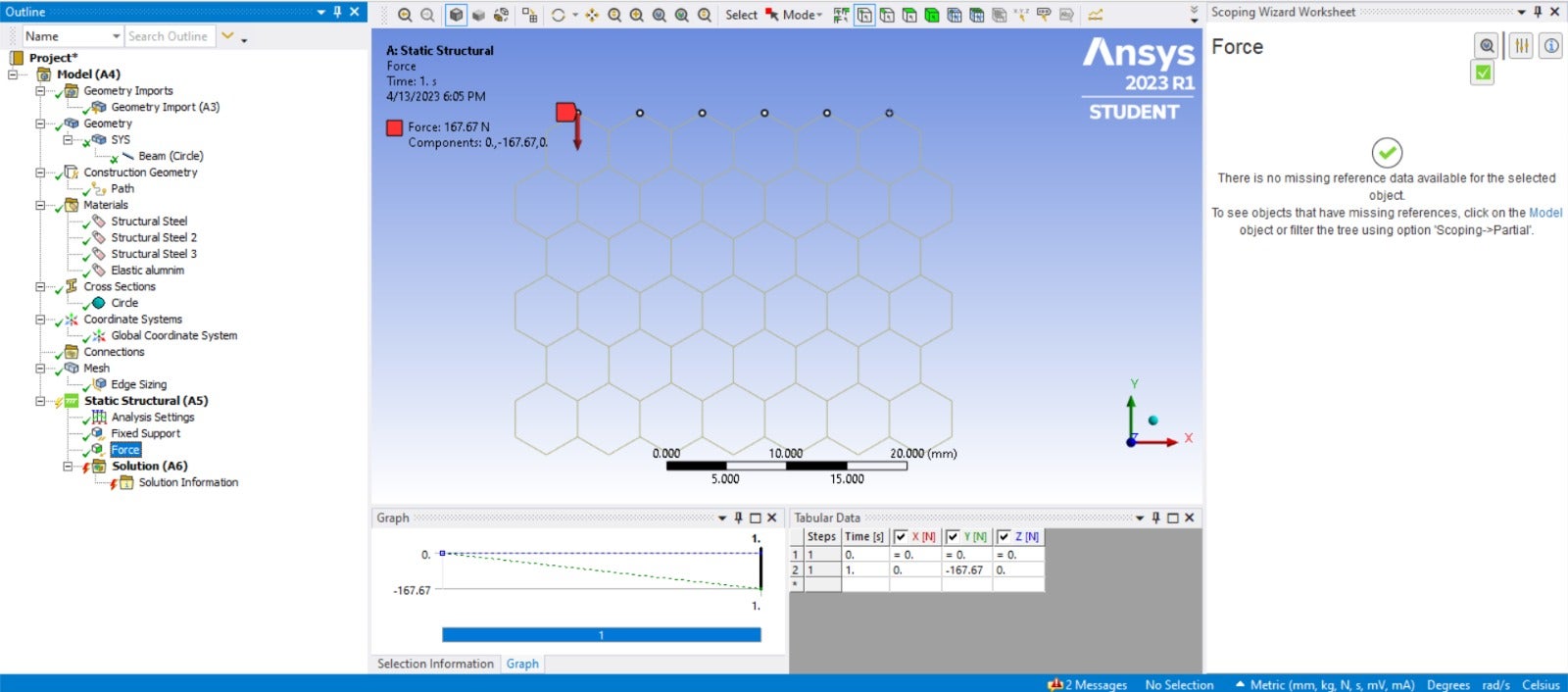
SubscriberHi, I need an urgent reply to this question. this is the solution information output message when I try to solve the model.
Ansys Mechanical Enterprise Academic Student------------------------------------------------------------------| || W E L C O M E T O T H E A N S Y S (R) P R O G R A M || |------------------------------------------------------------------********************** ANSYS MAPDL 2023 R1 LEGAL NOTICES *********************** ** Copyright 1971-2023 Ansys, Inc. All rights reserved. ** Unauthorized use, distribution or duplication is ** prohibited. ** ** Ansys is a registered trademark of Ansys, Inc. or its ** subsidiaries in the United States or other countries. ** See the Ansys, Inc. online documentation or the Ansys, Inc. ** documentation CD or online help for the complete Legal ** Notice. ** *********************** ** THIS ANSYS SOFTWARE PRODUCT AND PROGRAM DOCUMENTATION ** INCLUDE TRADE SECRETS AND CONFIDENTIAL AND PROPRIETARY ** PRODUCTS OF ANSYS, INC., ITS SUBSIDIARIES, OR LICENSORS. ** The software products and documentation are furnished by ** Ansys, Inc. or its subsidiaries under a software license ** agreement that contains provisions concerning ** non-disclosure, copying, length and nature of use, ** compliance with exporting laws, warranties, disclaimers, ** limitations of liability, and remedies, and other ** provisions. The software products and documentation may be ** used, disclosed, transferred, or copied only in accordance ** with the terms and conditions of that software license ** agreement. ** ** Ansys, Inc. is a UL registered ** ISO 9001:2015 company. ** *********************** ** This product is subject to U.S. laws governing export and ** re-export. ** ** For U.S. Government users, except as specifically granted ** by the Ansys, Inc. software license agreement, the use, ** duplication, or disclosure by the United States Government ** is subject to restrictions stated in the Ansys, Inc. ** software license agreement and FAR 12.212 (for non-DOD ** licenses). ** **********************2023 R1Point Releases and Patches installed:Discovery 2023 R1Autodyn 2023 R1SpaceClaim 2023 R1CFX (includes CFD-Post) 2023 R1Chemkin 2023 R1EnSight 2023 R1FENSAP-ICE 2023 R1Fluent (includes CFD-Post) 2023 R1Polyflow (includes CFD-Post) 2023 R1Forte (includes EnSight) 2023 R1TurboGrid 2023 R1Aqwa 2023 R1Speos 2023 R1Mechanical Products 2023 R1Material Calibration App 2023 R1ACIS Geometry Interface 2023 R1AutoCAD Geometry Interface 2023 R1Catia, Version 4 Geometry Interface 2023 R1Catia, Version 5 Geometry Interface 2023 R1Catia, Version 6 Geometry Interface 2023 R1Creo Elements/Direct Modeling Geometry Interface 2023 R1Creo Parametric Geometry Interface 2023 R1Inventor Geometry Interface 2023 R1JTOpen Geometry Interface 2023 R1NX Geometry Interface 2023 R1Parasolid Geometry Interface 2023 R1Solid Edge Geometry Interface 2023 R1SOLIDWORKS Geometry Interface 2023 R1Academic Student 2023 R1** MAPDL COMMAND LINE ARGUMENTS **BATCH MODE REQUESTED (-b) = NOLISTINPUT FILE COPY MODE (-c) = COPYDISTRIBUTED MEMORY PARALLEL REQUESTED4 PARALLEL PROCESSES REQUESTED WITH SINGLE THREAD PER PROCESSTOTAL OF 4 CORES REQUESTEDINPUT FILE NAME = D:\Family\_ProjectScratch\Scr2789\dummy.datOUTPUT FILE NAME = D:\Family\_ProjectScratch\Scr2789\solve.outSTART-UP FILE MODE = NOREADSTOP FILE MODE = NOREADRELEASE= 2023 R1 BUILD= 23.1 UP20221128 VERSION=WINDOWS x64CURRENT JOBNAME=file0 17:53:42 APR 13, 2023 CP= 0.078 -

June 4, 2023 at 9:13 am
HH AA
SubscriberWhat happened to this?
Hello,
I have a problem with my last step in ANSYS - Solution (Solve). Geometry, Mesh is fine, but I still getting error:
-
- The topic ‘An unknown error’ is closed to new replies.
-
4618
-
1530
-
1386
-
1209
-
1021
© 2025 Copyright ANSYS, Inc. All rights reserved.