TAGGED: body-interaction, faces, interfaces, interference, spaceclaim
-
-
August 9, 2023 at 8:40 pm
-
August 10, 2023 at 5:12 am
Keyur Kanade
Ansys EmployeeThere is no direct way. You can use Workbench → Share option to check these faces.
Please go through help manual for more details
Regards,
Keyur
How to access Ansys Online Help Document
Guidelines on the Student Community
Fluids Engineering Courses | Ansys Innovation Courses
-
August 10, 2023 at 10:29 am
peteroznewman
SubscriberHi Sterling,
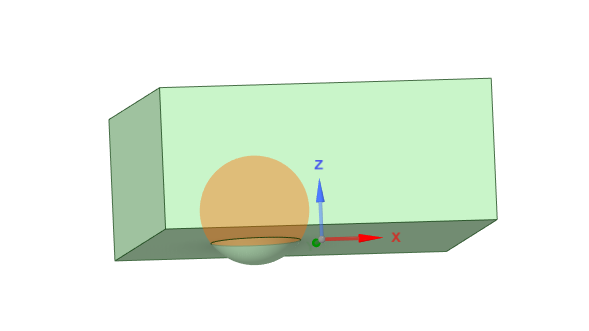
In SpaceClaim, on the Design tab, use the Combine tool. Select the block as the Target then select the sphere as the cutter object. It will subtract the two and leave you with a solid of interference and the block will have a spherical cavity in it. You can delete the solid of interference if you don't want it.
You can create a surface from the cavity face by simply selecting the face and type Ctrl-C, Ctrl-V to copy/paste the face and create a surface.
Regards,
Peter -
August 10, 2023 at 7:33 pm
Sterling Butters
Subscriber@peteroznewman That indeed does answer the question. I was attempting to provide a minimalist example to achieve my ultimate goal which is more complicated in my opinion. See, I was trying to get all wetted surfaces in a more complex geometry (imagine thousands of spheres and other terahedrons inside the rectangular prism). By creating the rectangular prism with the Enclosure feature, I was able to then detach all the associated surfaces and select the correct ones. I may make a separate post with a better representation of my problem and provide an answer there. Thanks for the help!
-
- The topic ‘SpaceClaim: Detect touching faces’ is closed to new replies.
-
6415
-
1906
-
1457
-
1308
-
1022
© 2026 Copyright ANSYS, Inc. All rights reserved.