-
-
July 11, 2018 at 10:20 pm
hamda
Subscriber Hi there,
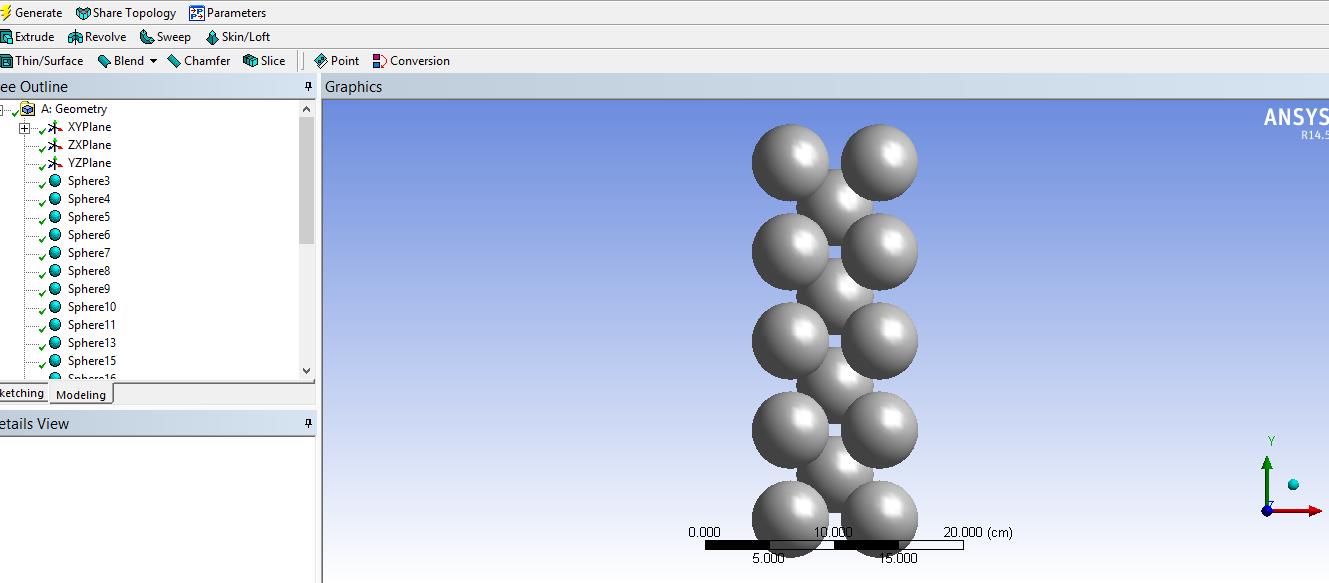
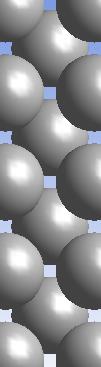
I modeled a packed bed of spheres through Ansys workbench (see pic1) and now I want to edit it and delete some of its parts to obtain a desired geometry (see pic 2). But I don't know how to do it. I select "add frozen" for each sphere and then when I want to extrude a cube to slice spheres, there is no option to slice.
pic1
 pic2
Â
-
July 12, 2018 at 12:25 am
peteroznewman
SubscriberSelect the YZ Plane, then select Create, New Plane.
You will build a New Plane based on the YZ Plane, but you will Transform 1, (RMB) and select Offset Z. Type in an offset value that will put the new plane through the center of the column of spheres on the right. Generate.
With the new plane selected, Create Slice, and Generate. All the sphere will be cut. You can suppress the half you don't want. Box select can be useful here. Repeat for the other side.
-
July 12, 2018 at 12:38 pm
Rahul Kumbhar
Ansys Employee'Slice' option in 'Extrude' is not available for frozen bodies. You may create a hollow box and subtract all other bodies from it.
-
July 12, 2018 at 1:38 pm
hamda
Subscriber
Thank you,
I have learned new things about this issue. When I posted my question, I was still working on my problem and as rkumbhar said, 'slice' is not available for rfozen bodies, so I created several boxes (about 4) and "add frozen" and then using "Boolean" to subtract some parts of spheres and I obtained the following geometry.
I am new member and never thought that anyone answered my question swiftly.. Thanks dudes.
-
June 4, 2020 at 1:25 am
ehsan120
SubscriberHi,
I have the same problem. I have a sandwich structure made of dozens of layers and I want to make a hole through all of them. However, because they are frozen bodies, I cannot do so. I cannot unfreeze them because then I cannot assign different material properties to each layer.Â
Is there any solution for this?
Thanks
-
- The topic ‘Editing Geometry’ is closed to new replies.
-
5899
-
1906
-
1420
-
1306
-
1021
© 2026 Copyright ANSYS, Inc. All rights reserved.


.jpg?width=690&upscale=false)