Hello SK Abdul Alim,
The TPU (Thermoplastic Polyurethane) is a Polymer Material. You can decide which aspects of the material you need to incorporate considering the concerned simulation.
Once going into the Engineering Data tab, you can add the name for new material and you can drag and drop the required properties from the Toolbox panel.
Another way can be duplicating the closest available material to TPU and renaming the same and updating the properties to the renamed material.
Please find the following image to get an idea of the same-
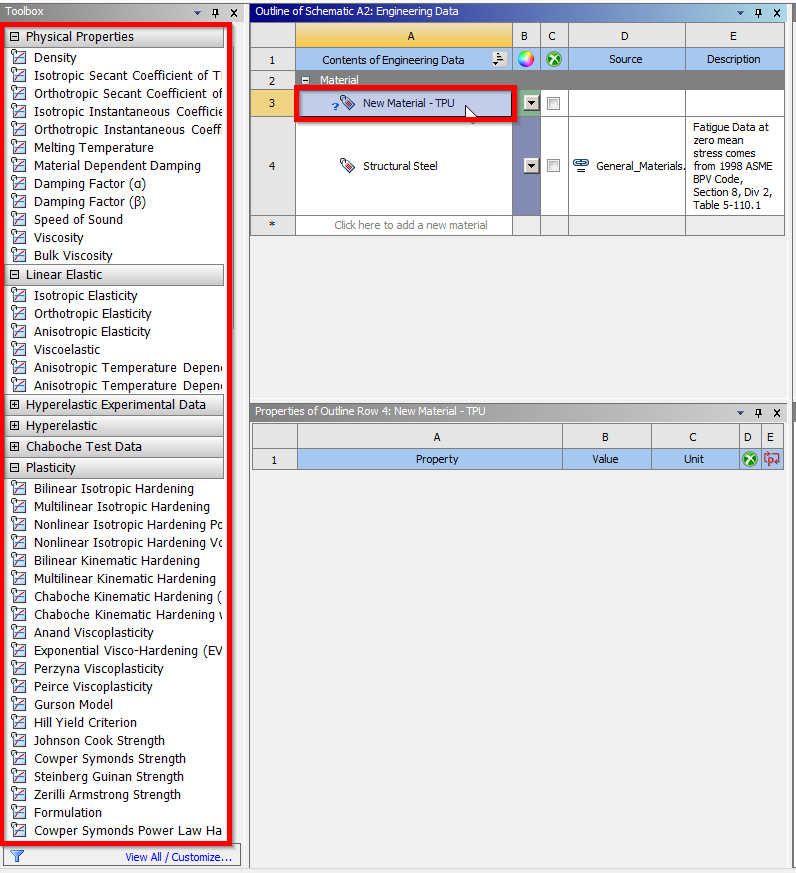
Please refer to the following link for more insights- Creating a New Material (ansys.com)
Hope this helps!
Thanks,
Sahil
/forum/forums/topic/how-to-access-the-ansys-online-help/
/forum/forums/topic/guidelines-for-posting-on-ansys-learning-forum/#latest


















 You are navigating away from the AIS Discovery experience