I'm on ANSYS 19 Student version and trying to slove structural problems on beams using the Mechanical APDL (Release 19.0 UP20171214).
Here's the issue I'm facing -
When ever I hit the Solution > Solve > Current-LS option The "Solve Current Load Step" dialog pops up and when I hit the OK button in the dialog, nothing happens. The problem is not solved.
I've recorded my steps in a video, click the below link to watch it.
https://youtu.be/rRMOKPVR76g
Alternatively, below I've quoted the steps I followed in the video -
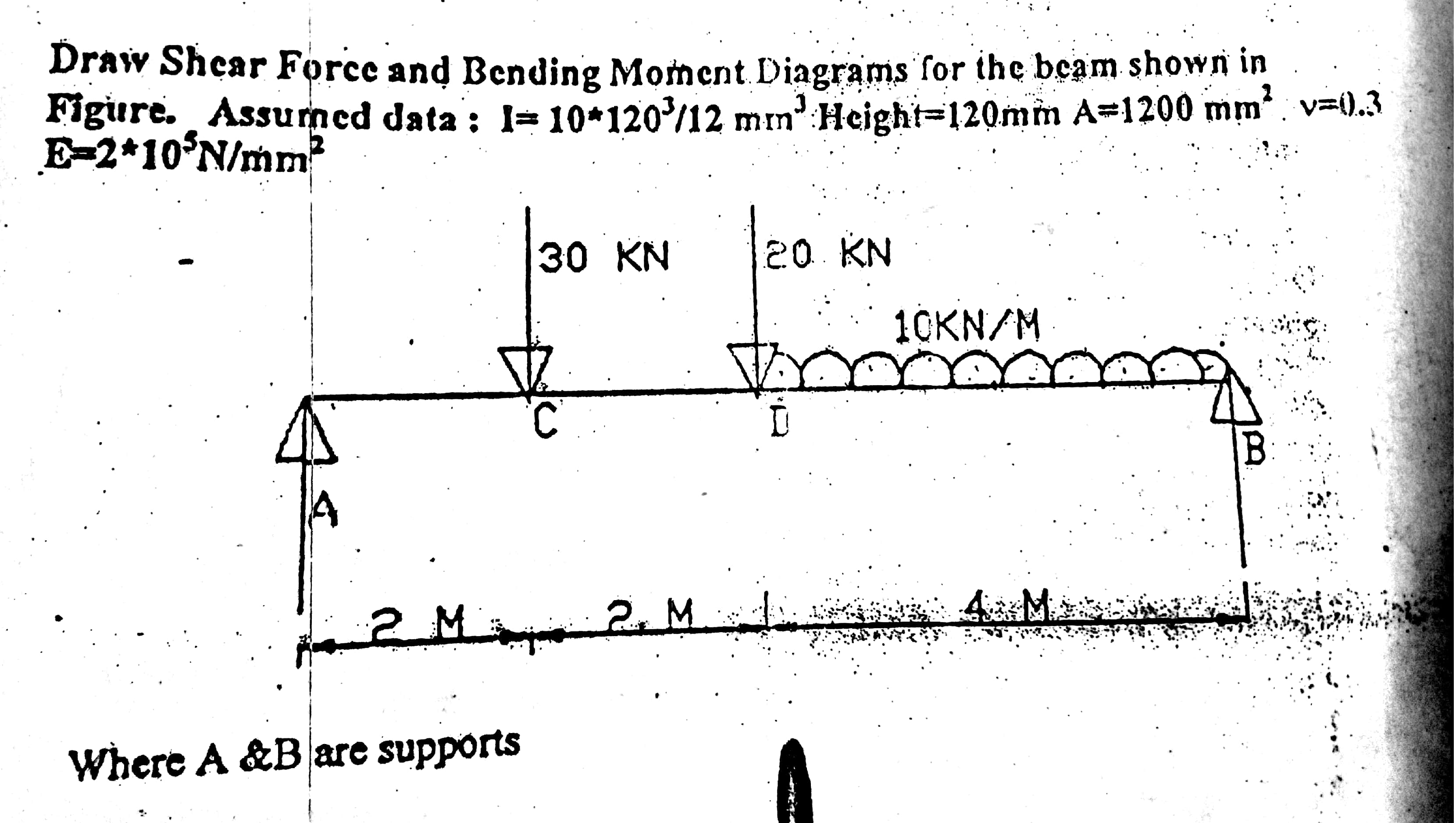
1. Preference > Structural
2. Preprocessor > Element type > Add/edit/del > Add > Element type - Beam, 2 node 188 (sometimes 3 node 189) > OK
3. Material Properties > Material Model > Structural > Linear > Elastic > Isotropic > EX = 2e5, PRXY = 0.3. > ok
4. Sections > Beams > Common Sections > Sub type = Rectangle, Offset = centroid, B = 100, H = 120
5. Modelling > Create > Keypoints > In Active CS > X = 0 > X = 2000 > X = 4000 > X = 8000 > OK
6. Modelling > Create > Lines > Lines > Straight lines > [Connecting every two consecutive nodes to create three lines.]
7. Meshing > Size ctrls > Manual size > Lines > All lines > In input box - No of element divisions = 20 (tried increasing the number too).
8. Meshing > Mesh > Lines > [All Lines Meshed].
9. Loads > Define loads > Apply > Structural > Displacement > No Keypoints > Selected Keypoints 1 and 4 > DOF to be constrained = UY
10. Loads > Define loads > Apply > Structural > Force/Moment > No keypoints > [On node 2, Dir = UY , val = -30000] > [On node 3, Dir = UY , val = -20000]
11. Loads > Define loads > Apply > Structural > Pressure > On beam > Selected line 3 > Load key = 2, Pressure val = 10 > Ok
12. Solution > Solve > Current LS > OK > {Solution successful dialog is not displayed, Hence problem is not solved}
Thanks.

















 You are navigating away from the AIS Discovery experience