TAGGED: siwave
-
-
June 24, 2023 at 11:22 am
Mallikarjuna.koppanati
SubscriberHi,
In Siwave, In Home tab if we press "Circuit element parameters" to open "Circuit element properties",
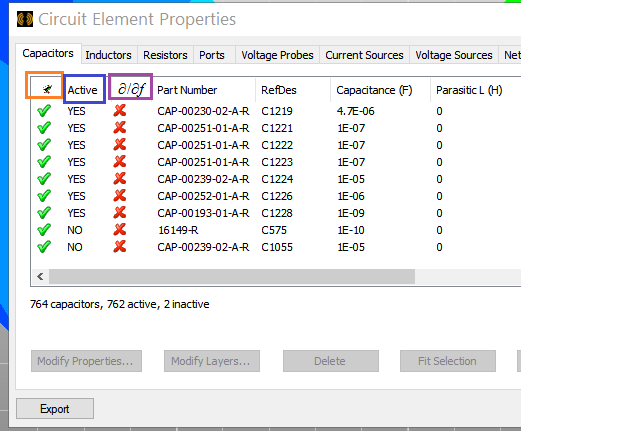
for each Tab(Capacitors,Inductors,Resistors,Ports,Voltage probes etc) We are seeing Multiple columns
Like Active, ∂/∂f, Part number, Refdes etc.
In these coulmns
what is the first column(some symbol i can see, not sure what it is) mean, If i hover the curser nothing was shown (Yes/No means ?)
2nd column is Active (Yes/No) - If i give "No" for a component , is this mean that component won't be considered for simulation?
3rd column ∂/∂f (√/X) indicates what? If i give √(Yes) for an inductor what happens?
Below is the picture for reference.

Thanks In advance.
-
June 26, 2023 at 1:34 pm
Mrinmoy Bharadwaj
Ansys EmployeeThe first coulmn indicates the visibility of the component in the UI.
The second column indicates whether or not to include the component into the simulation.
The third column is for sensitivity. If the user wants to check the sensitivity of the result with respect to that component, the “YES” option must be selected for sensitivity.
Please browse through the help document of the tool for more details.
-
June 26, 2023 at 3:46 pm
Mallikarjuna.koppanati
SubscriberHi,
Thanks for the response.
One doubt on the same,
First column indicates visibility of the component in UI,
1) if i give “x” for a particular component,
is it just not shown in the view (or) it won’t be considered for simulation also (or) is it permenently deleting the object like (edit->delete option).
2) I don’t want to consider some of the diodes also for simulation, which are not shown in this “Circuit element properties” menu. Is there any option to deactivate diodes/IC’s from simulation.
Regarding documention.
I have seen mention of ∂/∂f section 5.38(page 214) in Siwave help pdf as
I have not seen much explanation on what is meant by “Activate/Deactivate” or "visibility(1st column)" on this particular “Circuit element parameters” sheet.
I want to mention it, because i want to make sure i am seeing correct doc for reference.
Please correct me if i am not seeing correct doc.
-
June 26, 2023 at 5:07 pm
Mrinmoy Bharadwaj
Ansys Employee- "x" in the visibility column only hides the component from view. To delete a component, you have to select it in the list and press "delete"
- To exclude a component in the simulation, you must either deactivate or delete the compoent. To deactivate the component, select the corresponding component and toggle the "Active" option to "No"
You are referring to the correct document. Activate and deactivate are self-explanatory terms and so, the detailed explanation to these aren't necessary. If you watch the icon of the first column carefully, it resembles the eye of a person which is used to indicate visibility.
-
June 27, 2023 at 4:00 am
Mallikarjuna.koppanati
SubscriberThanks for the reply.
- clear.
- Only
are available in Circuit element parameters,where i can see option to Activate/Deactivate. I am asking about any diode like CR14,CR7 in my design or any IC like U3,U4… which are not shown in this dialog, If need to deactivate that diode/IC from simulation – How can i do it.I tried selecting that component(diode/IC) and right click to see any properties which can used to activate/deactivate – But i didn’t find any.
Thanks for confirming the documentation,
-
June 27, 2023 at 5:52 am
Mrinmoy Bharadwaj
Ansys EmployeeExcept R, L and C, all other devices aren’t actually present in the PCB simulation model. Only the pads for the pins of the component and an outline representing the component footprint are present on the model file. So there is no need of activating/deactivating any component except R, L and Cs.
-
June 27, 2023 at 6:14 am
Mallikarjuna.koppanati
SubscriberThanks Mrinmoy. got it.
-
-
- The topic ‘Siwave- Home-> Circuit element properties Tabs information required’ is closed to new replies.

-
4863
-
1587
-
1386
-
1242
-
1021
© 2026 Copyright ANSYS, Inc. All rights reserved.