TAGGED: installation
-
-
February 6, 2018 at 12:52 pm
chris
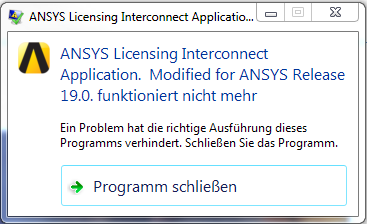
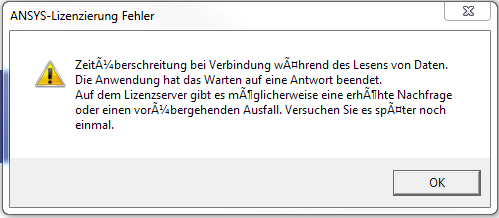
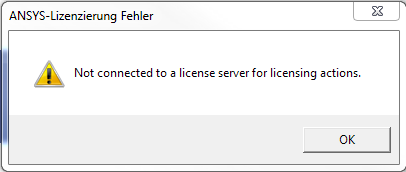
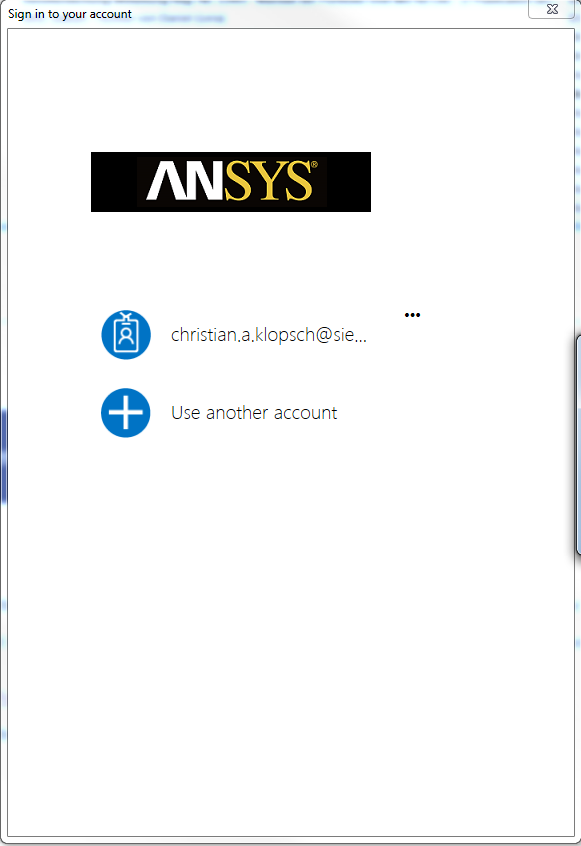
SubscriberHello, just downloaded the current version of DL and activated the test phase by clicking the "start trial" button. Various licensing error messages appeared after starting the program and signing in (see pictures). The R19 versions of SpaceClaim, Fluent and CFD-Post are running so the R19 Licinsing Manager is working correctly. Maybe the problem arises because we use at our company a global license pool / manager /server. Thank you in advance for your help to get DL running. Best regards Christian
-
February 6, 2018 at 5:19 pm
Naresh Patre
Ansys EmployeeHello Chris,
Are you able to open Discovery SpaceClaim and Discovery AIM successfully or the error persist with these products as well?
Can you try uninstalling and reinstalling Discovery products? There was one instance where reinstalling Discovery products helped to overcome one Workbench related issue.
-
February 7, 2018 at 7:09 am
chris
SubscriberHello Naresh,
thank you very much for your quick reply and the hints.
Yes, the same problem occurs with Discovery SpaceClaim and Discovery AIM.
Maybe the point is that I installed Discovery on my local machine whereas the rest of R19 (fluent, SC, CFD-Post is a network installation.
After uninstalling, should I reinstall DL again on the local machine (not to interfere with or mess up the network installation) or add DL to our network installation?
Thanks in advance.
Christian
-
February 7, 2018 at 7:25 am
Naresh Patre
Ansys Employeechris
Before uninstalling, Can you send the contents of the %temp%.ansys (note the 'dot' before ansys in this) directory for investigating this issue?
-
February 7, 2018 at 8:23 am
chris
SubscriberNaresh Patre I already uninstalled and reinstalled DL to the network installation, sorry. As the error stays the same I can now give you the information from the network install anyway. Enclosed the files from %temp%.ansys🛈 This post originally contained file attachments which have been removed in compliance with the updated Ansys Learning Forum Terms & Conditions -
February 8, 2018 at 11:19 am
Naresh Patre
Ansys EmployeeHi Chris,
Unfortunately, the temp files didn't help the licensing team much in troubleshooting the issue. However, another user was able to overcome this issue by uninstalling the Discovery Live Tech preview version. So, if you have installed this tech preview earlier, can you try uninstalling it and see if it helps to launch Discovery products.
In case it doesn't work, can you send following files from folder "C:Program FilesANSYS Inc"
- install.err
- install.log
- install_licconfig.log
Your patience is highly appreciated while we are trying to figure out the root cause of this issue and find out a solution to fix this problem.
-
February 8, 2018 at 12:24 pm
chris
SubscriberNaresh Patre Hi Naresh, Thanks for your reply. I uninstalled the TechPreview prior to installing DL19. Enclosed I send you the files you asked for. In addition I installed DL19 on a "clean" Laptop where no Ansys product was already installed and got the exact same error messages. So I attached the install files and temp files from the laptop as well🛈 This post originally contained file attachments which have been removed in compliance with the updated Ansys Learning Forum Terms & Conditions -
February 8, 2018 at 3:35 pm
Naresh Patre
Ansys Employeechris Hi Chris,
Can you check if below files are present in ~ANSYS IncShared FilesLicensingwinx64 folder:
FlxComm64.dll
FlxCore64.dll
-
February 9, 2018 at 8:46 am
chris
SubscriberNaresh Patre Hello Naresh, Thank you for your reply. Yes, both files are present, I uploaded them below.🛈 This post originally contained file attachments which have been removed in compliance with the updated Ansys Learning Forum Terms & Conditions -
February 9, 2018 at 9:44 am
Naresh Patre
Ansys Employeechris Hi Chris,
Thanks for confirming. Can you try activating the license as per below mentioned steps and let me know if it helps:
-
Launch the Windows Command Prompt from the start menu by entering “cmd” into the search field.
-
In the command prompt, type in:
cd C:Program FilesANSYS IncShared FilesLicensingwinx64 -
Once in that directory, run the following command:
ansysls_client.exe -ActivateLicenseEntitlement
Specify the Activation ID
at the end of above command. You can find the activation ID by logging into your Discovery account through below link: -
-
February 9, 2018 at 10:08 am
chris
SubscriberNaresh Patre
Hi Naresh,
Thank you for the hint. I ran the command and received a message (in german) telling that a connection to the License-Server could not be established:
X:Ansys IncShared FilesLicensingwinx64>ansysls_client.exe -ActivateLicenseEn
titlement Act-4e268126-0da3-4836-ab9b-3a3d28ea5dd9
2018/02/09 11:02:35 CONNECT_ERROR
0/0/0/0
32
Zu dem folgenden Lizenzserver konnte keine Verbindung hergestell
t werden: 58469@localhost. Zeitüberschreitung bei Verbindung während der Verbi
ndungsherstellung zum Server..
ERROR: Unable to activate entitlement with activation id 'Act-4e268126-0da3-4836
-ab9b-3a3d28ea5dd9', error:
Zu dem folgenden Lizenzserver konnte keine Verbindung hergestellt werden: 58469@
localhost. Zeitüberschreitung bei Verbindung während der Verbindungsherstellun
g zum Server.. -
February 9, 2018 at 10:16 am
chris
SubscriberNaresh Patre
...same error message with the laptop installation....
-
February 9, 2018 at 10:19 am
chris
SubscriberNaresh Patre
....but in English.... so I also include this one:
C:Program FilesANSYS IncShared FilesLicensingwinx64>ansysls_client.exe -Act
ivateLicenseEntitlement Act-4e268126-0da3-4836-ab9b-3a3d28ea5dd9
2018/02/09 11:15:52 CONNECT_ERROR
0/0/0/0
32
Could not connect to license server: 61576@localhost. Connection
timed out while connecting to the server.
ERROR: Unable to activate entitlement with activation id 'Act-4e268126-0da3-4836
-ab9b-3a3d28ea5dd9', error:
Could not connect to license server: 61576@localhost. Connection timed out while
connecting to the server.
-
-
February 15, 2018 at 11:11 am
g.vandeberg
SubscriberSame issue here. We tried all step still no solution.
Can we increase the time out?
-
February 15, 2018 at 2:01 pm
g.vandeberg
SubscriberCould it be that the ANSYSLI_DEVICE_USER is empty?
When I compare the log with a system where it is working I can see it shows the user id but on the system where it is not working it shows no id.
-
February 16, 2018 at 2:44 pm
Brian Bueno
Ansys EmployeeHello everyone,
Implementing these settings will resolve your problem in almost all cases:
- Port 443 is open in/out bound
- The executable ansysls_client.exe is on firewall exclusion list
- The PC is connected to the internet when activating
You should also confirm that you're able to connect to
our verification server using the following in the Windows command prompt: -
February 16, 2018 at 2:48 pm
g.vandeberg
SubscriberPing has no issues, 0% loss.
-
- The topic ‘DL Licensing error messages’ is closed to new replies.
-
6269
-
1906
-
1457
-
1308
-
1022
© 2026 Copyright ANSYS, Inc. All rights reserved.