Hello Roberto
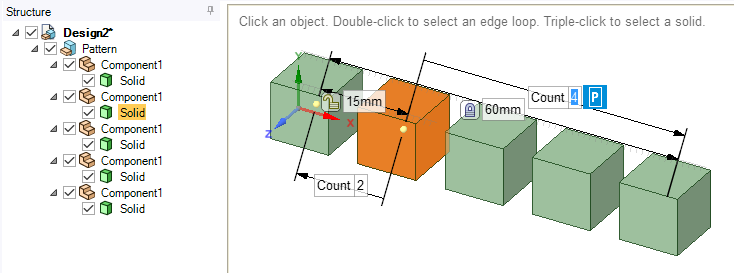
When you create a series (pattern), the components are created for each object of the series (pattern). The properties of pattern (count, pitch and total distance) are tied with the components. As shown below, if you select any body from the series (pattern) you get access to the pattern properties which can be modified.
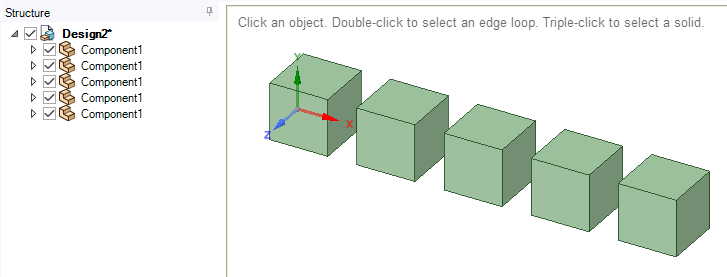
If you don't need to access the pattern properties later on, but would still like to have the bodies as instances (dependent) i.e. editing any body from the series edits all remaining bodies, you can simply select all the components and drag it on the topmost assembly in the structure. The pattern component will now be empty and can be deleted. The structure will look like as shown below.
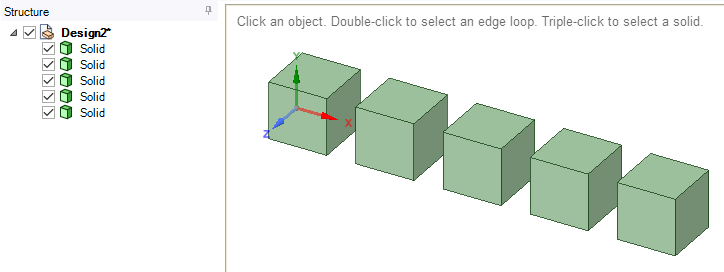
If you don't need pattern properties, as well as instances (dependency) i.e. editing any body from the series, edits all remaining bodies, select all series bodies in graphics window, then right click and select "Locate in Structure tree". This will select all the bodies (an not its components) in the structure tree. Now simply drag the selected bodies on the topmost structure and then delete all the empty components. You will now have only the bodies listed in the structure tree as shown below.


















 You are navigating away from the AIS Discovery experience