3D Design

3D Design

Topics related to Ansys Discovery and Ansys SpaceClaim.

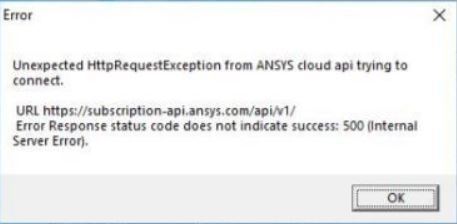
500 internal server error

TAGGED: 

    • Roberto Granito
      Subscriber
      Hi, from 02/03 is happening to many users and new installations this error and fail to access spaceclaim. I noticed that on that date windows did an update (lately the windows updates contrast spaceclaim I noticed and other programs). I tried to perform the following tests 1) Deactivation of firewall (domain network, public network, private network) but did not work, the error persists 2) Activation from the promt of the spaceclaim commands : cd C:Program FilesANSYS IncShared FilesLicensingwinx64 ansysls_client.exe -ActivateLicenseEntitlement ID but did not work, the error persists 3) deactivating windows defender : but did not work, the error persists (in some users arriving at this point spaceclaim starts, after started I can reactivate everything and continues to work spaceclaim) 4) restarted the computer, it still does not work 5 )Reactivated everything, firewall, defender ... arrested the pc. The PC is powered up now everything works   I do not understand if the error is caused by windows or by the management of license servers. I wrote you all the steps because maybe you need your technicians Regards
    • Naresh Patre
      Ansys Employee

      Hello Roberto

      Thank you for sharing the detailed steps that you performed and good to know that Discovery SpaceClaim is up and running. This issue has already been reported and the concerned team is looking into it. I may reach out to you if some additional information is needed in this context.

    • Roberto Granito
      Subscriber

      Naresh Patre Hi


      certainly if you need more information you can ask, I hope I can help you
      Regards

    • Naresh Patre
      Ansys Employee

      Hello  Roberto

      To investigate the httpsrequestexception error, the development team would need to know the UTC date & time of a sign-in attempt from within the product that led to the error below. Will it be possible for you to get these details?

    • Roberto Granito
      Subscriber
      Hi, I don't think because when I solved the problem I had deleted all the log files and the various activations in the client's PC. I can attach the errors of another customer with the same problem that you had solved
      🛈 This post originally contained file attachments which have been removed in compliance with the updated Ansys Learning Forum Terms & Conditions
    • Naresh Patre
      Ansys Employee

      Hello  Roberto

      The development team wants to know the UTC date & time of a sign-in attempt from within the product that led to the error. The log file doesn't provide these details. So the next time this error is encountered, I would request you to resend the log files along with the UTC date & time of a sign-in attempt

      • Roberto Granito
        Subscriber

        Naresh Patre 

        Hello today and another time this happened to a customer this error I attach you immediately the files you need.
        He logged in at 8:01 (see it also from the log file I put you in the folder).
        I noticed that this problem is always caused when the day before the PC updates to windows defender, I hope this can be useful to you to understand which is the cause of this error.


        Can I send you the files in a secure link?


        Regards

      • Naresh Patre
        Ansys Employee

        Roberto 

        I do not see any files attached here. I will send you a secure transfer link for uploading the required files.

        In addition to the files, please let me know the UTC time of a sign-in attempt, or the time zone of the user.

        You also mentioned that this problem is always caused when the day before the PC updates to windows defender. To confirm is this problem observed before the updates are installed or after installation?

      • Roberto Granito
        Subscriber

        Naresh Patre I sent you the files, let me know if they arrived.

        The problem occurs after updating windows defender (automatic windows updates).
        The customer access time when the error occurred and 8.01 am (Italian time)

    • Roberto Granito
      Subscriber

      Naresh Patre Hi

      Certainly I will send you all the files you need in case you still find this problem, I'm glad to help your team.

      Can you tell me in which folder I'm going to get the files you need? Regards

    • Naresh Patre
      Ansys Employee

      Hello  Roberto

      It would be the same files that you send earlier i.e. all files from %temp%.ansys folder, and the  UTC date & time of a sign-in attempt from the user when this error is encountered in future.

    • Roberto Granito
      Subscriber

      I understood
      thank you
       

    • Naresh Patre
      Ansys Employee

      Hello Roberto

      The licensing team investigated the issue and noticed that the system was temporarily down at the time when customer encountered this issue. The Windows update should not have created any problem. To confirm, can you ask the user to deactivate the subscriptions and launch Discovery application again? This will attempt to communicate with the server again and if the connection is successful, the application will launch successfully.  

      • Roberto Granito
        Subscriber

        Naresh Patre Hi I did so and it started again

        Regards

    • Naresh Patre
      Ansys Employee

      Hello Roberto

      Thank you for confirming that the application started successfully. So to conclude, this internal server error occurs when the system is down. The next time if this error encounters, please suggest the users to wait for some time and then try launching Discovery application again.

      • Roberto Granito
        Subscriber

        Naresh Patre Thank you

      • Roberto Granito
        Subscriber

        Naresh Patre  Hi, do you have a server problem today? Because many are releasing this error

      • Naresh Patre
        Ansys Employee
        Roberto yes, there are some server side issues which the concerned team is actively working on to fix it. Meanwhile, please advice the customers to deactivate the activation from command prompt and then activate it on required machine using activation command. The commands for deactivating and activating are mentioned in the below forum post: /knowledge/forums/topic/discovery-subscription-license-command-line-options/
      • Roberto Granito
        Subscriber

        Naresh Patre Hi, fine thank you

      • Roberto Granito
        Subscriber

        Naresh Patre Hi, I tried with the command prompt but even so it doesn't start spacecliam, I'll wait for the server to work.
        I only ask you for a favor, if you can write me when it works again.
        Thank you

    • Naresh Patre
      Ansys Employee

      Hello Roberto

      The server issue has been fixed and the activations can be released from the account page. Please check it and let me know if you still see any issues.

Viewing 11 reply threads
  • The topic ‘500 internal server error’ is closed to new replies.








