Ansys Assistant will be unavailable on the Learning Forum starting January 30. An upgraded version is coming soon. We apologize for any inconvenience and appreciate your patience. Stay tuned for updates.
3D Design

3D Design

Topics related to Ansys Discovery and Ansys SpaceClaim.

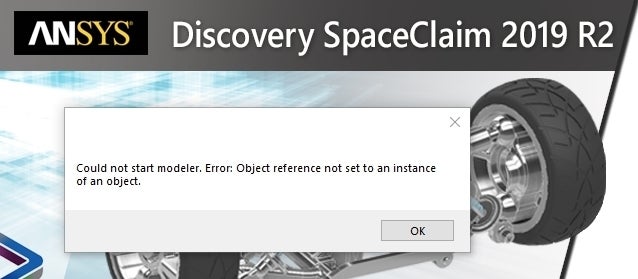
Could not start modeler. Error: Object reference not set to an instance of an object

    • ceo_office
      Subscriber

      Hi all,

      I cannot start my Discovery SpaceClaim 20019 R2 with the following message. Please let me know how to fix it! Thanks!

      Best regards,

    • subashni.satish
      Forum Moderator

      Hello nicolas.scire

      Could you please try uninstalling and reinstalling the software?

      While reinstalling please ensure that you have temporarily turned off the Firewall.

      Also, ensure that you run the 'Setup.exe' with administrator permissions (i.e 'Run as administrator').

    • ceo_office
      Subscriber

      Hi Subashni ,


      Thanks for your support! However, I still run into the same problem after your steps.

      It is noted that the program used to work properly. I start it today and detect the problem.


      I did some searches and it seems to be related to .NET framework. Re-installing the .NET Framework cannot fix the problem too.


      Best regards,

    • subashni.satish
      Forum Moderator

      Hello nicolas.scire

      I will have to consult my team regarding this.

      In the meantime, can you confirm if any changes were made to the OS ( Ex. Windows update) or Firewall recently?

      • ceo_office
        Subscriber

         Hi Subashni ,

        Thanks! I have used Kaspersky Internet Security for more than 2 years. It does not cause any problem with SpaceClaim as far as I know.

        I am using Windows 10 Home 1903. Windows Update automatically installs the updates. Hence, I am not sure if any change makes SpaceClaim broken.

        Best regards,

    • subashni.satish
      Forum Moderator

      nicolas.scire

      Thanks for sharing the information. I have written to the Discovery Team on your issue. I will get back to you as soon as I hear from them.

    • subashni.satish
      Forum Moderator

      Hello nicolas.scire

      Our team would like to investigate a few error log files. Could you please follow the below steps and send us the files at ansys-discovery-support@ansys.com.

      1. Please go to /Ansys Inc and send us :
        Install.log
        Install.err
      2. Next, Open "Event Viewer" by clicking the "Start" button 
      3. Click "Control Panel" > "System and Security" > "Administrative Tools", and then double-click "Event Viewer" 
      4. Click to expand "Windows Logs" in the left pane, and then select "Application". 
      5. Click the "Action" menu and select "Save All Events As". 
      6. Name the file "Applicationviewer.evtx" and click the "Save" button. 
      7. Click the "OK" button if you see a "Display Information" dialog. 
      8. Repeat Steps 3-5 and select "System" and save as "Systemviewer.evtx"
      9. Please send the 2 saved files.

      To summarize, your email should contain:

      • Install.log
      • Install.err
      • Applicationviewer.evtx
      • Systemviewer.evtx
      • ceo_office
        Subscriber

        Hi Subashni ,


        Thanks! I sent an email to the Support Team with the required files. It is noted that "Install.err" is not exist in the installation folder.


        Best regards,

    • subashni.satish
      Forum Moderator

      Hello nicolas.scire

      Thank you for sending the files. I have forwarded them to the concerned team. I will get back to you as soon as I hear from them.

    • ceo_office
      Subscriber

      SOLVED: The problem is fixed after re-installing "vcredist" packages in the "prereq" folder.

    • subashni.satish
      Forum Moderator

      nicolas.scire

      Good to know that our solution worked. 

      Hope you enjoy using ANSYS Discovery Products.

Viewing 8 reply threads
  • The topic ‘Could not start modeler. Error: Object reference not set to an instance of an object’ is closed to new replies.

[bingo_chatbox]