Ansys Assistant will be unavailable on the Learning Forum starting January 30. An upgraded version is coming soon. We apologize for any inconvenience and appreciate your patience. Stay tuned for updates.
3D Design

3D Design

Topics related to Ansys Discovery and Ansys SpaceClaim.

Override Contour Scale

    • Syed Saif Ali
      Subscriber
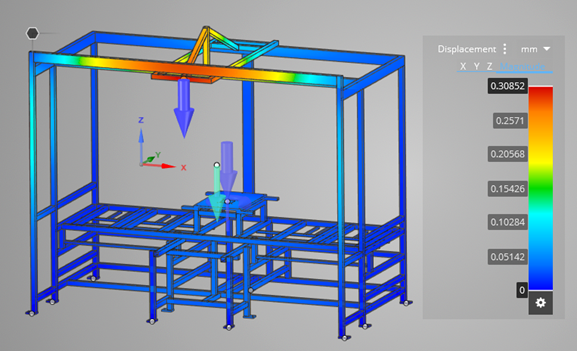
      Hi,   Can you possibly answer this. Did a specific load case sim on the same frame and I would like the scale to higher than what Discovery brings up. This is the results and the scale it shows by default.   I would like to override the scale and have it show 0 to 1.0 rather than 0 to .30852 This way nothing on the image will be red which looks bad even though the number is very small. I would then use the different scale image for a customer report, which again would look better as it would not show red.   I cannot seem to do this ?   Is this possible ?   Thanks, Ali
    • Charudatta Bandgar
      Subscriber

      Hello Syed Saif Ali

      You can click on the first value on your contour (0.30852mm in your case) and make it 1 to get the desired contour. Please check and let me know if that is what you were trying to get.

      Regards.

    • Syed Saif Ali
      Subscriber

      Hi Charudatta Bandgar ,


      I tried that way back and it didn't worked.

      • Charudatta Bandgar
        Subscriber
        Syed Saif Ali Hello, Apologies for the confusion, the contour can not pick a value greater than the maximum value the way you want. We thank you for sharing your feedback. We will share your idea/input with the product development team. Regards.
    • Syed Saif Ali
      Subscriber

      Hi Charudatta Bandgar ,

      No worries,

      Thanks for the answer.

Viewing 3 reply threads
  • The topic ‘Override Contour Scale’ is closed to new replies.
[bingo_chatbox]