I recently installed Discovery Student. Since my own PC only has an AMD card, I wasn't too worried about the explore phase being unavailable.
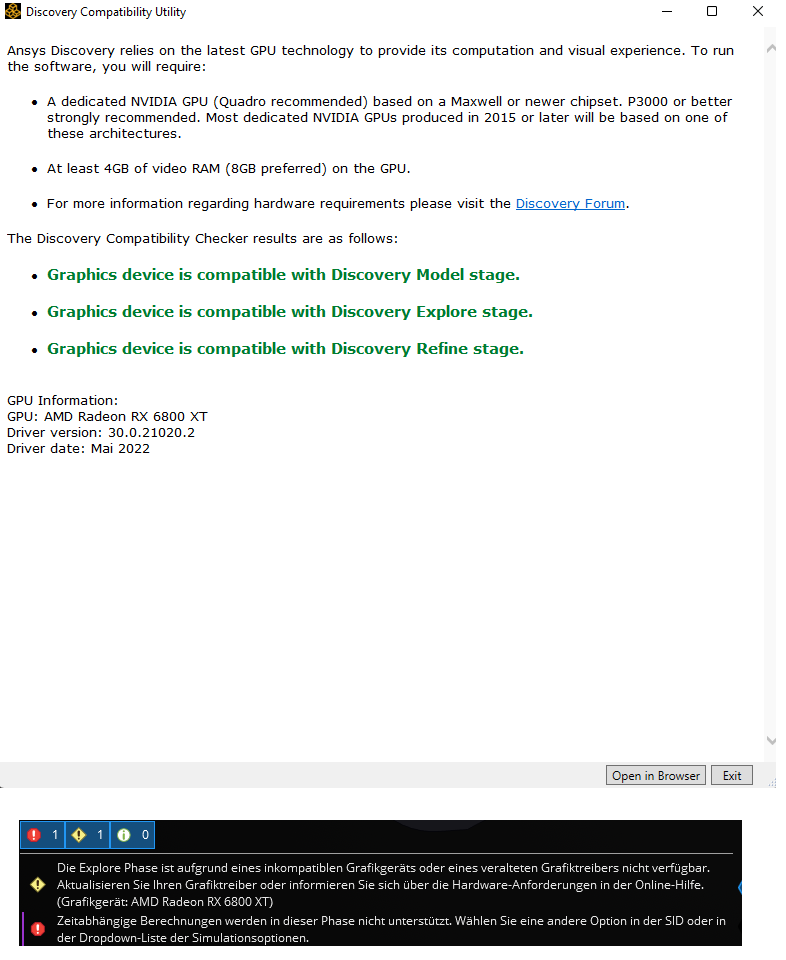
To my surprise, the Compatibility Tool displayed full compatibility with my AMD card (and the AMD pro driver).
Sadly, after the start of discovery and trying the Heat sink example, I was with the problem of not being able to use the Explore phase (which contradicts the compatibility tool).
The warning in the Picture telling me "explore phase is unavailable for my GPU and or Driver".
After that I tried to "solve all" solution variants (which is a step inside the heat sink example) which was also unavailable.
Since I then could only solve each solution one by one manually, I tried to set one of the thermal simulations to be transient.
This also failed, and I couldn't set a duration for the transient simulation, neither in the model nor the Analysis phase.
It would be sad If I couldn't use transient thermal simulations (that's the first thing I really need) if the explore phase is unavailable. But AMD is AMD.
More or less a bug is that my GPU gets displayed as compatible.


















 You are navigating away from the AIS Discovery experience