Ansys Assistant will be unavailable on the Learning Forum starting January 30. An upgraded version is coming soon. We apologize for any inconvenience and appreciate your patience. Stay tuned for updates.
Fluids

Fluids

Topics related to Fluent, CFX, Turbogrid and more.

create a circular surface based on existing circular surface in FLUENT

TAGGED: 

    • ll00023
      Subscriber

      I tried to create a new surface for particle injection in LES simulation in FLUENT.

      for 2D axisymmetric case, I can use a line surface as a new position for  DPM injection.

      For 3D case, in cartesian coordinate system, I can only generate a surface cross the section. my model is a tri-cylinder system. 

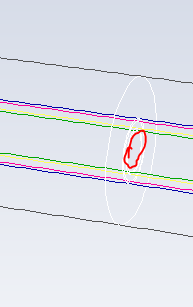
      I want to create a small circle inside the cylinder. indicated by red line.

      what I got is the all the surfaces indicated by white line. is it doable to get the small circle surface?

      Thank you.

    • Rob
      Forum Moderator

      More-or-less.  You need to look at iso-surfaces or planes and then Custom Field Functions to define a radial coordinate (hint, Pythagoras isn't just for school). 

    • ll00023
      Subscriber

      I defined a plane at x =-0.03m then create custom field function r= sqrt(y^2+z^2), then create a iso-clip. it works. Thank you, Rob.

    • Rob
      Forum Moderator

      You're welcome. There's a radial value in the system now too, I found it by accident when doing something else. That should save you the trouble of writing the custom function. Radial is also against the local coordinate system so will work on pipe junctions etc, the CFF option is against global x, y & z. 

Viewing 3 reply threads
  • The topic ‘create a circular surface based on existing circular surface in FLUENT’ is closed to new replies.

[bingo_chatbox]