Ansys Assistant will be unavailable on the Learning Forum starting January 30. An upgraded version is coming soon. We apologize for any inconvenience and appreciate your patience. Stay tuned for updates.
General Mechanical

General Mechanical

Topics related to Mechanical Enterprise, Motion, Additive Print and more.

Workbench Job script on HPC

    • s_safiza
      Subscriber

      Hello,

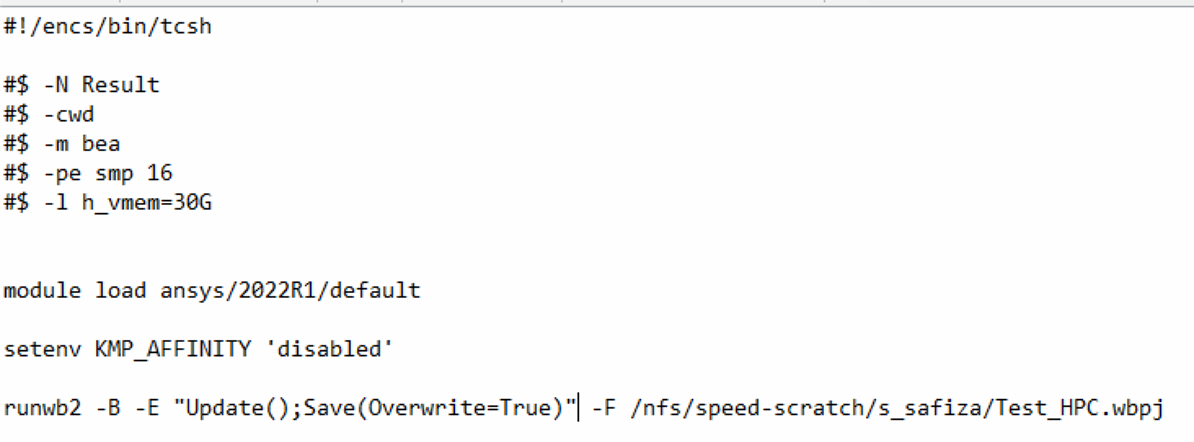
      I am trying to write a job script to submit my simulation on our university's cluster. We don't have an RSM license so we should generate our own job script and submit it on a Linux system. My simulation is on Workbench and the job script that I have generated is below:

      The problem I have is that I am requesting more than 8 cores from the cluster but Ansys only uses 2 cores! I need to add a command to ask Workbench to use the requested cores and memory from the cluster. I know for Ansys mechanical the command is "-np" but for Workbench, it is not defined. I would appreciate it if anyone knows what command should I add to use the requested resources from the cluster.

      Thanks in advance.

    • ErKo
      Ansys Employee


      Hi

      First of all try to get RSM as this is the easiest way – talk to your University , but I do not think there is not a licence (RSM), and a cost for that as far as I know

      Not that straight forward. You need to supply a script (.py) in the batch line using the -R argument:


      runwb2 -B -F “D:\\OTHER\\sunbatch\\test.wbpj” -R ” D:\\OTHER\\sunbatch\\test.py”


      The test.py can include the settings as :

      https://ansyshelp.ansys.com/account/Secured?returnurl=/Views/Secured/corp/v231/en/act_script/SolveProcessSettings.html


      config2 = ExtAPI.Application.SolveConfigurations["My Computer, Background"]
      x = config2.Default
      y = config2.Settings.License
      z = config2.SolveProcessSettings.ManualSolverMemorySettings.Workspace
      config2.SolveProcessSettings.ManualLinuxSettings.UserName = "jane.doe"
      config2.SolveProcessSettings.MaxNumberOfCores = 12

      See here for more info:
      https://ansyshelp.ansys.com/account/secured?returnurl=/Views/Secured/corp/v222/en/act_script/SolveProcessSettings.html

      All the best
      Erik

    • s_safiza
      Subscriber


      Hello, 

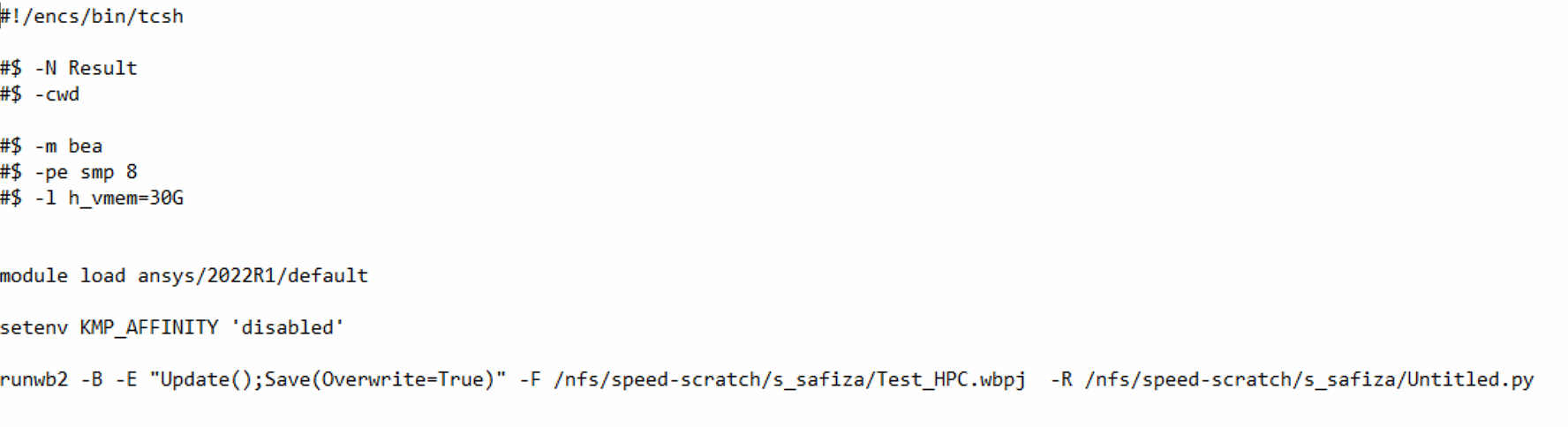
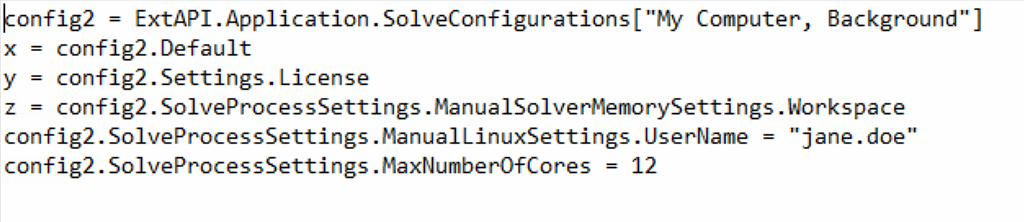
      Thank you for replying. Honestly, I tried to make a .py file including the script as it was mentioned in Ansys help as the link you sent me. But still, the analysis is done with only 2 cores. I included the screenshots below.


      Would you please let me know if you have any suggestions? Thanks a lot.

      Kind regards,


Viewing 2 reply threads
  • The topic ‘Workbench Job script on HPC’ is closed to new replies.
[bingo_chatbox]