LS Dyna

LS Dyna

Topics related to LS-DYNA, Autodyn, Explicit STR and more.

Maximum Time Step

    • king79
      Subscriber

      Hi,

      I am running an explicit dynamic analysis with Ls dyna using a constant time step. I entered my initial time step of 2.75e-5 using the control implicit general card; however, Ls dyna chooses to evaluate the problem with a larger time step. I invoked DTMax as recommended by the ls-dyna user's manual but the software appears to ignore it. Is there another way to make Ls dyna use a particular time step throughout the analysis run time?

    • Reno Genest
      Ansys Employee

      Hello,

      Are you running an explicit dynamics analysis? Or an implicit static (or dynamic) analysis?

      If  you want to run an implicit static analysis with a constant timestep, make sure the following are set:

      1. Set IMFLAG=1 and DT0=initial timestep on *CONTROL_IMPLICIT_GENERAL. The default for IMFLAG=0 which will result in an explicit  analysis.
      2. Set IAUTO=0 for a constant timestep on *CONTROL_IMPLICIT_AUTO. 

      Refer to the LS-DYNA user manual Vol. I for more information in implicit keywords:

      https://lsdyna.ansys.com/manuals/

      The above should set  a constant timestep. 

      Also, why is your implicit initial timestep set to 2.75e-5 second? This is a very small timestep for an implicit solution. This timestep is more typical in explicit dynamics simulations. What is the termination time for this implicit analysis? For example, a termination time of 1 second is very common for implicit static problems. Note that in implicit static, time is not real and not taken into account. With a termination time of 1 second, an implicit timestep of 0.1s or 0.01  is typical. You can use a timestep of 0.001 if you run into convergence issues. With a very small timestep (2.75e-5 second), it will take a long time for the solver to converge to a solution, especially if your termination time is 1 seconds or more.

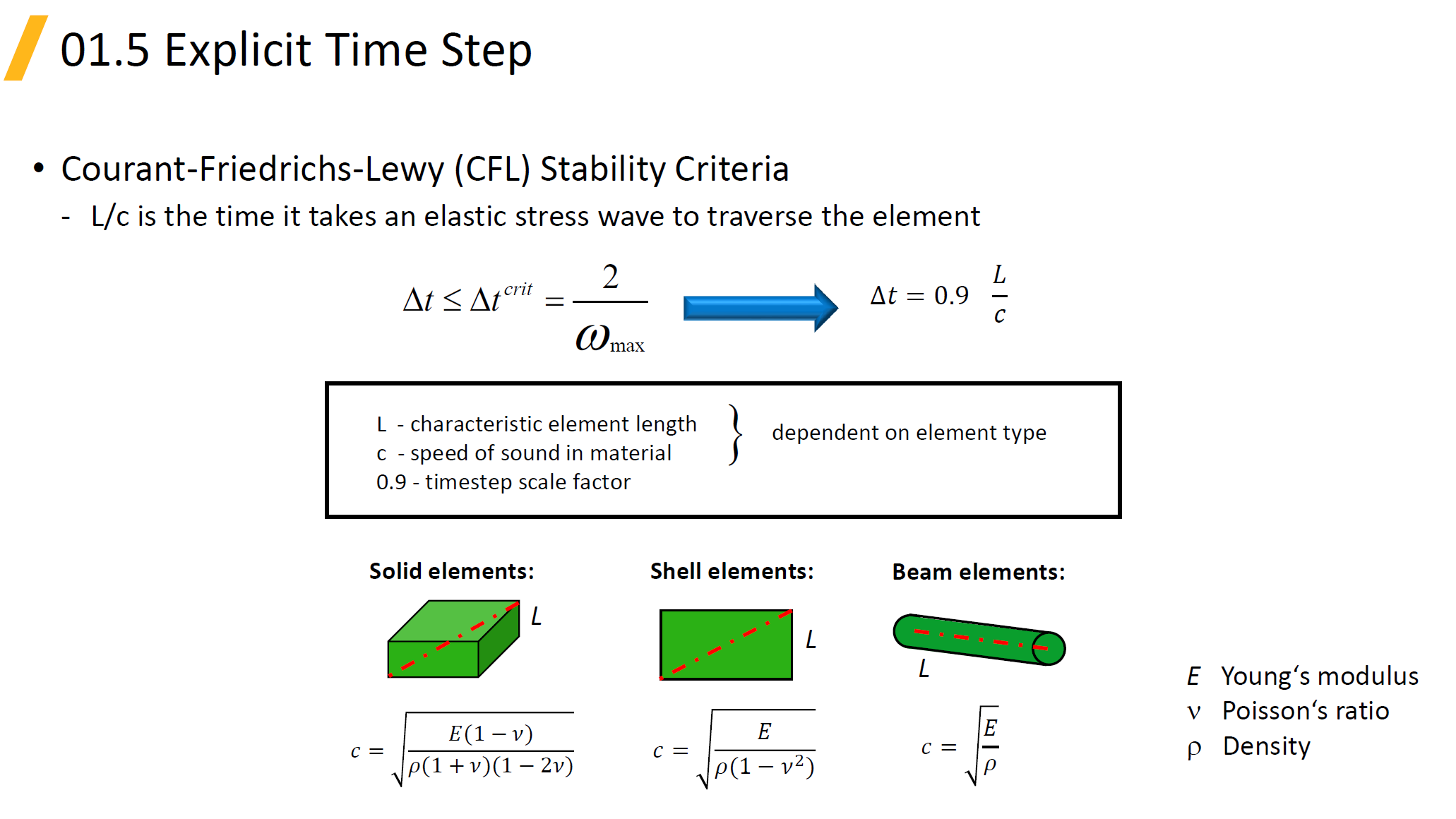
      Note that if you run explicit dynamics, the timestep is set by the solver based on the smallest element in your model (element characteristic length), the material stiffness and density (E and rho), and the TSSFAC parameter (default=0.9) on *CONTROL_TIMESTEP. The explicit time step  is governed by the CFL stability criteria:
       

      Let me know how it goes.


      Reno.

    • king79
      Subscriber
      Thanks for reaching out. I am running an explicit dyniamic time history analysis.
       In the Control_Implicit_auto, I have set IAUTO = 0 to ensure a constant time step. I have also specified DTMIN = 1.2e-7sec and  added a table to control DTMAX. In Control_implicit_general, IMFLAG = 0 for explicit analysis. Perhaps, it is not clear to me how Ls Dyna works. For the purpose of my research, I need to have constant time step for the results to be accurate. If Ls Dyna skips a several time steps, the results may be incorrect. Thus, I would like to control the maximum timestep.
    • king79
      Subscriber

      Hi if I understand your  explanation correctly, the user cannot control the maximum time steps for explicit dynamic anaylsis in Ls Dyna?

    • Reno Genest
      Ansys Employee

      Hello,

      For explicit dynamics, you can remove all the *CONTROL_IMPLICIT_ keywords from your model; you don't need them. Also, in explicit dynamics, the timestep is controlled by the solver (see my previous post) and not by the user. Usually, the explicit timestep is small enough (1e-6 or 1e-7 second) and what the user controls is the output frequency of results (*DATABASE_BINARY_D3PLOT, *DATABASE_ASCII, etc.). The timestep will vary a little bit based  on the change in element size with deformation, but the output of results  will remain the same. For example, if the explicit timestep is 1e-6, then you can have constant results output interval at say 1e-4 second.


      Let me know if this helps or not.


      Reno.

    • Reno Genest
      Ansys Employee

      Hello,

      Why do you need to control the timestep in your case? Users don't usually control the timestep in explicit; what is more important is the result output interval.


      Reno.

    • Reno Genest
      Ansys Employee

      Hello,

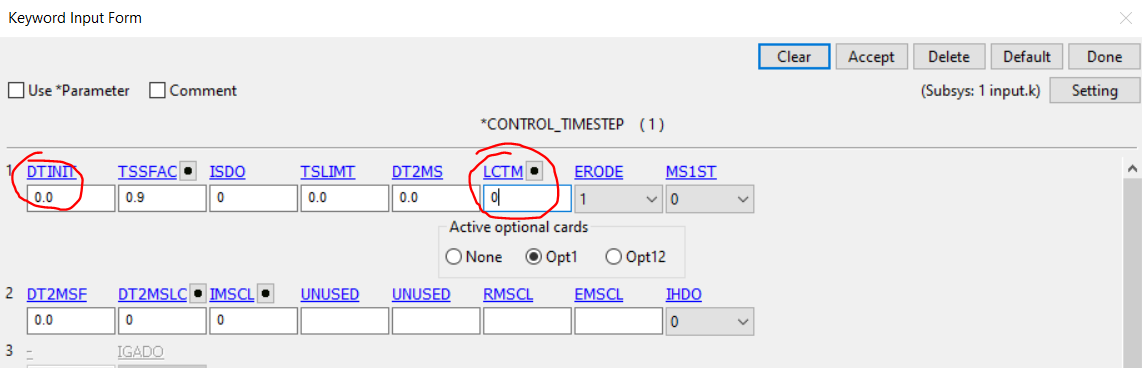
      In explicit dynamics, you can use *CONTROL_TIMESTEP to specify an initial timestep (this is usually set by the solver) and you can limit the maximum timestep with a load curve (*DEFINE_CURVE) with the LCTM parameter:


      Let me know if this helps or not.


      Reno.

    • king79
      Subscriber

      Great. Thanks

    • Kane Charles
      Subscriber

      You seem to be having problems with controlling the maximum time step in explicit impact dynamic analysis using LS-DYNA. According to guidance from Ansys Employee, in the case of explicit dynamic analysis, the time step is controlled by the solver and not adjusted by the user. The apparent time step is usually very small (1e-6 or 1e-7 seconds) and what the user controls is how often the results are output.

      If you need to control the time step in your particular case, you can use *CONTROL_TIMESTEP time calculator to specify an initial time step and limit the maximum time step with a load curve (*DEFINE_CURVE) with the parameter LCTM number.

Viewing 8 reply threads
  • The topic ‘Maximum Time Step’ is closed to new replies.